TL;DR
CSRF tricks logged-in users into submitting requests they never intended to make. A malicious page can silently POST to your site using the visitor's existing session cookies, and the server can't tell the difference. SameSite cookies stop most of it. Add CSRF tokens for anything sensitive.
What Is CSRF?
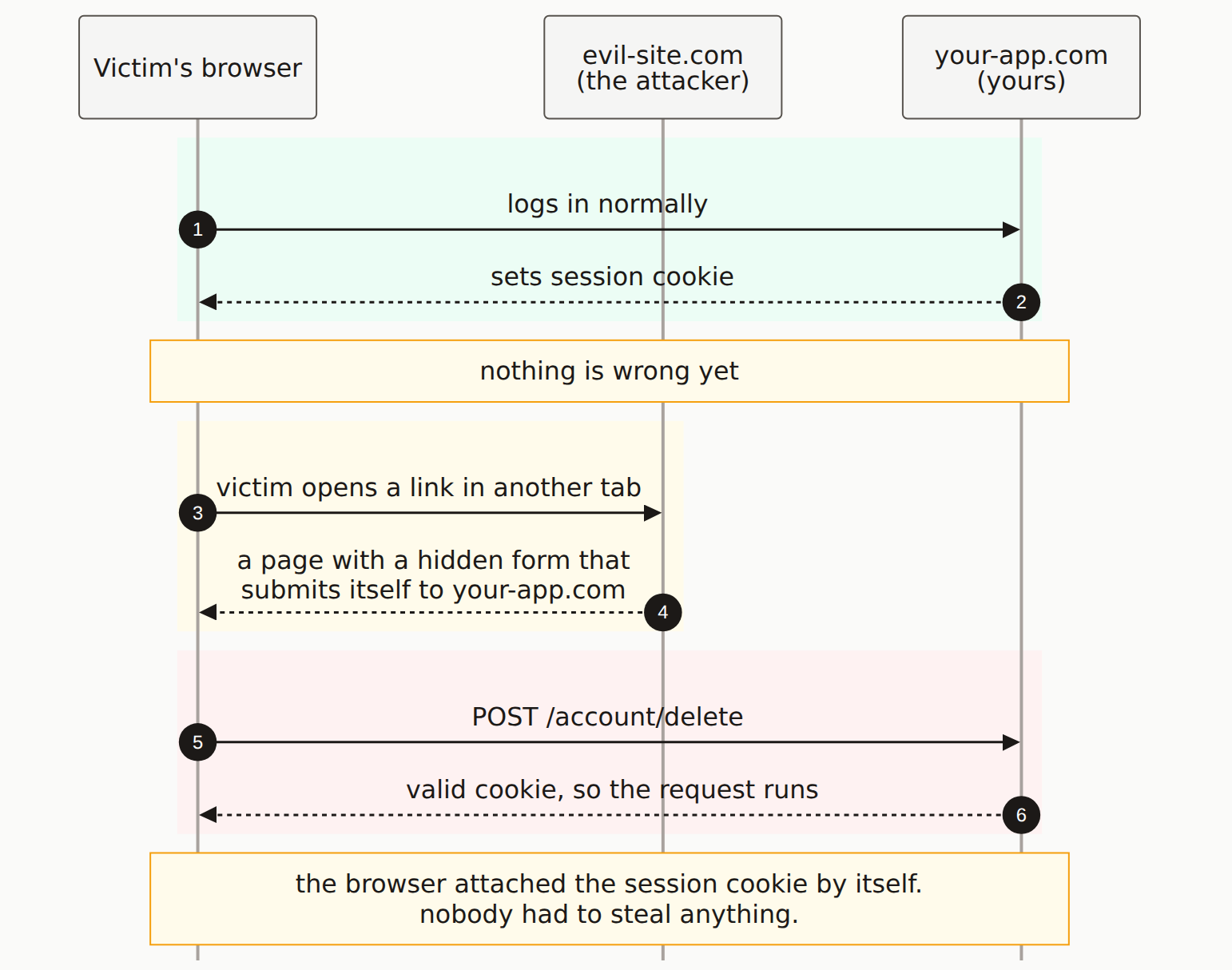
Cross-Site Request Forgery (CSRF, pronounced "sea-surf") is an attack where your own browser makes requests you didn't authorize. The site receiving the request can't tell whether you clicked a button on their page or whether a third-party page triggered it behind the scenes.
A concrete example:
- You're logged into your bank
- You open a separate tab and visit a site that's been compromised
- That page silently submits a money transfer form to your bank
- Your browser includes your banking cookies automatically
- The transfer goes through
How CSRF Attacks Work
Basic Form Attack
<!-- On evil-site.com -->
<html>
<body onload="document.forms[0].submit()">
  <form action="https://yourbank.com/transfer" method="POST">
    <input type="hidden" name="to" value="attacker-account" />
    <input type="hidden" name="amount" value="10000" />
  </form>
</body>
</html>

<!-- When a logged-in user visits this page,
     their browser submits the form with their cookies -->
Image-Based Attack
<!-- GET requests can be triggered by images -->
<img src="https://yoursite.com/api/delete-account" style="display:none" />

<!-- Or change settings -->
<img src="https://yoursite.com/api/settings?email=attacker@evil.com" />
Why it works: Browsers attach cookies to requests automatically, regardless of which page triggered the request. Your server receives a request with a valid session cookie and has no way to know it came from somewhere else.
Real-World CSRF Consequences
| Attack Target | Potential Damage |
|---|---|
| Email settings | Change recovery email, take over account |
| Password change | Lock user out of their account |
| Payment actions | Transfer money, make purchases |
| Admin functions | Add attacker as admin, modify data |
| Social actions | Post content, follow accounts, share data |
How to Prevent CSRF
1. Use SameSite Cookies
SameSite cookies don't travel on cross-site requests. It's the simplest fix and it works in all modern browsers:
// Express.js session with SameSite
app.use(session({
  cookie: {
    httpOnly: true,
    secure: true, // Requires HTTPS
    sameSite: 'strict' // Or 'lax' for less strict protection
  }
}));

// Next.js API route
res.setHeader('Set-Cookie',
  'session=abc123; HttpOnly; Secure; SameSite=Strict');
| SameSite Value | Behavior | Use Case |
|---|---|---|
| Strict | Never sent cross-site | Maximum security |
| Lax | Sent on top-level navigations only | Good balance (default in modern browsers) |
| None | Always sent (requires Secure) | Third-party integrations |
2. Use CSRF Tokens
A CSRF token is a secret value your server generates, embeds in a form, and checks on submission. An attacker on another page can't read it from your DOM, so they can't forge a valid request:
// Generate token and store in session
const csrfToken = crypto.randomUUID();
req.session.csrfToken = csrfToken;

// Include in form
<form action="/transfer" method="POST">
  <input type="hidden" name="_csrf" value="{csrfToken}" />
  <!-- other fields -->
</form>

// Verify on submission
if (req.body._csrf !== req.session.csrfToken) {
  return res.status(403).json({ error: 'Invalid CSRF token' });
}
3. Validate the Origin Header
function validateOrigin(req, res, next) {
  const origin = req.headers.origin || req.headers.referer;
  const allowedOrigins = ['https://yoursite.com'];

  if (origin && !allowedOrigins.some(o => origin.startsWith(o))) {
    return res.status(403).json({ error: 'Invalid origin' });
  }
  next();
}

// Apply to state-changing routes
app.post('/api/*', validateOrigin);
4. Re-authenticate Before Sensitive Actions
// For sensitive actions, require password confirmation
app.post('/api/change-email', async (req, res) => {
  const { newEmail, currentPassword } = req.body;

  // Verify current password before making changes
  const isValid = await verifyPassword(req.user.id, currentPassword);
  if (!isValid) {
    return res.status(401).json({ error: 'Invalid password' });
  }

  // Now safe to change email
  await updateUserEmail(req.user.id, newEmail);
});
CSRF Protection in Frameworks
| Framework | Built-in Protection | How to Enable |
|---|---|---|
| Next.js | None by default | Use next-csrf or similar package |
| Express | None by default | Use csurf middleware |
| Django | Enabled by default | Include {% csrf_token %} in forms |
| Rails | Enabled by default | protect_from_forgery included |
Modern browsers help: Modern browsers default to SameSite=Lax for cookies without explicit SameSite setting, which prevents most CSRF attacks on POST requests.
What is CSRF?
CSRF (Cross-Site Request Forgery) is an attack where a third-party page submits requests to your site using a visitor's existing session cookies. The browser attaches those cookies automatically, so your server can't tell the request wasn't intentional.
Do SameSite cookies prevent CSRF?
Mostly yes. SameSite=Strict blocks cookies on all cross-site requests. SameSite=Lax (the browser default since Chrome 80) blocks them on cross-site POST requests but allows them on top-level navigations. For most apps, Lax is enough. Strict is better if you don't mind users not staying logged in when they click a link from another site.
Does using JSON APIs prevent CSRF?
It helps but doesn't eliminate it. Browsers won't send a cross-origin JSON body without CORS approval, so a lot of CSRF vectors don't work. But if your API also accepts application/x-www-form-urlencoded, or if your CORS policy is too permissive, you're still exposed.
What's the difference between CSRF and XSS?
XSS puts malicious code on your page that runs in the victim's browser. CSRF uses the victim's browser to send requests to your site without their knowledge. Different mechanisms, similar damage. Both can lead to account takeover.
Check Your CSRF Protection
Our scanner tests your forms and APIs for CSRF vulnerabilities.