TL;DR
SSRF happens when your server fetches URLs provided by users without proper validation. Attackers can use this to reach internal services, hit cloud metadata endpoints, or scan your network for more targets. If you fetch URLs server-side, validate that they're public and block requests to private IP ranges and metadata endpoints.
What Is SSRF?
Server-Side Request Forgery (SSRF) occurs when an attacker gets your server to send HTTP requests to destinations of their choosing. It's not a client-side trick: SSRF piggybacks on your server's network position to reach internal resources the outside world can't touch directly.
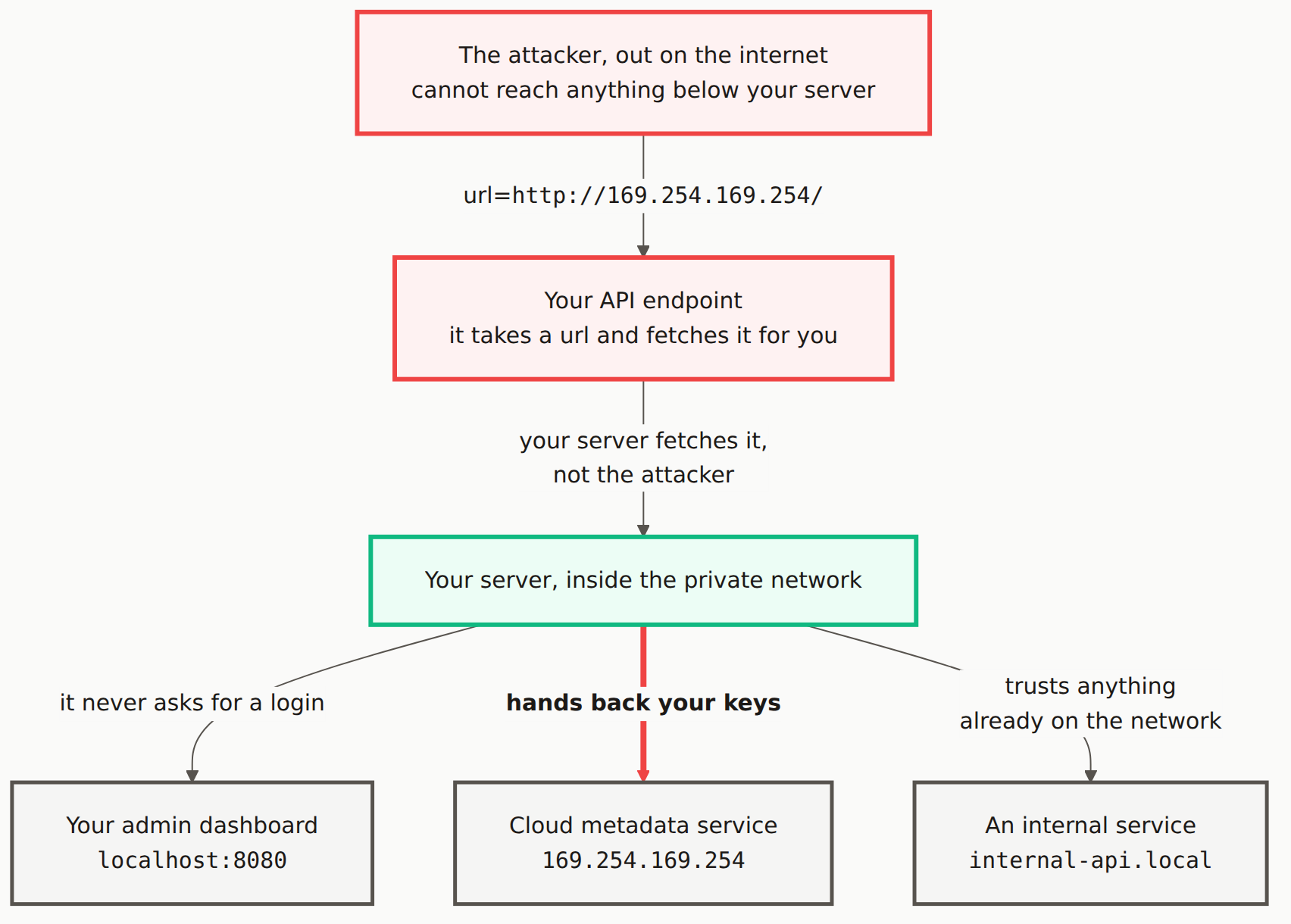
How SSRF Attacks Work
// User provides a URL to fetch
app.post('/api/fetch-preview', async (req, res) => {
  const { url } = req.body;
  const response = await fetch(url);  // VULNERABLE!
  const data = await response.text();
  res.json({ preview: data });
});

// Attacker sends:
// url = "http://169.254.169.254/latest/meta-data/iam/security-credentials/"
// This accesses AWS metadata from inside your cloud!
Common SSRF Targets
- Cloud metadata:
169.254.169.254exposes AWS/GCP/Azure credentials - Internal services:
http://localhost:8080/admin - Internal APIs:
http://internal-api.local/secret - Network scanning: Probe internal IP addresses
Cloud danger: The metadata endpoint at 169.254.169.254 can expose IAM credentials and API keys. It's the top target for SSRF attacks in cloud environments, and attackers check it first.
How to Prevent SSRF
import { URL } from 'url';

function isValidPublicUrl(urlString) {
  try {
    const url = new URL(urlString);

    // Only allow HTTP(S)
    if (!['http:', 'https:'].includes(url.protocol)) {
      return false;
    }

    // Block private/internal IPs
    const blockedPatterns = [
      /^localhost$/i,
      /^127\./,
      /^10\./,
      /^172\.(1[6-9]|2[0-9]|3[0-1])\./,
      /^192\.168\./,
      /^169\.254\./,  // Cloud metadata
      /^0\./,
      /\.local$/i,
      /\.internal$/i,
    ];

    if (blockedPatterns.some(p => p.test(url.hostname))) {
      return false;
    }

    return true;
  } catch {
    return false;
  }
}

app.post('/api/fetch-preview', async (req, res) => {
  const { url } = req.body;

  if (!isValidPublicUrl(url)) {
    return res.status(400).json({ error: 'Invalid URL' });
  }

  // Now safer to fetch
  const response = await fetch(url);
});
When does SSRF apply to my app?
SSRF matters any time your server fetches URLs based on user input: URL preview features, webhook callbacks, image downloads, file imports. If your code makes an outbound request based on something a user typed, it applies.
Is DNS rebinding a concern?
Yes. Attackers can register a domain that resolves to a public IP on the first check, then flips to a private IP on the actual request. Resolve the DNS and validate the IP right before you make the call, not before.
Check for SSRF Vulnerabilities
Our scanner tests URL fetching endpoints for SSRF issues.