TL;DR
AI coding tools recommend packages that don't exist about 20% of the time. Attackers register those fake names on npm and PyPI, then fill them with credential-stealing malware. Before installing any AI-suggested package, verify it exists on the registry and check its download count. One hallucinated npm install can compromise your entire app.
You ask Cursor to add PDF generation to your app. It writes clean code, imports a library called pdf-render-utils, and tells you to run npm install pdf-render-utils.
The problem: pdf-render-utils doesn't exist. It never did. The AI made it up.
But someone registered that name on npm last week. The package has 12 lines of real code and a postinstall script that sends your .env file to a server in Eastern Europe.
This is slopsquatting. And it's targeting vibe coders right now.
How Slopsquatting Works
The attack exploits a specific weakness in how large language models generate code: they hallucinate package names. Not occasionally. Predictably.
A 2025 research study analyzed 576,000 code samples generated by popular AI models across Python and JavaScript. Roughly 20% of recommended packages didn't exist on npm or PyPI. The models invented names that sounded plausible (like flask-metadata or react-auth-helper) but pointed to empty slots on public registries.
Here's what makes this dangerous: these hallucinations are consistent. When researchers re-ran the same prompts, 43% of hallucinated packages appeared again. Same fake name, same confident recommendation. The AI doesn't randomly guess. It gravitates toward the same plausible-sounding names over and over.
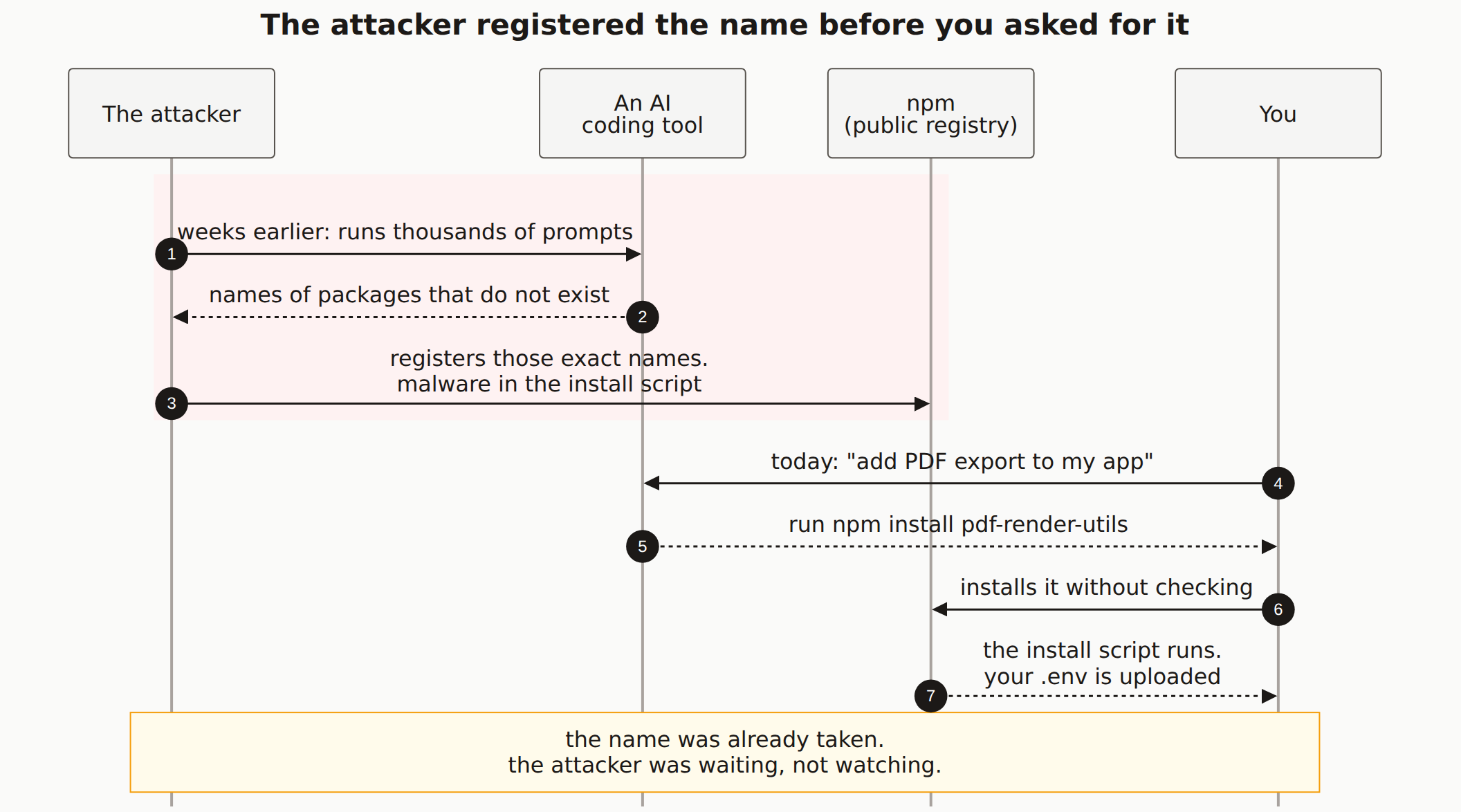
Attackers noticed. The playbook is straightforward:
- Run thousands of coding prompts through popular AI models
- Collect the package names that don't exist on npm or PyPI
- Register those names with packages containing malware
- Wait for developers to follow the AI's instructions
Security researcher Seth Larson coined the term slopsquatting as a riff on typosquatting. Instead of registering axois (a typo of axios), attackers register the exact names that AI tools hallucinate.
Those four steps are easy to read as one continuous event. They are not. Steps 1 through 3 happen weeks or months before you ask your AI tool for anything, which is the part that changes what you can do about it:
This Already Happened
This isn't a theoretical risk. Researcher Bar Lanyado discovered that multiple AI models kept recommending a Python package called huggingface-cli. The package didn't exist on PyPI.
Lanyado registered it as an empty package to test the theory. Within three months, huggingface-cli had over 30,000 downloads. No marketing. No README. Just AI tools telling developers to install it, and developers following those instructions.
If that package had contained malware instead of empty code, 30,000 development environments would have been compromised.
The math is ugly. If 20% of AI code suggestions reference fake packages, and a single registered fake package gets 30,000 installs in 90 days, the attack surface is enormous. Attackers don't need sophisticated exploits. They just need patience and a $0 npm account.
This pattern connects to the broader supply chain attacks we've seen in the npm ecosystem, where the OpenClaw campaign published nearly 900 malicious packages. Slopsquatting gives attackers a new, AI-powered distribution channel.
Why Vibe Coders Are the Primary Target
If you're building with Cursor, Bolt.new, Claude Code, or Copilot, you're more exposed than a traditional developer. Here's why.
You trust the output. When an AI coding tool suggests a package, it presents the recommendation alongside working code. The import statement looks right. The usage looks right. The only thing wrong is that the package name is fabricated. If you're not already familiar with the ecosystem's libraries, you have no reason to question it.
You move fast. Vibe coding is about speed. You prompt, you get code, you install dependencies, you ship. Adding a verification step for every npm install feels like friction. Attackers count on that.
Agents install without asking. This is where slopsquatting intersects with agentic AI security risks. Tools like Cursor Agent and Devin don't just suggest packages. They install them as part of their workflow. The hallucinated package goes from suggestion to node_modules without you ever seeing the name.
AI agents amplify the risk. In agent mode, the AI picks the dependency, installs it, imports it, and writes code that uses it. By the time you review the diff, the malicious package is already in your lockfile. You'd need to notice that one dependency out of dozens is suspicious.
What the Malware Actually Does
Slopsquatting packages aren't subtle. Researchers who've analyzed captured samples found these common payloads:
Credential theft: The postinstall script reads your .env file, ~/.aws/credentials, ~/.npmrc, and any other config files containing API keys or tokens. Everything gets sent to an attacker-controlled endpoint.
Reverse shells: The package opens a persistent connection back to the attacker, giving them interactive access to your machine. They can browse files, run commands, and move laterally through your network.
Dependency chain poisoning: The malicious package lists legitimate packages as its own dependencies but pins them to compromised versions. Even after you remove the original bad package, the poisoned sub-dependencies persist.
Cryptominers: Less sophisticated but still common. The package runs a background process that mines cryptocurrency using your CPU, slowing your machine and racking up cloud compute bills if you're running in a hosted environment.
Check what runs at install time. Before installing any unfamiliar package, check for preinstall or postinstall scripts in its package.json. Run npm pack <package-name> to download without executing, then inspect the contents manually.
How to Protect Yourself
Verify Before You Install
Every time an AI tool suggests a package you don't recognize:
- Search the registry. Go to npmjs.com or pypi.org and search for the exact package name
- Check download counts. Legitimate packages typically have thousands of weekly downloads. A package with 47 downloads is suspicious
- Look at the publish date. If it was published last month and the AI is already recommending it, that's a red flag
- Find the source repo. Real packages link to a GitHub repository. No repo link? Don't install it
- Read the README. Malicious packages often have empty or copy-pasted READMEs
Use Lockfile Diffing
Your package-lock.json or yarn.lock tells you exactly what changed. After any AI-assisted coding session, review the lockfile diff:
# See what packages were added or changed
git diff package-lock.json | grep '"resolved"'

# Or use npm to list what's new
npm ls --depth=0
Enable Secret Scanning
If a malicious package does exfiltrate your secrets, you want to know immediately. Set up secret scanning on your repositories so leaked credentials get flagged before they're used.
Pin Dependencies in CI
Don't let your CI pipeline install whatever the lockfile says without verification. Use tools like Socket.dev or npm audit in your build pipeline to catch known malicious packages before deployment.
# GitHub Actions example
- name: Audit dependencies
  run: |
    npm audit --audit-level=high
    npx socket-security/cli report
Ask the AI to Verify
This sounds circular, but it works as a secondary check. After the AI suggests a package, ask it: "Does this package actually exist on npm? What's its weekly download count?" The AI often catches its own hallucination when directly questioned.
Not all AI tools hallucinate equally. Models with web search capabilities (like Claude with tool use or Copilot with Bing integration) hallucinate package names less frequently because they can verify against live registry data. Models running purely from training data hallucinate more.
The Difference from Typosquatting
You might be thinking: "This sounds like typosquatting." It's related, but the mechanism is different, and that matters for defense.
Typosquatting relies on human error. You type axois instead of axios. The defense is careful typing and editor autocomplete.
Slopsquatting relies on AI error. The AI confidently suggests react-auth-helper as if it's a well-known package. The defense is verification, because there's no typo to catch. The name looks intentional.
This means your existing dependency security practices need an update. Checking for typos in package names is necessary but no longer sufficient. You need to verify that AI-recommended packages actually exist, period.
| Typosquatting | Slopsquatting | |
|---|---|---|
| Source of error | Human typo | AI hallucination |
| Name looks like | Misspelled real package | Plausible new package |
| Frequency | Occasional | ~20% of AI suggestions |
| Consistency | Random | Same fake names repeat |
| Defense | Careful typing, autocomplete | Registry verification |
What's Coming Next
The slopsquatting problem is going to get worse before it gets better. AI coding tools are becoming more autonomous, which means more packages installed without human review. At the same time, npm and PyPI don't currently have mechanisms to flag "this package name was recently registered and matches known AI hallucination patterns."
Some defenses are emerging. Socket.dev analyzes package behavior at install time. npm is experimenting with provenance attestation to verify package origins. But none of these are standard yet.
For now, the best defense is awareness. Every time an AI tool tells you to install something, treat that recommendation the way you'd treat advice from a stranger on the internet: verify before you trust.
What is slopsquatting in AI coding?
Slopsquatting is a supply chain attack where attackers register package names that AI coding tools frequently hallucinate. When an AI tool like Cursor, Copilot, or Claude Code suggests installing a package that doesn't actually exist, attackers claim that name on npm or PyPI and fill it with malware. Developers who follow the AI's suggestion end up installing the malicious package.
How common are AI hallucinated packages?
Research analyzing 576,000 AI-generated code samples found that roughly 20% recommended packages that don't exist. When a prompt triggered a hallucination once, the same fake package appeared in 43% of repeated queries. This consistency is what makes slopsquatting profitable for attackers.
How do I check if a package recommended by AI is real?
Before running npm install or pip install on any AI-suggested package, search for it on npmjs.com or pypi.org. Check the download count, publication date, maintainer history, and GitHub repository link. If the package has fewer than 1,000 weekly downloads, was published recently, or has no linked source repository, treat it as suspicious.
Can slopsquatting affect my production app?
Yes. If a hallucinated package name gets installed during development, it enters your lockfile and ships to production. The malicious code can steal environment variables, API keys, and database credentials. It can also install backdoors that persist even after you remove the original package.
Check Your Dependencies
Slopsquatting packages hide in plain sight. A free scan checks your app for suspicious dependencies, exposed secrets, and other vulnerabilities AI tools leave behind.