Middleware patterns, auth guards, and authorization checks
TL;DR
TL;DR (20 minutes): Always verify authentication server-side (middleware or API route), never trust client-side auth alone. Check authorization (can this user access this resource?) not just authentication (is someone logged in?). Use middleware for route protection, but always double-check in API handlers. Return 401 for unauthenticated, 403 for unauthorized.
Prerequisites
- An authentication system (NextAuth, Supabase Auth, Firebase Auth, etc.)
- Basic understanding of HTTP status codes (401 vs 403)
- A Next.js, React, or Node.js application
The #1 Mistake
Protecting routes only on the client (hiding UI elements) does NOT secure your app. Anyone can call your API directly. Always verify authentication and authorization server-side.
Authentication vs Authorization
- Authentication (AuthN): Verifies WHO the user is. "Is this person logged in?"
- Authorization (AuthZ): Verifies WHAT the user can do. "Can this user access this resource?"
// Authentication: Is someone logged in?
if (!user) {
  return res.status(401).json({ error: 'Unauthorized' });
}

// Authorization: Can THIS user access THIS resource?
if (post.authorId !== user.id) {
  return res.status(403).json({ error: 'Forbidden' });
}
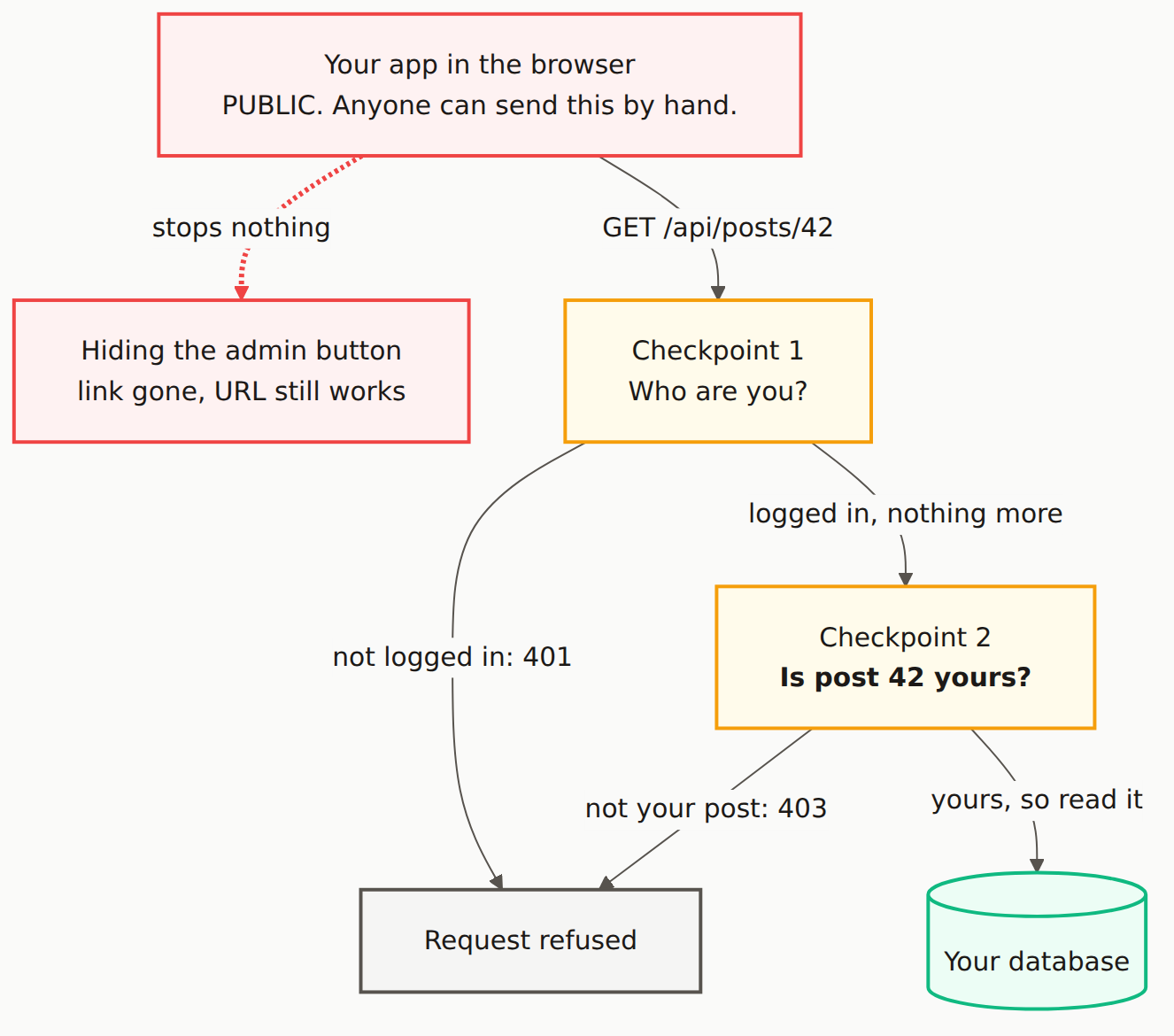
Step-by-Step Guide
Create authentication middleware (Next.js)
Create middleware.ts in your project root:
import { NextResponse } from 'next/server';
import type { NextRequest } from 'next/server';
import { getToken } from 'next-auth/jwt';  // For NextAuth
// Or use your auth library's method

export async function middleware(request: NextRequest) {
  // Get the pathname
  const path = request.nextUrl.pathname;

  // Define public paths that don't require auth
  const publicPaths = ['/', '/login', '/signup', '/about', '/api/auth'];
  const isPublicPath = publicPaths.some(p =>
    path === p || path.startsWith(p + '/')
  );

  if (isPublicPath) {
    return NextResponse.next();
  }

  // Check authentication
  const token = await getToken({
    req: request,
    secret: process.env.NEXTAUTH_SECRET
  });

  // No token = not authenticated
  if (!token) {
    // For API routes, return 401
    if (path.startsWith('/api/')) {
      return NextResponse.json(
        { error: 'Authentication required' },
        { status: 401 }
      );
    }

    // For pages, redirect to login
    const loginUrl = new URL('/login', request.url);
    loginUrl.searchParams.set('callbackUrl', path);
    return NextResponse.redirect(loginUrl);
  }

  // User is authenticated, continue
  return NextResponse.next();
}

// Configure which paths use this middleware
export const config = {
  matcher: [
    /*
     * Match all paths except:
     * - _next/static (static files)
     * - _next/image (image optimization)
     * - favicon.ico
     * - public folder
     */
    '/((?!_next/static|_next/image|favicon.ico|public/).*)',
  ],
};
Add role-based route protection
Extend middleware for role-based access:
import { NextResponse } from 'next/server';
import type { NextRequest } from 'next/server';
import { getToken } from 'next-auth/jwt';

// Define protected routes and required roles
const protectedRoutes: Record<string, string[]> = {
  '/admin': ['admin'],
  '/admin/users': ['admin'],
  '/dashboard': ['user', 'admin'],
  '/settings': ['user', 'admin'],
  '/moderator': ['moderator', 'admin'],
};

export async function middleware(request: NextRequest) {
  const path = request.nextUrl.pathname;

  // Check if path requires specific roles
  const requiredRoles = Object.entries(protectedRoutes).find(
    ([route]) => path.startsWith(route)
  )?.[1];

  if (!requiredRoles) {
    return NextResponse.next();
  }

  const token = await getToken({
    req: request,
    secret: process.env.NEXTAUTH_SECRET
  });

  // Not authenticated
  if (!token) {
    if (path.startsWith('/api/')) {
      return NextResponse.json({ error: 'Unauthorized' }, { status: 401 });
    }
    return NextResponse.redirect(new URL('/login', request.url));
  }

  // Check role authorization
  const userRole = token.role as string || 'user';

  if (!requiredRoles.includes(userRole)) {
    if (path.startsWith('/api/')) {
      return NextResponse.json({ error: 'Forbidden' }, { status: 403 });
    }
    // Redirect to access denied page or dashboard
    return NextResponse.redirect(new URL('/access-denied', request.url));
  }

  return NextResponse.next();
}
Protect API routes (double-check pattern)
Even with middleware, always verify in your API handlers:
// app/api/posts/[id]/route.ts (Next.js App Router)
import { getServerSession } from 'next-auth';
import { authOptions } from '@/lib/auth';
import { NextResponse } from 'next/server';
import { db } from '@/lib/db';

export async function GET(
  request: Request,
  { params }: { params: { id: string } }
) {
  // 1. Authentication check
  const session = await getServerSession(authOptions);

  if (!session?.user) {
    return NextResponse.json(
      { error: 'Authentication required' },
      { status: 401 }
    );
  }

  // 2. Fetch the resource
  const post = await db.post.findUnique({
    where: { id: params.id }
  });

  if (!post) {
    return NextResponse.json(
      { error: 'Post not found' },
      { status: 404 }
    );
  }

  // 3. Authorization check - can this user access this post?
  const isOwner = post.authorId === session.user.id;
  const isPublished = post.status === 'published';
  const isAdmin = session.user.role === 'admin';

  if (!isPublished && !isOwner && !isAdmin) {
    return NextResponse.json(
      { error: 'You do not have access to this post' },
      { status: 403 }
    );
  }

  return NextResponse.json(post);
}

export async function DELETE(
  request: Request,
  { params }: { params: { id: string } }
) {
  const session = await getServerSession(authOptions);

  if (!session?.user) {
    return NextResponse.json({ error: 'Unauthorized' }, { status: 401 });
  }

  const post = await db.post.findUnique({
    where: { id: params.id }
  });

  if (!post) {
    return NextResponse.json({ error: 'Not found' }, { status: 404 });
  }

  // Only owner or admin can delete
  if (post.authorId !== session.user.id && session.user.role !== 'admin') {
    return NextResponse.json({ error: 'Forbidden' }, { status: 403 });
  }

  await db.post.delete({ where: { id: params.id } });

  return NextResponse.json({ success: true });
}
Create reusable auth utilities
// lib/auth-utils.ts
import { getServerSession } from 'next-auth';
import { authOptions } from '@/lib/auth';
import { NextResponse } from 'next/server';

type AuthResult =
  | { success: true; user: { id: string; email: string; role: string } }
  | { success: false; response: NextResponse };

export async function requireAuth(): Promise<AuthResult> {
  const session = await getServerSession(authOptions);

  if (!session?.user) {
    return {
      success: false,
      response: NextResponse.json(
        { error: 'Authentication required' },
        { status: 401 }
      )
    };
  }

  return {
    success: true,
    user: {
      id: session.user.id,
      email: session.user.email!,
      role: session.user.role || 'user'
    }
  };
}

export async function requireRole(
  allowedRoles: string[]
): Promise<AuthResult> {
  const authResult = await requireAuth();

  if (!authResult.success) {
    return authResult;
  }

  if (!allowedRoles.includes(authResult.user.role)) {
    return {
      success: false,
      response: NextResponse.json(
        { error: 'Insufficient permissions' },
        { status: 403 }
      )
    };
  }

  return authResult;
}

// Usage in API route
export async function GET(request: Request) {
  const auth = await requireAuth();
  if (!auth.success) return auth.response;

  // auth.user is now typed and available
  const data = await fetchUserData(auth.user.id);
  return NextResponse.json(data);
}

// Admin-only route
export async function DELETE(request: Request) {
  const auth = await requireRole(['admin']);
  if (!auth.success) return auth.response;

  // Only admins reach here
  await performAdminAction();
  return NextResponse.json({ success: true });
}
Protect Server Components (Next.js App Router)
// app/dashboard/page.tsx
import { getServerSession } from 'next-auth';
import { authOptions } from '@/lib/auth';
import { redirect } from 'next/navigation';

export default async function DashboardPage() {
  const session = await getServerSession(authOptions);

  if (!session) {
    redirect('/login?callbackUrl=/dashboard');
  }

  // Fetch user-specific data
  const data = await fetchDashboardData(session.user.id);

  return (
    <div>
      <h1>Welcome, {session.user.name}</h1>
      {/* Render dashboard */}
    </div>
  );
}

// Admin page with role check
// app/admin/page.tsx
export default async function AdminPage() {
  const session = await getServerSession(authOptions);

  if (!session) {
    redirect('/login');
  }

  if (session.user.role !== 'admin') {
    redirect('/access-denied');
  }

  return (
    <div>
      <h1>Admin Dashboard</h1>
      {/* Admin content */}
    </div>
  );
}
Add client-side route guards (React)
Client guards improve UX but are NOT security - always verify server-side:
// components/ProtectedRoute.tsx
'use client';

import { useSession } from 'next-auth/react';
import { useRouter, usePathname } from 'next/navigation';
import { useEffect } from 'react';

interface ProtectedRouteProps {
  children: React.ReactNode;
  requiredRoles?: string[];
}

export function ProtectedRoute({
  children,
  requiredRoles
}: ProtectedRouteProps) {
  const { data: session, status } = useSession();
  const router = useRouter();
  const pathname = usePathname();

  useEffect(() => {
    if (status === 'loading') return;

    if (!session) {
      router.push(`/login?callbackUrl=${encodeURIComponent(pathname)}`);
      return;
    }

    if (requiredRoles && !requiredRoles.includes(session.user.role)) {
      router.push('/access-denied');
    }
  }, [session, status, router, pathname, requiredRoles]);

  if (status === 'loading') {
    return <div>Loading...</div>;
  }

  if (!session) {
    return null;  // Will redirect
  }

  if (requiredRoles && !requiredRoles.includes(session.user.role)) {
    return null;  // Will redirect
  }

  return <>{children}</>;
}

// Usage
export default function SettingsPage() {
  return (
    <ProtectedRoute>
      <Settings />
    </ProtectedRoute>
  );
}

// Admin page
export default function AdminPage() {
  return (
    <ProtectedRoute requiredRoles={['admin']}>
      <AdminDashboard />
    </ProtectedRoute>
  );
}
Implement resource-level authorization
// lib/permissions.ts
type Resource = 'post' | 'comment' | 'user' | 'settings';
type Action = 'read' | 'create' | 'update' | 'delete';

interface User {
  id: string;
  role: string;
}

interface ResourceOwnership {
  ownerId?: string;
  isPublic?: boolean;
}

export function canAccess(
  user: User | null,
  resource: Resource,
  action: Action,
  ownership?: ResourceOwnership
): boolean {
  // Unauthenticated users
  if (!user) {
    // Can only read public resources
    return action === 'read' && ownership?.isPublic === true;
  }

  // Admins can do anything
  if (user.role === 'admin') {
    return true;
  }

  // Check ownership for user-owned resources
  if (ownership?.ownerId) {
    const isOwner = ownership.ownerId === user.id;

    switch (action) {
      case 'read':
        return isOwner || ownership.isPublic === true;
      case 'update':
      case 'delete':
        return isOwner;
      case 'create':
        return true;  // Anyone can create their own
    }
  }

  // Default permissions by role
  const rolePermissions: Record<string, Record<Resource, Action[]>> = {
    user: {
      post: ['read', 'create'],
      comment: ['read', 'create'],
      user: ['read'],
      settings: []
    },
    moderator: {
      post: ['read', 'create', 'update'],
      comment: ['read', 'create', 'update', 'delete'],
      user: ['read'],
      settings: []
    }
  };

  return rolePermissions[user.role]?.[resource]?.includes(action) ?? false;
}

// Usage in API route
export async function PUT(request: Request, { params }) {
  const auth = await requireAuth();
  if (!auth.success) return auth.response;

  const post = await db.post.findUnique({ where: { id: params.id } });

  if (!canAccess(auth.user, 'post', 'update', { ownerId: post?.authorId })) {
    return NextResponse.json({ error: 'Forbidden' }, { status: 403 });
  }

  // Proceed with update...
}
Express.js / Node.js API protection
// middleware/auth.js
import jwt from 'jsonwebtoken';

export function authenticate(req, res, next) {
  const authHeader = req.headers.authorization;

  if (!authHeader?.startsWith('Bearer ')) {
    return res.status(401).json({ error: 'No token provided' });
  }

  const token = authHeader.split(' ')[1];

  try {
    const decoded = jwt.verify(token, process.env.JWT_SECRET);
    req.user = decoded;
    next();
  } catch (error) {
    return res.status(401).json({ error: 'Invalid token' });
  }
}

export function authorize(...allowedRoles) {
  return (req, res, next) => {
    if (!req.user) {
      return res.status(401).json({ error: 'Not authenticated' });
    }

    if (!allowedRoles.includes(req.user.role)) {
      return res.status(403).json({ error: 'Insufficient permissions' });
    }

    next();
  };
}

// Usage
import express from 'express';
import { authenticate, authorize } from './middleware/auth.js';

const app = express();

// Public route
app.get('/api/posts', async (req, res) => {
  const posts = await db.post.findMany({ where: { status: 'published' } });
  res.json(posts);
});

// Authenticated route
app.post('/api/posts', authenticate, async (req, res) => {
  const post = await db.post.create({
    data: { ...req.body, authorId: req.user.id }
  });
  res.json(post);
});

// Admin-only route
app.delete('/api/users/:id', authenticate, authorize('admin'), async (req, res) => {
  await db.user.delete({ where: { id: req.params.id } });
  res.json({ success: true });
});
Security Checklist
- All sensitive API routes verify authentication server-side
- Authorization checks verify the user can access the specific resource
- 401 is returned for unauthenticated requests
- 403 is returned for unauthorized requests (authenticated but not permitted)
- Client-side guards are used for UX only, not security
- Middleware provides first layer of protection
- API handlers double-check auth (defense in depth)
- Error messages don't leak information about resources
How to Verify It Worked
- Test unauthenticated access: Call API without token - should get 401
- Test unauthorized access: Access another user's resource - should get 403
- Test role restrictions: Access admin route as regular user - should get 403
- Test bypass attempts: Try calling API directly, skipping UI - should still be blocked
- Test with curl/Postman: Manually craft requests to verify server-side protection
# Test unauthenticated
curl http://localhost:3000/api/posts/123
# Expected: 401 Unauthorized

# Test with invalid token
curl -H "Authorization: Bearer invalid" http://localhost:3000/api/posts/123
# Expected: 401 Invalid token

# Test accessing another user's private resource
curl -H "Authorization: Bearer $USER_A_TOKEN" http://localhost:3000/api/posts/user-b-private-post
# Expected: 403 Forbidden
Common Errors & Troubleshooting
Middleware not running
Check your matcher config in middleware.ts. Ensure the path patterns match your routes. Remember middleware runs on the Edge Runtime - some Node.js APIs aren't available.
getServerSession returns null
Ensure you're passing the correct authOptions. In App Router, make sure you're calling it in a Server Component or Route Handler, not a Client Component.
Redirect loops
Your login page is probably being protected by middleware. Add it to the public paths list or exclude it from the matcher.
CORS errors on API calls
If your API returns 401/403 before CORS headers are set, browsers show CORS errors. Ensure your error responses include proper CORS headers.
Token not included in requests
For httpOnly cookies, ensure credentials: 'include' in fetch calls. For Bearer tokens, check your auth context is providing the token to your HTTP client.
Is middleware enough, or do I need to check in API routes too?
Both. Middleware provides a first layer of defense, but always verify in your API handlers too (defense in depth). Middleware can be bypassed in certain edge cases, and authorization logic often needs access to the specific resource being requested.
Should I use 401 or 403 for unauthorized access?
Use 401 Unauthorized when the user is not authenticated (no token or invalid token). Use 403 Forbidden when the user is authenticated but doesn't have permission to access the resource. This distinction helps clients know whether to prompt for login vs show an access denied message.
How do I protect static files?
Next.js middleware can protect routes, but not files in /public. For protected files, serve them through API routes that check auth, or use signed URLs from cloud storage (S3, GCS) with short expiration times.
What about protecting GraphQL endpoints?
GraphQL typically has a single endpoint. Implement auth in your resolver context, then check permissions in each resolver. Use directives like @auth or @hasRole for declarative authorization. Libraries like graphql-shield can help.
Related guides:Add Auth to Next.js · Supabase Auth Setup · Firebase Auth Setup · JWT Security