Build secure token-based authentication without the pitfalls
TL;DR
Use RS256 with asymmetric keys, not HS256 with a shared secret. Keep access tokens short-lived (15 min), store them in httpOnly cookies, and rotate refresh tokens on every use. Validate the algorithm, expiry, issuer, and audience on every request -- never skip a claim.
Prerequisites:
- Understanding of authentication concepts
- Node.js or similar backend
- A way to generate/store secrets or key pairs
Why This Matters
JWT misconfiguration is one of the more consistent findings in our scans of vibe-coded apps. The "none" algorithm attack, weak HS256 secrets, tokens stored in localStorage, and skipped claim validation each show up regularly and each on their own is enough to let an attacker impersonate any user. Getting JWT right means handling all of them.
Step-by-Step Guide
Choose the right signing algorithm
// AVOID: HS256 with weak secrets
// AVOID: The "none" algorithm
// GOOD: RS256 (RSA) or ES256 (ECDSA) for production

import { generateKeyPairSync } from 'crypto';

// Generate RSA key pair (do this once, store securely)
const { publicKey, privateKey } = generateKeyPairSync('rsa', {
  modulusLength: 2048,
  publicKeyEncoding: { type: 'spki', format: 'pem' },
  privateKeyEncoding: { type: 'pkcs8', format: 'pem' }
});

// Or for ECDSA (smaller tokens)
const { publicKey: ecPublicKey, privateKey: ecPrivateKey } =
  generateKeyPairSync('ec', {
    namedCurve: 'P-256',
    publicKeyEncoding: { type: 'spki', format: 'pem' },
    privateKeyEncoding: { type: 'pkcs8', format: 'pem' }
  });

// Store keys in environment variables or secrets manager
// Never commit private keys to git!
Create tokens with proper claims
import jwt from 'jsonwebtoken';

const ACCESS_TOKEN_EXPIRY = '15m';  // Short-lived
const REFRESH_TOKEN_EXPIRY = '7d';   // Longer-lived

function createTokens(user) {
  const accessToken = jwt.sign(
    {
      sub: user.id,              // Subject (user ID)
      email: user.email,
      role: user.role
    },
    process.env.JWT_PRIVATE_KEY,
    {
      algorithm: 'RS256',
      expiresIn: ACCESS_TOKEN_EXPIRY,
      issuer: 'https://myapp.com',    // Who issued the token
      audience: 'https://myapp.com',   // Who can use it
      jwtid: crypto.randomUUID()       // Unique token ID
    }
  );

  const refreshToken = jwt.sign(
    {
      sub: user.id,
      type: 'refresh'
    },
    process.env.JWT_PRIVATE_KEY,
    {
      algorithm: 'RS256',
      expiresIn: REFRESH_TOKEN_EXPIRY,
      issuer: 'https://myapp.com',
      jwtid: crypto.randomUUID()
    }
  );

  // Store refresh token hash in database for revocation
  await db.refreshToken.create({
    data: {
      userId: user.id,
      tokenHash: hashToken(refreshToken),
      expiresAt: new Date(Date.now() + 7 * 24 * 60 * 60 * 1000)
    }
  });

  return { accessToken, refreshToken };
}
Validate tokens properly
import jwt from 'jsonwebtoken';

async function validateAccessToken(token) {
  try {
    const decoded = jwt.verify(token, process.env.JWT_PUBLIC_KEY, {
      algorithms: ['RS256'],        // CRITICAL: Specify allowed algorithms
      issuer: 'https://myapp.com',  // Verify issuer
      audience: 'https://myapp.com', // Verify audience
      complete: true                 // Get header info too
    });

    // Check if token is blacklisted (for revocation)
    const isBlacklisted = await db.blacklistedToken.findUnique({
      where: { jti: decoded.payload.jti }
    });

    if (isBlacklisted) {
      throw new Error('Token has been revoked');
    }

    return decoded.payload;
  } catch (error) {
    if (error.name === 'TokenExpiredError') {
      throw new Error('Token expired');
    }
    if (error.name === 'JsonWebTokenError') {
      throw new Error('Invalid token');
    }
    throw error;
  }
}

// Middleware
async function authMiddleware(req, res, next) {
  const token = req.cookies.accessToken;  // From httpOnly cookie

  if (!token) {
    return res.status(401).json({ error: 'No token provided' });
  }

  try {
    const user = await validateAccessToken(token);
    req.user = user;
    next();
  } catch (error) {
    return res.status(401).json({ error: error.message });
  }
}
Store tokens securely
// WRONG: localStorage is vulnerable to XSS
localStorage.setItem('token', accessToken);

// CORRECT: Use httpOnly cookies (server sets them)
function setAuthCookies(res, accessToken, refreshToken) {
  // Access token cookie
  res.cookie('accessToken', accessToken, {
    httpOnly: true,     // Can't be accessed by JavaScript
    secure: true,       // HTTPS only
    sameSite: 'strict', // Prevent CSRF
    maxAge: 15 * 60 * 1000,  // 15 minutes
    path: '/'
  });

  // Refresh token cookie
  res.cookie('refreshToken', refreshToken, {
    httpOnly: true,
    secure: true,
    sameSite: 'strict',
    maxAge: 7 * 24 * 60 * 60 * 1000, // 7 days
    path: '/api/auth/refresh'  // Only sent to refresh endpoint
  });
}

// Clear cookies on logout
function clearAuthCookies(res) {
  res.clearCookie('accessToken');
  res.clearCookie('refreshToken', { path: '/api/auth/refresh' });
}
Implement refresh token rotation
Rotation means each refresh token works exactly once. The point isn't shorter lifetimes, it's that a second use of the same token can only come from a copy, which is a signal you would otherwise never get.
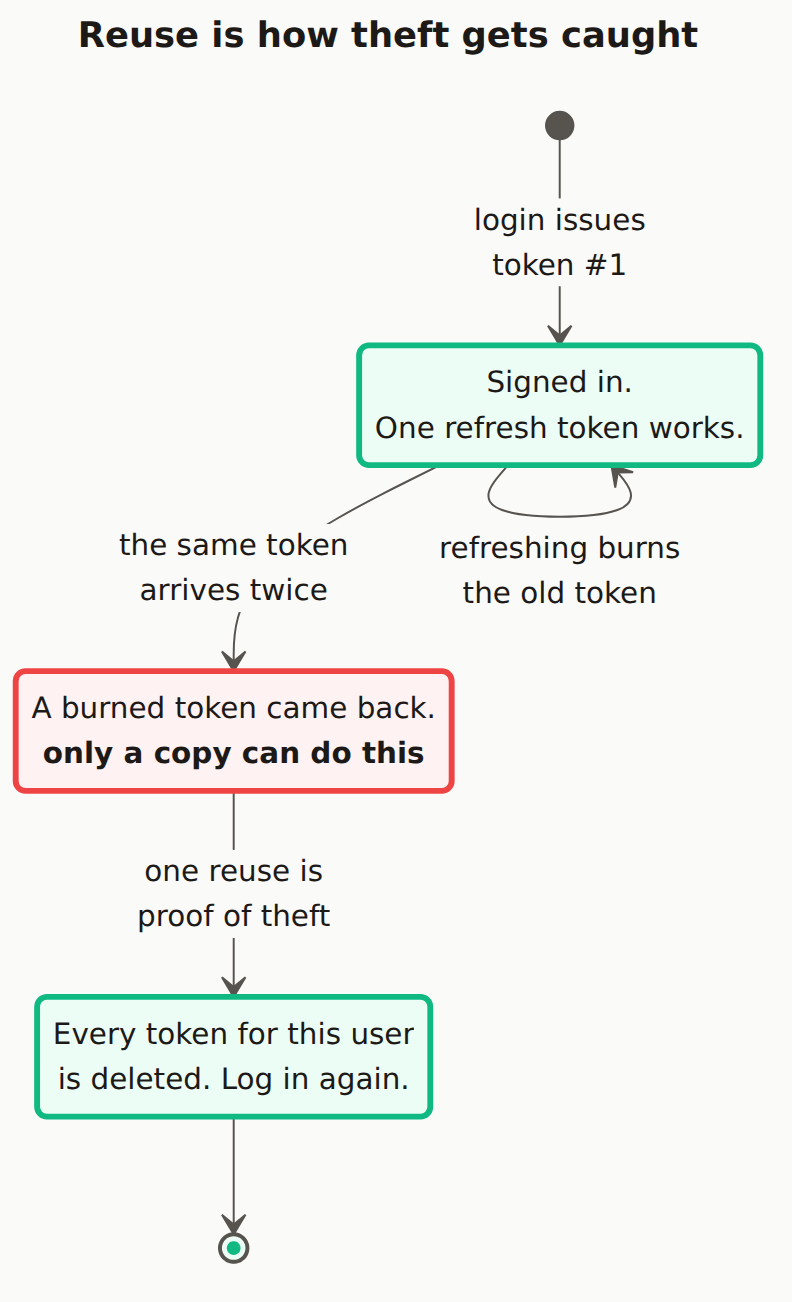
async function refreshAccessToken(req, res) {
  const refreshToken = req.cookies.refreshToken;

  if (!refreshToken) {
    return res.status(401).json({ error: 'No refresh token' });
  }

  try {
    // Verify refresh token
    const decoded = jwt.verify(refreshToken, process.env.JWT_PUBLIC_KEY, {
      algorithms: ['RS256'],
      issuer: 'https://myapp.com'
    });

    // Check if refresh token exists in database
    const storedToken = await db.refreshToken.findFirst({
      where: {
        userId: decoded.sub,
        tokenHash: hashToken(refreshToken),
        expiresAt: { gt: new Date() }
      }
    });

    if (!storedToken) {
      // Token reuse detected! Revoke all user's tokens
      await db.refreshToken.deleteMany({
        where: { userId: decoded.sub }
      });
      clearAuthCookies(res);
      return res.status(401).json({
        error: 'Invalid refresh token. Please login again.'
      });
    }

    // Delete old refresh token (rotation)
    await db.refreshToken.delete({
      where: { id: storedToken.id }
    });

    // Get user and create new tokens
    const user = await db.user.findUnique({
      where: { id: decoded.sub }
    });

    const { accessToken, refreshToken: newRefreshToken } = createTokens(user);
    setAuthCookies(res, accessToken, newRefreshToken);

    return res.json({ success: true });
  } catch (error) {
    clearAuthCookies(res);
    return res.status(401).json({ error: 'Invalid refresh token' });
  }
}
Handle token revocation
// For immediate revocation (logout, password change, etc.)
async function revokeAllUserTokens(userId) {
  // Delete all refresh tokens
  await db.refreshToken.deleteMany({
    where: { userId }
  });

  // For access tokens, we need a blacklist (they're stateless)
  // Option 1: Blacklist specific tokens until they expire
  // Option 2: Track a "tokens valid after" timestamp per user
}

// Logout endpoint
async function logout(req, res) {
  const accessToken = req.cookies.accessToken;
  const refreshToken = req.cookies.refreshToken;

  if (accessToken) {
    // Blacklist access token until expiry
    const decoded = jwt.decode(accessToken);
    if (decoded?.jti && decoded?.exp) {
      await db.blacklistedToken.create({
        data: {
          jti: decoded.jti,
          expiresAt: new Date(decoded.exp * 1000)
        }
      });
    }
  }

  if (refreshToken) {
    // Delete refresh token from database
    await db.refreshToken.deleteMany({
      where: { tokenHash: hashToken(refreshToken) }
    });
  }

  clearAuthCookies(res);
  return res.json({ success: true });
}

// Clean up expired blacklist entries (run periodically)
async function cleanupBlacklist() {
  await db.blacklistedToken.deleteMany({
    where: { expiresAt: { lt: new Date() } }
  });
}
JWT Security Mistakes to Avoid:
- Never allow the "none" algorithm. Specify
algorithms: ['RS256']explicitly. - Never store JWTs in localStorage. XSS can read it; httpOnly cookies can't be touched by JS.
- Never use a weak HS256 secret. If it's guessable, the whole token system collapses.
- Never put sensitive data in the payload. It's base64, not encrypted -- anyone can decode it.
- Never skip claim validation (exp, iss, aud). A valid signature proves nothing else.
How to Verify It Worked
- Test algorithm confusion: Send a token with
alg="none"-- your server must reject it - Test expiry: Wait past the access token lifetime, then try the token; expect a 401
- Test refresh rotation: Use the same refresh token twice; the second call must fail and ideally revoke all tokens for that user
- Test revocation: Logout, then replay the old access token against a protected endpoint
Common Errors & Troubleshooting
Error: "invalid algorithm"
You're verifying with a different algorithm than used for signing. Check that algorithms array matches.
Error: "invalid signature"
Key mismatch. For RS256, sign with private key, verify with public key.
Tokens not being sent
Check cookie settings - sameSite, secure, and path must be correct for your setup.
Token too large
JWTs in cookies have ~4KB limit. Don't put large data in tokens - use user ID and fetch data as needed.
Why not just use sessions instead?
Sessions are often simpler and more secure for traditional web apps. JWTs make sense for: stateless microservices, mobile apps, or when you need tokens to work across domains. For most web apps, sessions are fine.
What's the deal with HS256 vs RS256?
HS256 uses a shared secret (both sides need the same key). RS256 uses public/private keys (sign with private, verify with public). RS256 is better when you have multiple services - they can verify tokens without having the signing key.
How do I handle token refresh in a SPA?
The access token cookie is sent automatically. When you get a 401, call your /refresh endpoint. If that fails, redirect to login. Use an interceptor in your HTTP client to handle this automatically.
Related guides:Session Management · Secure Login Form · OAuth Setup