Social login done right with Google, GitHub, and more
TL;DR
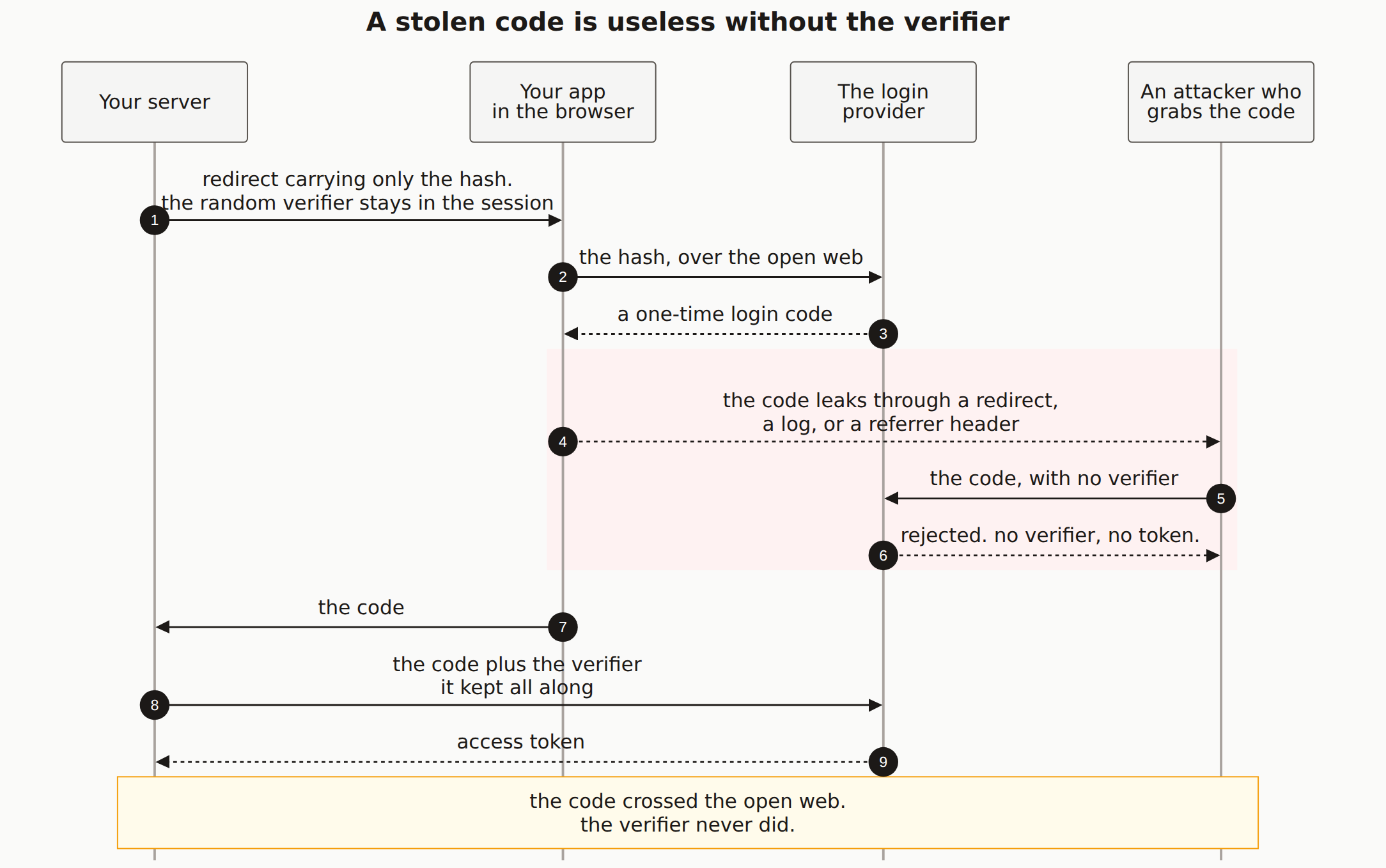
TL;DR (30 minutes): Use Authorization Code flow with PKCE (not implicit flow). Always validate the state parameter. Verify tokens on the server side, not client. Use exact redirect URI matching. Store OAuth tokens encrypted. Link accounts by verified email only after confirming email ownership.
Prerequisites:
- OAuth provider account (Google, GitHub, etc.)
- HTTPS-enabled domain
- Database for storing user accounts
Why This Matters
OAuth lets users sign in with existing accounts (Google, GitHub, etc.) instead of creating new passwords. But improper implementation leads to account takeover vulnerabilities. Common mistakes include missing state validation, improper token handling, and insecure account linking.
Step-by-Step Guide
Register your OAuth application
Create credentials with your OAuth provider:
# Google Cloud Console
1. Go to console.cloud.google.com
2. Create project → APIs & Services → Credentials
3. Create OAuth 2.0 Client ID
4. Add authorized redirect URIs:
   - https://yourapp.com/api/auth/callback/google
   - http://localhost:3000/api/auth/callback/google (dev)

# GitHub
1. Go to github.com/settings/developers
2. New OAuth App
3. Set callback URL:
   - https://yourapp.com/api/auth/callback/github

# Store credentials securely
GOOGLE_CLIENT_ID=xxx
GOOGLE_CLIENT_SECRET=xxx
GITHUB_CLIENT_ID=xxx
GITHUB_CLIENT_SECRET=xxx
Implement authorization with PKCE
import crypto from 'crypto';

// Generate PKCE challenge
function generatePKCE() {
  const verifier = crypto.randomBytes(32).toString('base64url');
  const challenge = crypto
    .createHash('sha256')
    .update(verifier)
    .digest('base64url');

  return { verifier, challenge };
}

// Generate state parameter (prevents CSRF)
function generateState() {
  return crypto.randomBytes(32).toString('hex');
}

// Start OAuth flow
async function startOAuth(req, res, provider) {
  const { verifier, challenge } = generatePKCE();
  const state = generateState();

  // Store in session for validation later
  req.session.oauthState = state;
  req.session.oauthVerifier = verifier;
  req.session.oauthProvider = provider;

  const params = new URLSearchParams({
    client_id: process.env[`${provider.toUpperCase()}_CLIENT_ID`],
    redirect_uri: `${process.env.APP_URL}/api/auth/callback/${provider}`,
    response_type: 'code',
    scope: getScopes(provider),
    state,
    code_challenge: challenge,
    code_challenge_method: 'S256'
  });

  const authUrl = getAuthUrl(provider);
  res.redirect(`${authUrl}?${params}`);
}

function getScopes(provider) {
  switch (provider) {
    case 'google': return 'openid email profile';
    case 'github': return 'read:user user:email';
    default: return 'openid email profile';
  }
}

function getAuthUrl(provider) {
  switch (provider) {
    case 'google': return 'https://accounts.google.com/o/oauth2/v2/auth';
    case 'github': return 'https://github.com/login/oauth/authorize';
  }
}
Handle the callback securely
async function handleCallback(req, res) {
  const { code, state, error } = req.query;
  const provider = req.params.provider;

  // Check for OAuth errors
  if (error) {
    return res.redirect('/login?error=oauth_denied');
  }

  // CRITICAL: Validate state parameter
  if (!state || state !== req.session.oauthState) {
    return res.redirect('/login?error=invalid_state');
  }

  // Validate provider matches
  if (provider !== req.session.oauthProvider) {
    return res.redirect('/login?error=provider_mismatch');
  }

  try {
    // Exchange code for tokens
    const tokens = await exchangeCodeForTokens(
      provider,
      code,
      req.session.oauthVerifier
    );

    // Get user info from provider
    const oauthUser = await getOAuthUserInfo(provider, tokens.access_token);

    // Find or create user in your database
    const user = await findOrCreateUser(oauthUser, provider, tokens);

    // Clear OAuth session data
    delete req.session.oauthState;
    delete req.session.oauthVerifier;
    delete req.session.oauthProvider;

    // Create your app's session
    await createUserSession(req, res, user);

    res.redirect('/dashboard');
  } catch (error) {
    console.error('OAuth callback error:', error);
    res.redirect('/login?error=oauth_failed');
  }
}

async function exchangeCodeForTokens(provider, code, verifier) {
  const tokenUrl = provider === 'google'
    ? 'https://oauth2.googleapis.com/token'
    : 'https://github.com/login/oauth/access_token';

  const response = await fetch(tokenUrl, {
    method: 'POST',
    headers: {
      'Content-Type': 'application/x-www-form-urlencoded',
      'Accept': 'application/json'
    },
    body: new URLSearchParams({
      client_id: process.env[`${provider.toUpperCase()}_CLIENT_ID`],
      client_secret: process.env[`${provider.toUpperCase()}_CLIENT_SECRET`],
      code,
      grant_type: 'authorization_code',
      redirect_uri: `${process.env.APP_URL}/api/auth/callback/${provider}`,
      code_verifier: verifier
    })
  });

  const data = await response.json();

  if (data.error) {
    throw new Error(data.error_description || data.error);
  }

  return data;
}
Get and verify user info
async function getOAuthUserInfo(provider, accessToken) {
  let userInfo;

  if (provider === 'google') {
    const response = await fetch(
      'https://www.googleapis.com/oauth2/v2/userinfo',
      { headers: { Authorization: `Bearer ${accessToken}` } }
    );
    userInfo = await response.json();

    return {
      providerId: userInfo.id,
      email: userInfo.email,
      emailVerified: userInfo.verified_email,
      name: userInfo.name,
      avatar: userInfo.picture
    };
  }

  if (provider === 'github') {
    // Get user profile
    const userResponse = await fetch('https://api.github.com/user', {
      headers: { Authorization: `Bearer ${accessToken}` }
    });
    const user = await userResponse.json();

    // Get user emails (GitHub may not include email in profile)
    const emailsResponse = await fetch('https://api.github.com/user/emails', {
      headers: { Authorization: `Bearer ${accessToken}` }
    });
    const emails = await emailsResponse.json();

    // Find primary verified email
    const primaryEmail = emails.find(e => e.primary && e.verified);

    return {
      providerId: user.id.toString(),
      email: primaryEmail?.email,
      emailVerified: primaryEmail?.verified || false,
      name: user.name || user.login,
      avatar: user.avatar_url
    };
  }
}
Link accounts securely
async function findOrCreateUser(oauthUser, provider, tokens) {
  // Check if OAuth account already linked
  let oauthAccount = await prisma.oAuthAccount.findUnique({
    where: {
      provider_providerId: {
        provider,
        providerId: oauthUser.providerId
      }
    },
    include: { user: true }
  });

  if (oauthAccount) {
    // Update tokens
    await prisma.oAuthAccount.update({
      where: { id: oauthAccount.id },
      data: {
        accessToken: encrypt(tokens.access_token),
        refreshToken: tokens.refresh_token ? encrypt(tokens.refresh_token) : null
      }
    });
    return oauthAccount.user;
  }

  // IMPORTANT: Only link to existing account if email is verified
  if (oauthUser.email && oauthUser.emailVerified) {
    const existingUser = await prisma.user.findUnique({
      where: { email: oauthUser.email }
    });

    if (existingUser) {
      // Link OAuth account to existing user
      await prisma.oAuthAccount.create({
        data: {
          provider,
          providerId: oauthUser.providerId,
          userId: existingUser.id,
          accessToken: encrypt(tokens.access_token),
          refreshToken: tokens.refresh_token ? encrypt(tokens.refresh_token) : null
        }
      });
      return existingUser;
    }
  }

  // Create new user
  const user = await prisma.user.create({
    data: {
      email: oauthUser.email,
      emailVerified: oauthUser.emailVerified ? new Date() : null,
      name: oauthUser.name,
      avatar: oauthUser.avatar,
      oauthAccounts: {
        create: {
          provider,
          providerId: oauthUser.providerId,
          accessToken: encrypt(tokens.access_token),
          refreshToken: tokens.refresh_token ? encrypt(tokens.refresh_token) : null
        }
      }
    }
  });

  return user;
}
Schema for OAuth accounts
// Prisma schema
model User {
  id            String    @id @default(cuid())
  email         String?   @unique
  emailVerified DateTime?
  name          String?
  avatar        String?
  oauthAccounts OAuthAccount[]
  sessions      Session[]
}

model OAuthAccount {
  id           String  @id @default(cuid())
  provider     String  // 'google', 'github', etc.
  providerId   String  // ID from the OAuth provider
  userId       String
  user         User    @relation(fields: [userId], references: [id], onDelete: Cascade)
  accessToken  String  // Encrypted
  refreshToken String? // Encrypted

  @@unique([provider, providerId])
  @@index([userId])
}
OAuth Security Mistakes to Avoid:
- Never skip state validation - it prevents CSRF attacks
- Never use implicit flow for web apps - use authorization code with PKCE
- Never trust unverified emails for account linking - attackers can register with victim's email
- Never expose client secrets to the frontend
- Never use wildcard redirect URIs - exact match only
- Always verify tokens on your server, not the client
How to Verify It Worked
- Test state validation: Modify the state parameter in callback URL - should fail
- Test redirect URI: Try different redirect URIs - should fail
- Test account linking: Create accounts with same email different providers
- Inspect tokens: Verify access tokens are encrypted in database
Common Errors & Troubleshooting
Error: "redirect_uri_mismatch"
The redirect URI doesn't match what's registered. Check exact match including trailing slashes.
Error: "invalid_grant"
The authorization code was already used or expired. Codes are single-use.
State mismatch
Session was lost between redirect and callback. Check session configuration and cookie settings.
Email not returned
Some providers don't return email in profile. Request email scope and fetch from separate endpoint (like GitHub).
Should I store OAuth refresh tokens?
Only if you need to access the provider's API on behalf of the user (like accessing their Google Drive). For simple authentication, you don't need to store tokens after creating the session.
How do I handle account linking for existing users?
If a user is logged in and wants to add another OAuth provider, link directly to their account. If not logged in, only link by email if the email is verified by the OAuth provider.
Why PKCE if I'm using server-side code?
PKCE adds defense in depth. It protects against authorization code interception, which can happen even in server-side flows. Modern OAuth best practices recommend PKCE for all clients.
Related guides:NextAuth Setup · Session Management · Magic Links