Passwordless login that's both secure and user-friendly
TL;DR
TL;DR (25 minutes): Generate 32+ byte random tokens, store hashed with 15-minute expiration, send via email with clear context, verify and invalidate in a single atomic operation, rate limit to 3-5 requests per email per hour. Magic links trade password security for email security. Only use them when that tradeoff makes sense for your users.
Prerequisites:
- Email sending capability (Resend, SendGrid, etc.)
- Database for token storage
- HTTPS-enabled domain
Why This Matters
Magic links eliminate the most common password attacks. No weak passwords to crack, no credential-stuffing lists to exploit. The tradeoff is that security shifts to the user's inbox. If someone has access to their email, they can log in, so proper rate limiting and short token expiration aren't optional.
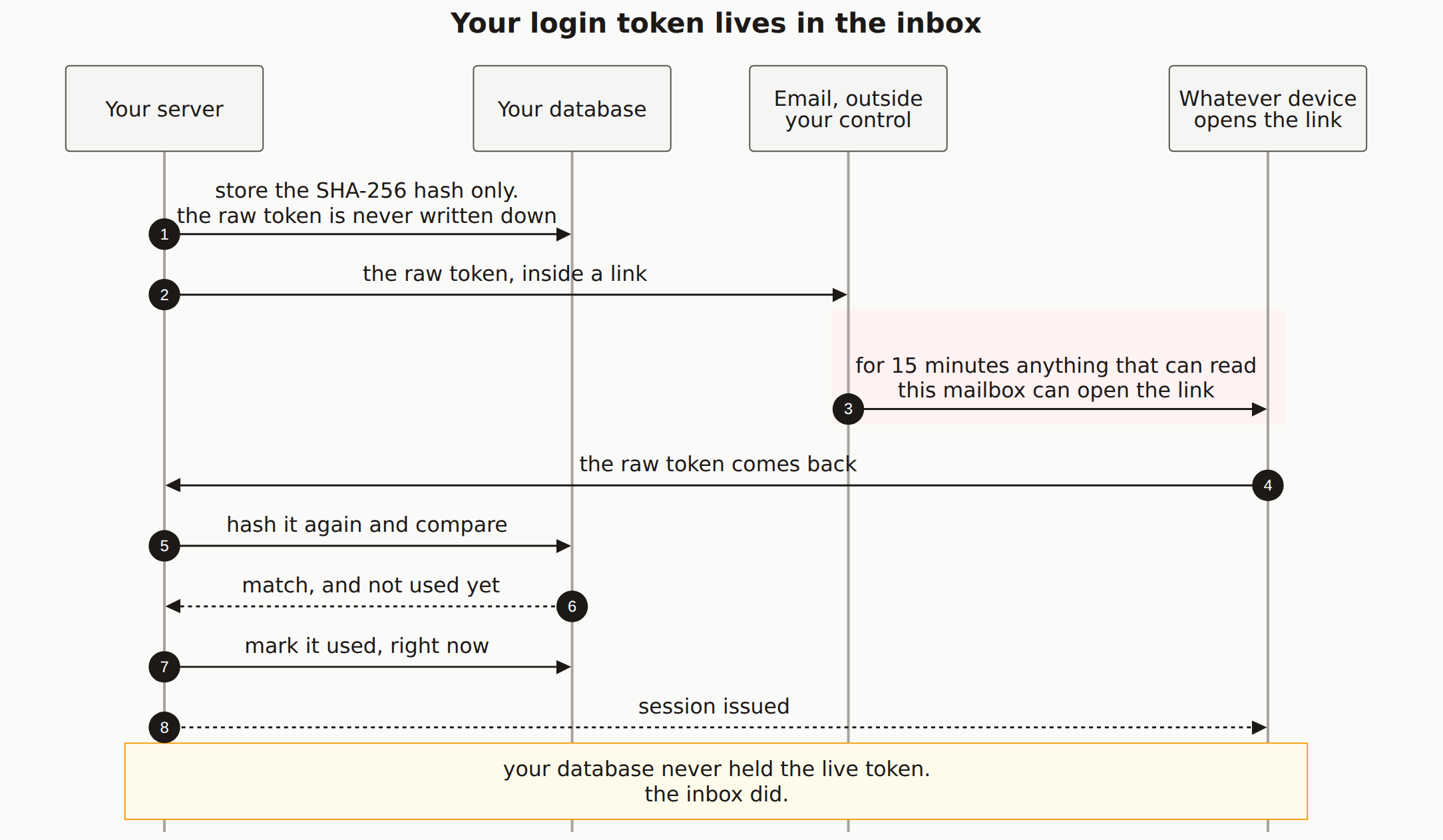
The reason that tradeoff exists is easier to see than to describe. The login secret leaves your server and waits in a mailbox:
Step-by-Step Guide
Create the database schema
// Prisma schema
model MagicLink {
  id        String   @id @default(cuid())
  tokenHash String   @unique  // Store hashed, not raw
  email     String
  expiresAt DateTime
  usedAt    DateTime?
  createdAt DateTime @default(now())

  @@index([email])
  @@index([expiresAt])
}

model User {
  id            String    @id @default(cuid())
  email         String    @unique
  emailVerified DateTime?
  // ... other fields
}
Generate secure tokens
import crypto from 'crypto';

// Generate cryptographically secure token
function generateMagicLinkToken(): string {
  return crypto.randomBytes(32).toString('hex');
}

// Hash token for storage
function hashToken(token: string): string {
  return crypto.createHash('sha256').update(token).digest('hex');
}

// Create magic link
async function createMagicLink(email: string) {
  const token = generateMagicLinkToken();
  const tokenHash = hashToken(token);

  // Delete any existing unused tokens for this email
  await prisma.magicLink.deleteMany({
    where: {
      email,
      usedAt: null
    }
  });

  // Create new token with 15-minute expiration
  await prisma.magicLink.create({
    data: {
      tokenHash,
      email: email.toLowerCase(),
      expiresAt: new Date(Date.now() + 15 * 60 * 1000)
    }
  });

  // Return the raw token (for the URL)
  return token;
}
Implement rate limiting
import { Ratelimit } from '@upstash/ratelimit';
import { Redis } from '@upstash/redis';

const redis = new Redis({
  url: process.env.UPSTASH_REDIS_URL,
  token: process.env.UPSTASH_REDIS_TOKEN
});

// Rate limit per email: 3 requests per hour
const emailRateLimiter = new Ratelimit({
  redis,
  limiter: Ratelimit.slidingWindow(3, '1 h')
});

// Rate limit per IP: 10 requests per hour
const ipRateLimiter = new Ratelimit({
  redis,
  limiter: Ratelimit.slidingWindow(10, '1 h')
});

async function checkRateLimits(email: string, ip: string) {
  const [emailLimit, ipLimit] = await Promise.all([
    emailRateLimiter.limit(email),
    ipRateLimiter.limit(ip)
  ]);

  if (!emailLimit.success) {
    return {
      allowed: false,
      message: 'Too many login attempts for this email. Please try again later.'
    };
  }

  if (!ipLimit.success) {
    return {
      allowed: false,
      message: 'Too many requests. Please try again later.'
    };
  }

  return { allowed: true };
}
Request magic link endpoint
import { z } from 'zod';

const requestSchema = z.object({
  email: z.string().email().toLowerCase()
});

async function requestMagicLink(req, res) {
  const result = requestSchema.safeParse(req.body);
  if (!result.success) {
    return res.status(400).json({ error: 'Invalid email address' });
  }

  const { email } = result.data;

  // Check rate limits
  const rateLimit = await checkRateLimits(email, req.ip);
  if (!rateLimit.allowed) {
    return res.status(429).json({ error: rateLimit.message });
  }

  // Always return success to prevent email enumeration
  // Even if user doesn't exist, we show the same message
  const userExists = await prisma.user.findUnique({
    where: { email }
  });

  if (userExists) {
    const token = await createMagicLink(email);
    const magicLink = `${process.env.APP_URL}/auth/verify?token=${token}`;

    await sendMagicLinkEmail(email, magicLink);
  }

  // Same response regardless of whether user exists
  return res.json({
    message: 'If an account exists, a login link has been sent to your email.'
  });
}
Send the email
import { Resend } from 'resend';

const resend = new Resend(process.env.RESEND_API_KEY);

async function sendMagicLinkEmail(email: string, magicLink: string) {
  await resend.emails.send({
    from: 'MyApp ',
    to: email,
    subject: 'Your login link for MyApp',
    html: `
      Sign in to MyApp
      Click the button below to sign in. This link expires in 15 minutes.


        Sign in to MyApp


        If you didn't request this link, you can safely ignore this email.
        Someone may have typed your email address by mistake.


        Link not working? Copy and paste this URL:
        ${magicLink}


        This link expires in 15 minutes and can only be used once.
        Never share this link with anyone.

    `
  });
}
Verify the magic link
async function verifyMagicLink(req, res) {
  const { token } = req.query;

  if (!token || typeof token !== 'string') {
    return res.redirect('/login?error=invalid_link');
  }

  const tokenHash = hashToken(token);

  // Find and validate token atomically
  const magicLink = await prisma.magicLink.findUnique({
    where: { tokenHash }
  });

  // Check if token exists
  if (!magicLink) {
    return res.redirect('/login?error=invalid_link');
  }

  // Check if already used
  if (magicLink.usedAt) {
    return res.redirect('/login?error=link_already_used');
  }

  // Check if expired
  if (magicLink.expiresAt < new Date()) {
    return res.redirect('/login?error=link_expired');
  }

  // Mark as used immediately (prevent race conditions)
  await prisma.magicLink.update({
    where: { id: magicLink.id },
    data: { usedAt: new Date() }
  });

  // Find or create user
  let user = await prisma.user.findUnique({
    where: { email: magicLink.email }
  });

  if (!user) {
    user = await prisma.user.create({
      data: {
        email: magicLink.email,
        emailVerified: new Date()  // Email is verified by using magic link
      }
    });
  } else if (!user.emailVerified) {
    // Mark email as verified
    await prisma.user.update({
      where: { id: user.id },
      data: { emailVerified: new Date() }
    });
  }

  // Create session
  const session = await createSession(user.id, req);
  setSessionCookie(res, session.sessionId, session.expiresAt);

  return res.redirect('/dashboard');
}
Clean up expired tokens
// Run periodically (cron job or scheduled function)
async function cleanupExpiredTokens() {
  const result = await prisma.magicLink.deleteMany({
    where: {
      OR: [
        { expiresAt: { lt: new Date() } },
        // Also clean up used tokens older than 24 hours
        {
          usedAt: { not: null },
          createdAt: { lt: new Date(Date.now() - 24 * 60 * 60 * 1000) }
        }
      ]
    }
  });

  console.log(`Cleaned up ${result.count} magic link tokens`);
}
Magic Link Security Considerations:
- Short expiration (15 minutes max) - reduces window for interception
- Single use - token invalidated after first use
- Rate limiting - prevent abuse and enumeration
- Hash tokens - raw tokens never stored in database
- HTTPS only - tokens should never travel over HTTP
- Clear email messaging - help users identify phishing
- Consider adding device fingerprinting for suspicious logins
How to Verify It Worked
- Single use: Click a magic link, then try clicking it again. It should fail with "link already used."
- Expiration: Wait 15+ minutes and try the link. You'll get a "link expired" error.
- Rate limiting: Hit the request endpoint 4+ times quickly. The 4th should return 429.
- Token storage: Query your database directly and confirm only hashes appear, never raw tokens.
Common Errors & Troubleshooting
Links always show as expired
Your servers' clocks need to agree. A time difference of even a few seconds between the app server and database server can cause links to appear expired before they should be.
Emails not arriving
Check spam folders first. Then verify sender domain authentication: SPF, DKIM, and DMARC. Most delivery problems trace back to one of those three.
Race condition: link used twice
Use an atomic database operation to check and mark as used in a single query. Two simultaneous requests can both pass the "is it used?" check before either updates the row.
Links breaking in email
Some email clients break long URLs at line-length limits. Include a copy-paste fallback and consider UUID v4 tokens, which are shorter.
Magic links vs passwords - which is more secure?
It depends on your users. Magic links eliminate password-related attacks but shift security to email. If users have strong email security (2FA), magic links are great. If not, you're trusting their email provider's security.
Should I offer both magic links and passwords?
Yes, many apps offer both. Users can choose their preference. Consider requiring 2FA if users set a password.
How do I handle mobile email apps?
Mobile email apps often preview links, potentially "using" them. Consider: longer tokens that are harder to guess if previewed, or a confirmation page before consuming the token.
Related guides:Session Management · OAuth Setup · Two-Factor Auth