Prevent account takeover through password reset vulnerabilities
TL;DR
TL;DR (20 minutes): Generate 32+ byte random tokens, hash before storing, 1-hour expiration max, single-use only. Always return "if account exists, email sent" to prevent enumeration. Invalidate all sessions after password change. Rate limit requests (3/hour per email). Send notification to old email after reset.
Prerequisites:
- User authentication system
- Email sending capability
- Database for token storage
Why This Matters
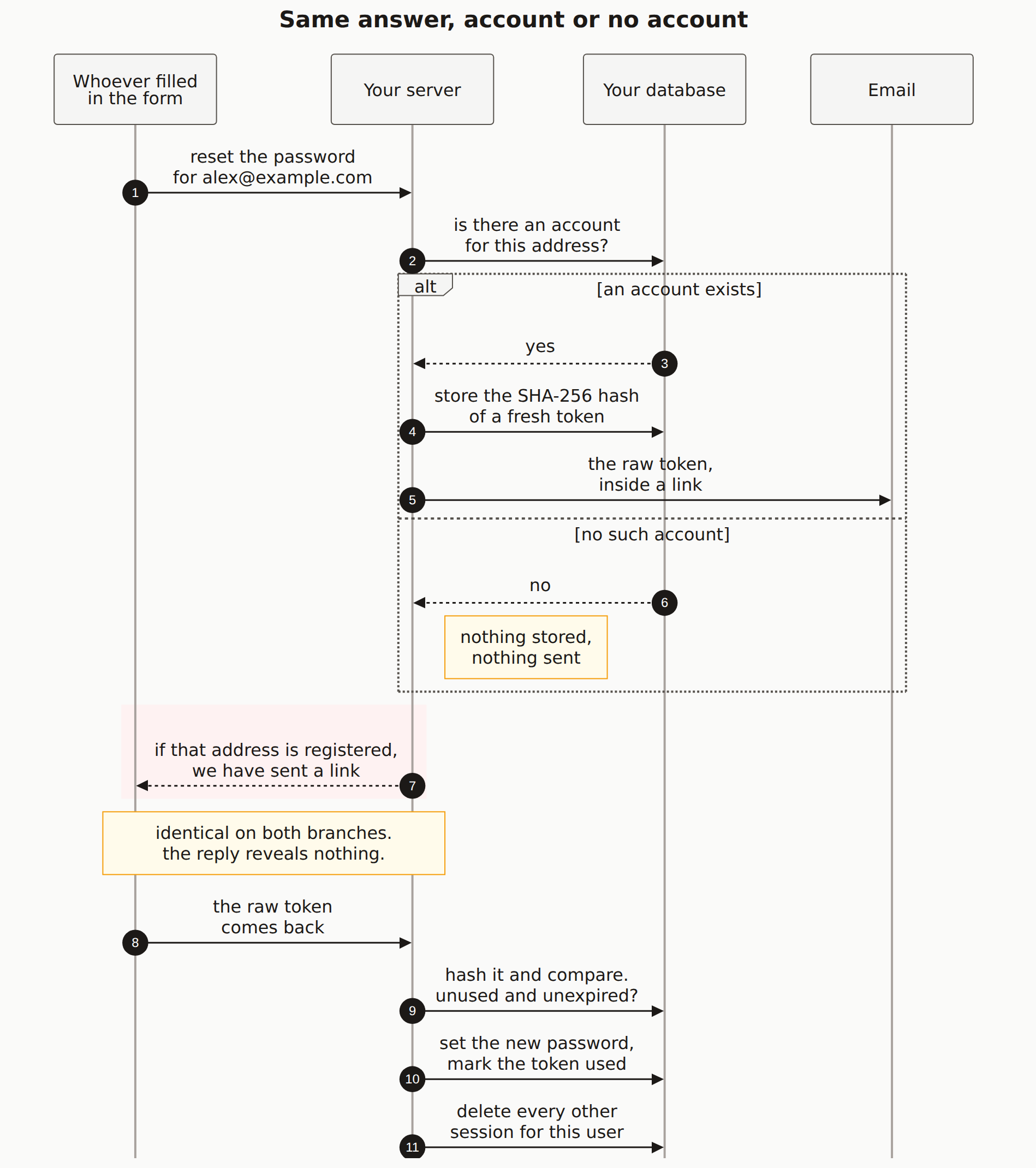
Password reset is a high-value target for attackers, and vulnerabilities in reset flows have led to countless account takeovers. Predictable tokens. No expiration. User enumeration. Missing session invalidation. We see all four in vibe-coded apps regularly, usually because the reset flow was the last thing built before launch. This guide covers what a reset flow actually needs.
Two of those four are hard to see in code, because they are about what an outsider can observe rather than what a function returns. Here is the whole flow with both marked.
Step-by-Step Guide
Database schema
// Prisma schema
model PasswordResetToken {
  id        String   @id @default(cuid())
  tokenHash String   @unique
  userId    String
  user      User     @relation(fields: [userId], references: [id])
  expiresAt DateTime
  usedAt    DateTime?
  createdAt DateTime @default(now())
  ipAddress String?
  userAgent String?

  @@index([userId])
  @@index([expiresAt])
}
Generate secure reset tokens
import crypto from 'crypto';

function generateResetToken(): string {
  return crypto.randomBytes(32).toString('hex');
}

function hashToken(token: string): string {
  return crypto.createHash('sha256').update(token).digest('hex');
}

async function createPasswordResetToken(
  userId: string,
  ipAddress?: string,
  userAgent?: string
) {
  // Invalidate any existing tokens for this user
  await prisma.passwordResetToken.updateMany({
    where: {
      userId,
      usedAt: null,
      expiresAt: { gt: new Date() }
    },
    data: { usedAt: new Date() }  // Mark as used
  });

  const token = generateResetToken();
  const tokenHash = hashToken(token);

  await prisma.passwordResetToken.create({
    data: {
      tokenHash,
      userId,
      expiresAt: new Date(Date.now() + 60 * 60 * 1000), // 1 hour
      ipAddress,
      userAgent
    }
  });

  return token;  // Return raw token for email link
}
Request password reset endpoint
import { Ratelimit } from '@upstash/ratelimit';

const resetRateLimiter = new Ratelimit({
  redis,
  limiter: Ratelimit.slidingWindow(3, '1 h')  // 3 per hour
});

async function requestPasswordReset(req, res) {
  const { email } = req.body;

  // Validate email format
  if (!email || !isValidEmail(email)) {
    return res.status(400).json({ error: 'Invalid email address' });
  }

  // Rate limit
  const rateLimit = await resetRateLimiter.limit(email.toLowerCase());
  if (!rateLimit.success) {
    // Don't reveal rate limiting to prevent enumeration
    return res.json({
      message: 'If an account exists with this email, a reset link has been sent.'
    });
  }

  // Look up user
  const user = await prisma.user.findUnique({
    where: { email: email.toLowerCase() }
  });

  // IMPORTANT: Same response whether user exists or not
  if (user) {
    const token = await createPasswordResetToken(
      user.id,
      req.ip,
      req.headers['user-agent']
    );

    const resetLink = `${process.env.APP_URL}/reset-password?token=${token}`;

    await sendPasswordResetEmail(user.email, resetLink, {
      userName: user.name,
      ipAddress: req.ip,
      requestTime: new Date()
    });
  }

  // Always return success (prevents enumeration)
  return res.json({
    message: 'If an account exists with this email, a reset link has been sent.'
  });
}
Send secure reset email
async function sendPasswordResetEmail(
  email: string,
  resetLink: string,
  context: { userName?: string; ipAddress?: string; requestTime: Date }
) {
  await resend.emails.send({
    from: 'MyApp Security ',
    to: email,
    subject: 'Reset your password - MyApp',
    html: `
      Password Reset Request

      Hi${context.userName ? ` ${context.userName}` : ''},

      We received a request to reset your password. Click the button below to create a new password:


        Reset Password


      This link expires in 1 hour.


        Didn't request this?
        If you didn't request a password reset, you can safely ignore this email.
        Your password won't be changed unless you click the link above.


        This request was made from IP address ${context.ipAddress || 'unknown'}
        at ${context.requestTime.toISOString()}.
        If this wasn't you, please secure your account.


        Link not working? Copy and paste this URL:
        ${resetLink}

    `
  });
}
Validate token and reset password
import { z } from 'zod';
import bcrypt from 'bcrypt';

const resetSchema = z.object({
  token: z.string().min(1),
  password: z.string()
    .min(8, 'Password must be at least 8 characters')
    .regex(/[a-z]/, 'Password must contain a lowercase letter')
    .regex(/[A-Z]/, 'Password must contain an uppercase letter')
    .regex(/[0-9]/, 'Password must contain a number')
});

async function resetPassword(req, res) {
  const result = resetSchema.safeParse(req.body);
  if (!result.success) {
    return res.status(400).json({ errors: result.error.flatten() });
  }

  const { token, password } = result.data;
  const tokenHash = hashToken(token);

  // Find valid token
  const resetToken = await prisma.passwordResetToken.findUnique({
    where: { tokenHash },
    include: { user: true }
  });

  // Check token exists
  if (!resetToken) {
    return res.status(400).json({ error: 'Invalid or expired reset link' });
  }

  // Check not already used
  if (resetToken.usedAt) {
    return res.status(400).json({ error: 'This reset link has already been used' });
  }

  // Check not expired
  if (resetToken.expiresAt < new Date()) {
    return res.status(400).json({ error: 'This reset link has expired' });
  }

  // Hash new password
  const passwordHash = await bcrypt.hash(password, 12);

  // Update password and invalidate token in transaction
  await prisma.$transaction([
    prisma.user.update({
      where: { id: resetToken.userId },
      data: {
        passwordHash,
        passwordChangedAt: new Date()
      }
    }),
    prisma.passwordResetToken.update({
      where: { id: resetToken.id },
      data: { usedAt: new Date() }
    }),
    // Invalidate ALL sessions for this user
    prisma.session.deleteMany({
      where: { userId: resetToken.userId }
    })
  ]);

  // Send confirmation email
  await sendPasswordChangedEmail(resetToken.user.email);

  return res.json({
    success: true,
    message: 'Password has been reset. Please log in with your new password.'
  });
}
Send password changed notification
async function sendPasswordChangedEmail(email: string) {
  await resend.emails.send({
    from: 'MyApp Security ',
    to: email,
    subject: 'Your password has been changed - MyApp',
    html: `
      Password Changed

      Your password was successfully changed. You can now log in with your new password.

      For security, all your other sessions have been logged out.


        Didn't change your password?
        If you didn't make this change, your account may be compromised.
        Please reset your password immediately
        and contact our support team.

    `
  });
}
Clean up expired tokens
// Run periodically
async function cleanupExpiredTokens() {
  await prisma.passwordResetToken.deleteMany({
    where: {
      OR: [
        { expiresAt: { lt: new Date() } },
        { usedAt: { not: null } }
      ]
    }
  });
}
Password Reset Security Checklist:
- Use cryptographically secure random tokens (32+ bytes)
- Hash tokens before storing (attacker with DB access can't use them)
- Short expiration (1 hour max)
- Single use: invalidate immediately after use
- Same response for valid/invalid emails (prevent enumeration)
- Invalidate all sessions after password change
- Send notification to the account after reset
- Rate limit reset requests
- Include security context in emails (IP, time)
How to Verify It Worked
- Test token security: Try using a token twice. It should fail
- Test expiration: Wait 1+ hour, try the token. It should fail
- Test enumeration: Request reset for a non-existent email; same response as a valid one
- Test session invalidation: Reset password, verify other sessions logged out
- Test notification: Verify email sent after password change
Common Errors & Troubleshooting
Users not receiving reset emails
Check spam folders, verify domain authentication (SPF, DKIM), check email service logs.
Token expired too quickly
Check server time synchronization. Consider extending to 2-4 hours if users consistently have issues.
Rate limiting blocking legitimate users
3/hour might be too strict. Adjust based on your user behavior, but don't go above 5-10/hour.
Should I require the old password to reset?
No. Password reset is for when users forgot their password, so they can't provide the old one. For changing a password while already logged in, yes, require the current password. Those are different flows.
What about security questions?
Skip them. They're often guessable or findable through social engineering (a pet's name, a mother's maiden name, things people post about online). Email-based reset with proper token security does the job better.
Should I send the new password in email?
Never! Email isn't secure. Always have the user create their own password through your secure form.
Related guides:Hash Passwords Securely · Session Management · Magic Links