Most explanations of cross-site scripting teach three attacks. There is one attack. What differs is the on-ramp.
That framing matters because the fix follows the sink, not the source. Sanitize every field your server receives and you have covered two of the three routes, which feels thorough right up until someone reads the third one out of the URL bar.
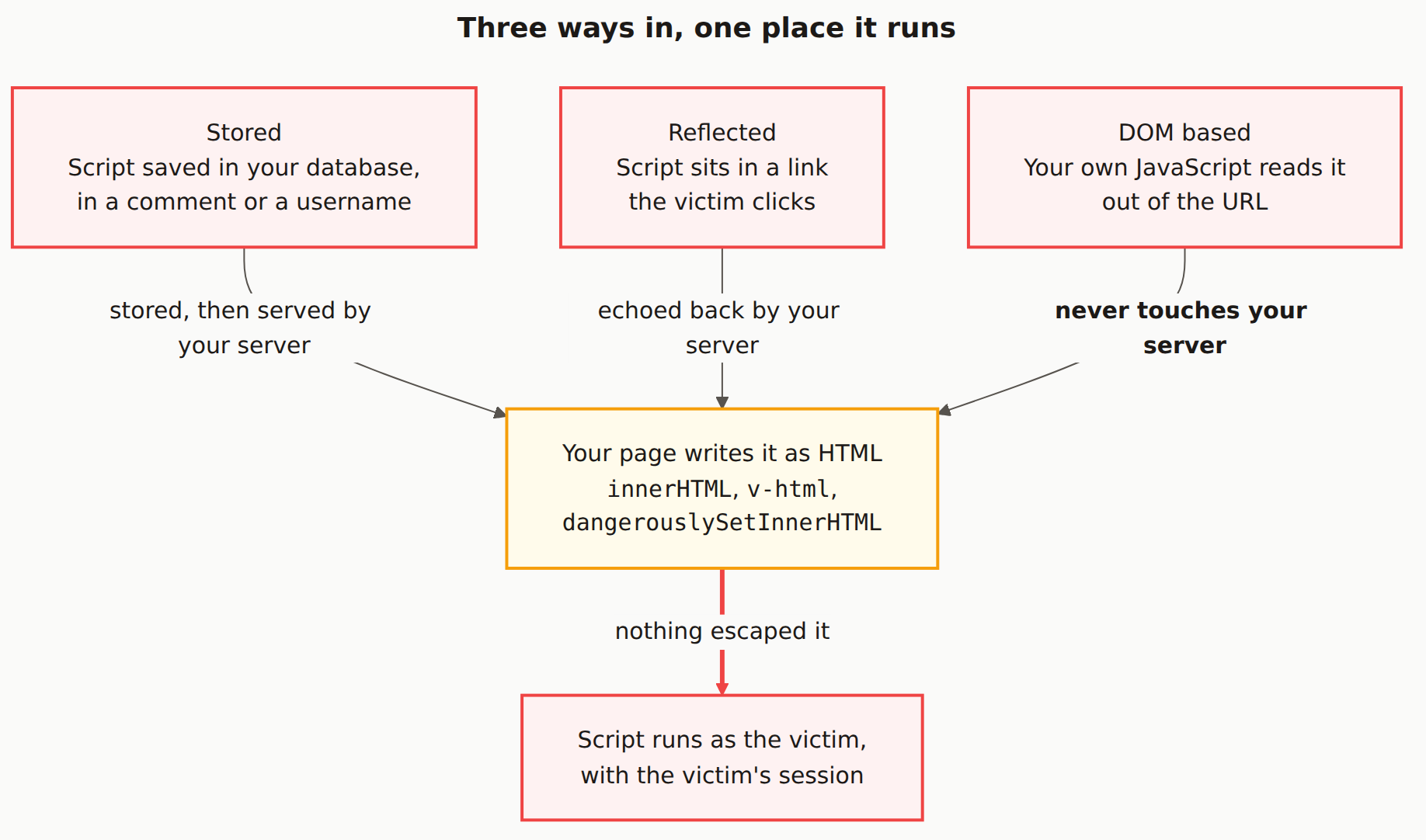
Reading the diagram
Three red boxes across the top, one amber box in the middle, one red box at the bottom. Red means the attacker controls it. Amber is the only node you own outright.
The top row is the taxonomy, and it is the part every article spends its length on. Stored means the text sits in your database, in a comment or a display name, and gets served to everyone who loads that record. Reflected means the text sits in a link, and gets echoed back to whoever clicks it. DOM-based means the text sits in the URL and is read by your own JavaScript.
The three edge labels are the actual content of the diagram. Two of them say the payload passes through your server. The third says it never touches it. That is the whole distinction, and it decides where your defence has to live.
The amber box is where all three arrive, and it is one line of code. innerHTML. v-html. dangerouslySetInnerHTML. document.write. Untrusted text goes in one side as data and comes out the other side as markup, and the browser has no way to know it was not meant to be.
The red arrow at the bottom is the only consequence worth stating. Not "an alert box pops up". The script runs inside your origin, with your user's session, and can do anything that user could do: read the page, call your API as them, exfiltrate their token.
Everything after the # in a URL is never sent to your server. The browser strips the fragment before making the request. So a WAF, an input filter, and a request-logging middleware all see nothing, while document.getElementById('out').innerHTML = location.hash.slice(1) executes it happily. This is the single most common way a team with good server-side hygiene still ships XSS.
Why AI-generated code lands on the amber box
The default rendering path in React, Vue, Svelte, and Angular escapes interpolated values. That is why the overwhelming majority of framework apps have no XSS: you would have to opt out.
Opting out is exactly what a model does when the prompt says "render the description as rich text" or "support markdown in comments". The escaped path cannot produce a <strong>, so the generated code reaches for dangerouslySetInnerHTML or v-html, and now user-supplied text is markup. The model is not being careless; it is solving the stated problem with the only API that solves it.
We see this pattern constantly in scans of AI-built apps, and it clusters in exactly the features you would predict: comment bodies, product descriptions, profile bios, anything that wanted formatting.
Grep is a genuinely good first audit here. grep -rn "dangerouslySetInnerHTML\|v-html\|innerHTML\|document.write" src/ gives you the complete list of places XSS can exist in your app. If that list is empty, you are almost certainly fine. If it is short, you can read every one of them in ten minutes.
The Mermaid source
Remix it. The shape generalises to any injection class: several sources, one sink, one consequence.
---
title: "Three ways in, one place it runs"
---
flowchart TB
    S["Stored<br/>Script saved in your database,<br/>in a comment or a username"]
    R["Reflected<br/>Script sits in a link<br/>the victim clicks"]
    D["DOM based<br/>Your own JavaScript reads it<br/>out of the URL"]
    SINK["Your page writes it as HTML<br/><code>innerHTML</code>, <code>v-html</code>,<br/><code>dangerouslySetInnerHTML</code>"]
    OUT["Script runs as the victim,<br/>with the victim's session"]

    S -->|"stored, then served by your server"| SINK
    R -->|"echoed back by your server"| SINK
    D -->|"<b>never touches your server</b>"| SINK
    SINK -->|"nothing escaped it"| OUT

    classDef public fill:#fef2f2,stroke:#ef4444,stroke-width:2px,color:#1c1917
    classDef gate fill:#fffbeb,stroke:#f59e0b,stroke-width:2px,color:#1c1917

    class S,R,D,OUT public
    class SINK gate

    linkStyle 3 stroke:#ef4444,stroke-width:3px
What is the difference between stored, reflected, and DOM-based XSS?
Only how the attacker's text reaches your page. Stored XSS is saved in your database and served to everyone who loads the record. Reflected XSS rides in a link and is echoed back in the response to whoever clicks it. DOM-based XSS never reaches your server at all: your own JavaScript reads it out of the URL and writes it into the page. The bug they all end at is identical.
Why does sanitizing on the server not stop DOM-based XSS?
Because the payload never arrives at the server. Everything after the # in a URL is not sent in the HTTP request, and query strings read client-side by your own script are never inspected by your backend either. A server that scrubs every field it receives still ships a page whose JavaScript then reads window.location and writes it into innerHTML.
What is an XSS sink?
The line where untrusted text stops being data and starts being markup. In practice that means innerHTML, outerHTML, document.write, insertAdjacentHTML, Vue's v-html, React's dangerouslySetInnerHTML, Angular's bypassSecurityTrustHtml, and jQuery's .html(). If you can enumerate every sink in your app, you can enumerate every place XSS can happen in it.
Does React or Vue protect me from XSS automatically?
Their default rendering path does. Interpolating a value with braces or a template expression escapes it, which is why most React and Vue apps have no XSS at all. The protection ends the moment you reach for dangerouslySetInnerHTML or v-html, and AI-generated code reaches for those whenever a prompt mentions rendering rich text or markdown.
Which type of XSS is the most dangerous?
Stored, usually, because it fires for every visitor without needing anyone to click anything, and it persists until you clean the database. Reflected and DOM-based need the victim to open a crafted link. That said, the ranking matters less than it sounds: all three end with a script running under the victim's session, which is total account compromise either way.
Is your app writing user text as HTML?
A scan checks your deployed pages for unescaped injection points, a missing Content Security Policy, and cookies an injected script could read.