The slopsquatting explainer lists the attack as four steps: the AI invents a package name, an attacker registers it, you install it, the malware runs. All four are true, and listed that way they read like a chain of events happening around the same time.
They are not. The interesting thing about slopsquatting is the gap between step two and step three, which can be months.
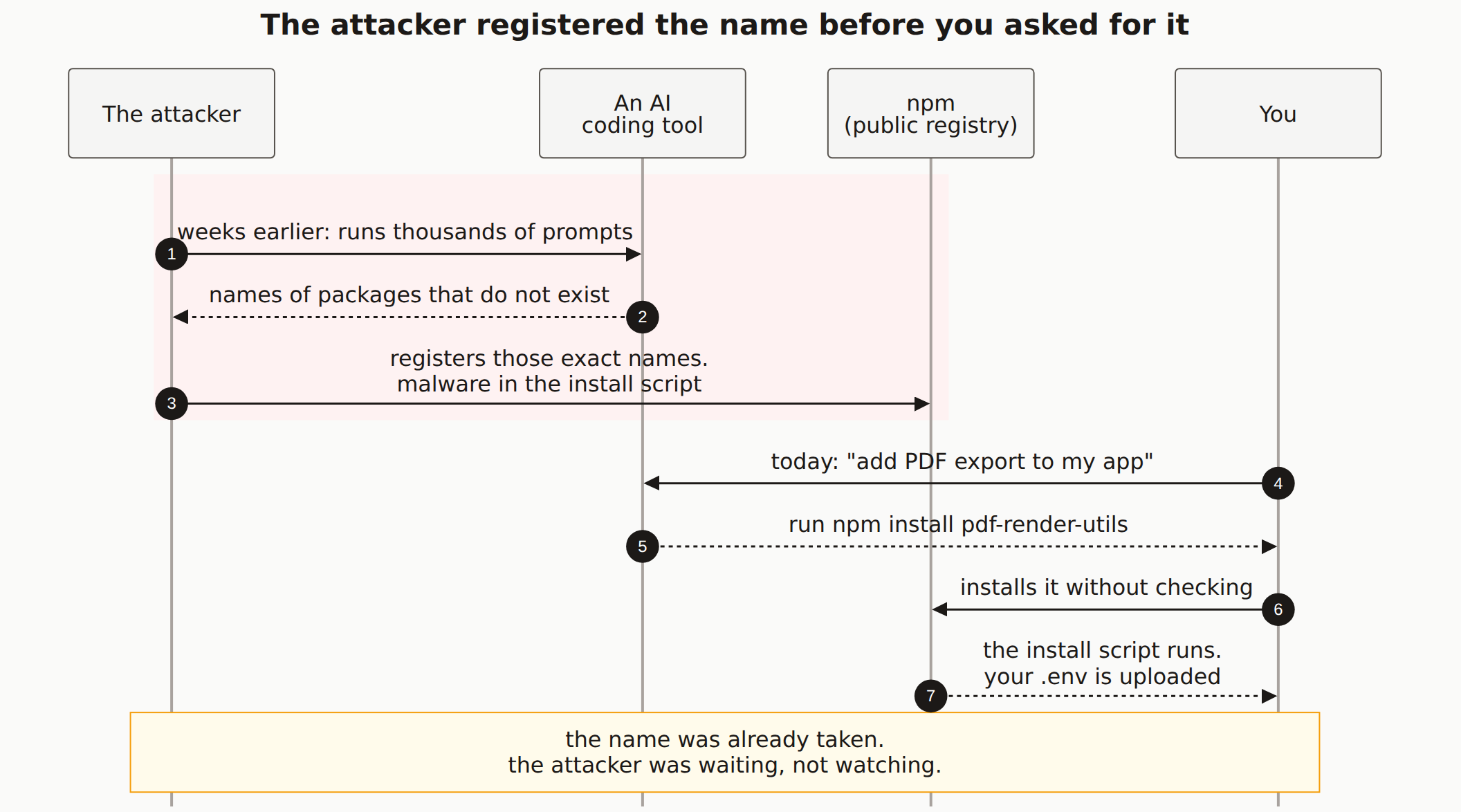
Reading the diagram
The red band at the top is everything that happened before you were involved. Read it first, because it is the half most people skip.
The attacker runs thousands of prompts through the same kind of AI coding tool you use. Not to get code. To collect the names it invents. Roughly one in five packages an AI recommends does not exist, and the ones it invents come back consistently across runs, so the harvest is repeatable rather than a one-off fishing trip.
Then they register those names. This is the step that costs nothing. An npm account is free, publishing is instant, and a package nobody has installed yet draws no attention. A preinstall or postinstall script goes in the package.json, and the whole thing goes quiet.
Now look at the gap below the band, where the attacker's lane is empty. That emptiness is the point. The attacker is not monitoring you, not targeting your company, not waiting for your deploy. They are not doing anything at all. The trap does not need them present to work.
The bottom half is your ordinary Tuesday. You ask for a feature. The tool answers confidently, with an install command, in the same tone it uses for react and express. You run it. The install script executes before you have imported anything or written a line of code against the library, and your .env file leaves the machine.
Message 6 is the only step you control. By the time you type npm install, every other actor in this diagram has already done its part. Nothing downstream of that arrow is a decision you get to make.
What this changes about the fix
Seeing it as a timeline rather than a chain reorders the advice.
Reacting after the fact does not work here, because there is no incident to react to. Nobody attacked you. There is no unusual login, no failed request in your logs, no alert. The malicious package installed exactly as successfully as a real one would have.
What does work, roughly in order:
- Look the package up before you install it. On npmjs.com, check first-publish date, weekly downloads, and whether the repository link goes anywhere real. A legitimate PDF library has years of history. A slopsquat was published last month with 40 downloads and no source repo. This is the check that lands on message 6, the one arrow you own.
- Turn install scripts off. npm 12 disables lifecycle scripts by default, which cuts the arrow between message 6 and message 7. On older npm,
npm install --ignore-scriptsdoes the same thing manually. Watch for the failure mode where a build breaks and the fix is to blanket-approve every pending script, which puts the hole straight back. - Do not paste install commands straight from a chat window. The confident tone is not evidence. The AI has no way to know whether the name it produced resolves to anything, and it will not tell you that it is guessing.
- Keep secrets out of
.envfiles on machines that run installs. If the install script finds nothing worth stealing, the last arrow is wasted.
The first two are the ones the diagram argues for, because both of them act before the payload runs rather than after.
The Mermaid source
Copy this and swap in whatever package name your own tool invented.
---
title: "The attacker registered the name before you asked for it"
---
sequenceDiagram
    autonumber
    participant A as The attacker
    participant M as An AI<br/>coding tool
    participant N as npm<br/>(public registry)
    participant Y as You

    rect rgb(254, 242, 242)
        A->>M: weeks earlier: runs thousands of prompts
        M-->>A: names of packages that do not exist
        A->>N: registers those exact names.<br/>malware in the install script
    end

    Y->>M: today: "add PDF export to my app"
    M-->>Y: run npm install pdf-render-utils
    Y->>N: installs it without checking
    N-->>Y: the install script runs.<br/>your .env is uploaded

    Note over A,Y: the name was already taken.<br/>the attacker was waiting, not watching.
Why does the attacker act before I do?
Because registering a name on npm is free, instant, and does not require anyone to install it. An attacker can claim thousands of hallucinated names in an afternoon and then do nothing. The names sit there costing nothing until someone follows an AI suggestion. There is no race to win, which is why the timing in the diagram runs the direction it does.
If the package name is made up, how does the attacker know which one to register?
AI hallucinations are not random. Research on 576,000 AI-generated code samples found that when a prompt produced a hallucinated package once, the same fake name came back in 43% of repeated runs. An attacker who runs the same prompts you would run sees the same names you will see.
Does the malware run before I import the package?
Yes, if the package uses an install script. On older npm versions, preinstall and postinstall scripts execute during npm install, before you write a single line that imports the package. Deleting the import afterwards does not undo it. npm 12 turns those scripts off by default, which helps, but only once you are actually on npm 12.
What is the one check that breaks this chain?
Look the package up on npmjs.com before you run the install. A real library that an AI has any business recommending has years of releases, a linked GitHub repository, and meaningful weekly download numbers. A slopsquat has a recent first-publish date, no repository link, and almost no downloads. That check takes about fifteen seconds and it happens at the only step in the diagram you control.
Not sure what your app installed?
A scan looks at what your deployed app actually exposes, including the secrets an install script would have been reaching for.