Ask ten founders who ship uploads to S3 to describe what happens when a user picks a file, and most will describe the file arriving at their backend, getting checked, then being forwarded to the bucket.
That is not what a presigned upload does. Getting the shape wrong is why the bucket policy in the blueprint looks paranoid: it is compensating for checks that never ran, because the machine everyone assumed was doing the checking was never in the path.
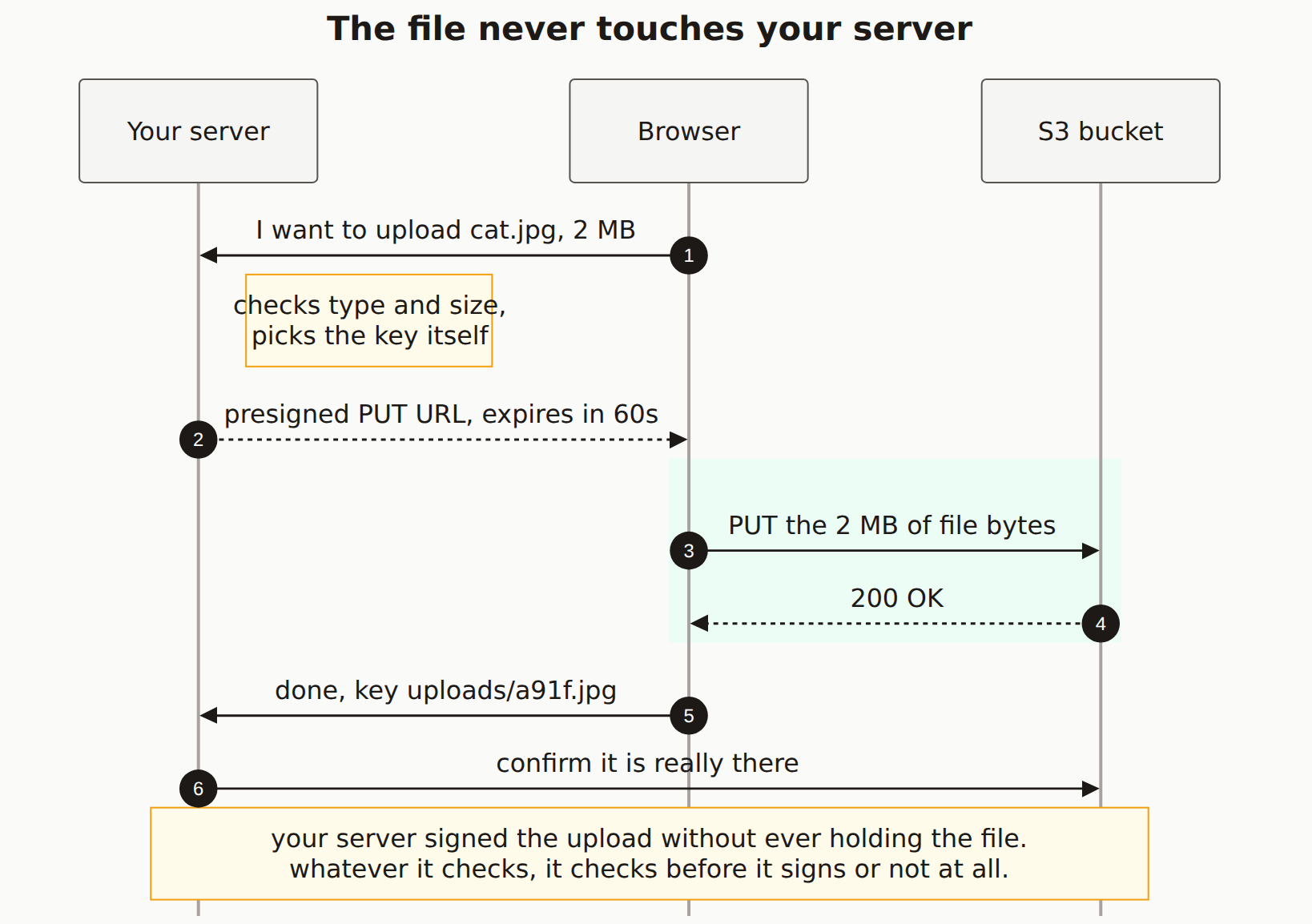
Reading the diagram
Your server is on the left, deliberately. In most drawings of this it sits in the middle, between the browser and the bucket, and that placement quietly tells the lie the diagram is trying to correct.
Step 1. The browser announces an intention, not a file. cat.jpg, 2 MB is a claim typed by the client. Nothing has been uploaded and nothing has been proven. A malicious client says cat.jpg, 2 MB and means something else entirely.
The note on your server's lane is the only moment your backend has any leverage. It decides whether this upload happens, what it is allowed to be, and where it lands. Everything you want enforced has to be encoded into the signature here, because after step 2 your server has no further say.
Step 2 hands over a presigned PUT URL. Read that URL for what it is: a bearer credential. It carries your AWS identity, it works for anyone who has it, and you cannot recall it. The sixty-second expiry is the whole of your revocation story.
Steps 3 and 4 are the green band, and notice what it does not touch. The file bytes travel from the browser to S3 on a connection your server is not part of. No proxying, no buffering, no memory pressure, and no opportunity to inspect. This is the good part of the pattern (a 2 GB video does not have to fit through your dyno) and it is also the part people forget when they reason about validation.
Steps 5 and 6 are the ones most implementations skip. The browser reporting success is another client claim. Confirming with S3 that an object of a plausible size actually exists at that key is the only server-side fact you get about the upload, and it is cheap: one HeadObject call.
A presigned URL with no content-length condition is an open invitation to fill your bucket. The signature authorises a PUT to a key; if you did not constrain the size, it authorises a PUT of any size. We see buckets billed into the hundreds of dollars this way, from an endpoint the founder believed had a 5 MB limit because the file picker in the UI enforced one.
What this changes about the checks
Once the path is clear, the checklist reorders itself.
The pre-signing checks are the ones with teeth, because they get baked into a signature S3 will enforce for you. Pin Content-Type. Set a content-length-range. Generate the key. Set the shortest expiry the upload can survive.
The post-upload checks are the ones that catch what the client lied about. Read the object's real size. Sniff its actual leading bytes rather than trusting its extension or the content type the browser declared. A file named .jpg, served with image/jpeg, containing HTML, is stored HTML, and if your bucket serves it back on your domain you have hosted someone's XSS.
What is left is the gap in the middle, and there is nothing you can do about it. Between signing and confirming, your server knows nothing. That window is why the bucket needs a policy that assumes the worst about whatever lands in it: block public access, serve through a CDN with an explicit content type, and never execute anything from the upload prefix.
The Mermaid source
Copy this and swap S3 for your own object store; the shape is identical on R2, GCS, and Supabase Storage.
---
title: "The file never touches your server"
---
sequenceDiagram
    autonumber
    participant A as Your server
    participant B as Browser
    participant S as S3 bucket

    B->>A: I want to upload cat.jpg, 2 MB
    Note right of A: checks type and size,<br/>picks the key itself
    A-->>B: presigned PUT URL, expires in 60s

    rect rgb(236, 253, 245)
        B->>S: PUT the 2 MB of file bytes
        S-->>B: 200 OK
    end

    B->>A: done, key uploads/a91f.jpg
    A->>S: confirm it is really there

    Note over A,S: your server signed the upload without ever holding the file.<br/>whatever it checks, it checks before it signs or not at all.
Does the file go through my server with a presigned URL?
No. That is the entire point of the pattern. Your server produces a signed URL and hands it back; the browser then opens its own connection to S3 and sends the bytes there. Your backend never allocates memory for the file, never writes it to disk, and never sees its contents. It only ever sees what the browser claimed about the file beforehand.
If my server never sees the file, how do I validate it?
You validate twice, and neither point is where people expect. Before signing, you check what the browser told you, which is a claim rather than a fact, so use it to set limits rather than to trust: cap the content length in the signature and pin the content type. After the upload, you verify the object that actually landed by reading its size and sniffing its real bytes from S3. Anything you skip in those two windows is never checked at all.
Why should my server pick the object key instead of the client?
Because a key the client chooses is a path the client controls. Accept a filename from the browser and someone will send ../../config.json, or simply reuse another user's key and overwrite their file. Generate the key yourself from a random identifier, store the original filename as metadata if you need to display it, and the whole class of problem disappears.
How long should a presigned URL live?
Long enough for the upload to finish and no longer. Sixty seconds covers a small image on a slow connection; a large video needs more. The expiry is your only revocation mechanism, because once a URL is signed you cannot un-sign it. Anyone holding a copy can use it until it expires, so treat a presigned URL as a bearer token with a stamped shelf life.
What stops someone uploading a 5 GB file to my bucket?
Only the content-length condition you put in the signature. A presigned PUT with no size condition will accept whatever the client sends, and you pay for the storage. Sign a policy with an explicit content-length-range and S3 rejects anything outside it before the bytes are stored.
Is your upload bucket as closed as you think?
A scan checks your deployed app from outside for publicly listable buckets, uploads served without a pinned content type, and endpoints that hand out signed URLs to anyone who asks.