To secure S3 uploads, you need to: (1) use presigned URLs for direct client uploads instead of exposing AWS credentials, (2) validate file types and sizes server-side before generating upload URLs, (3) generate unique object keys server-side to prevent path traversal and overwrites, (4) configure bucket policies to block public access unless explicitly needed, and (5) set short expiry times on presigned URLs. This blueprint prevents credential exposure and upload abuse.
TL;DR
Never expose AWS credentials to the client. Use presigned URLs for direct uploads, validate file types by content (not extension), generate unique keys to prevent overwrites, and configure bucket policies to block public access unless explicitly needed.
Presigned URL Generation AWS S3
Before the code, be clear about what the code does. The file does not pass through the server that signs the URL.
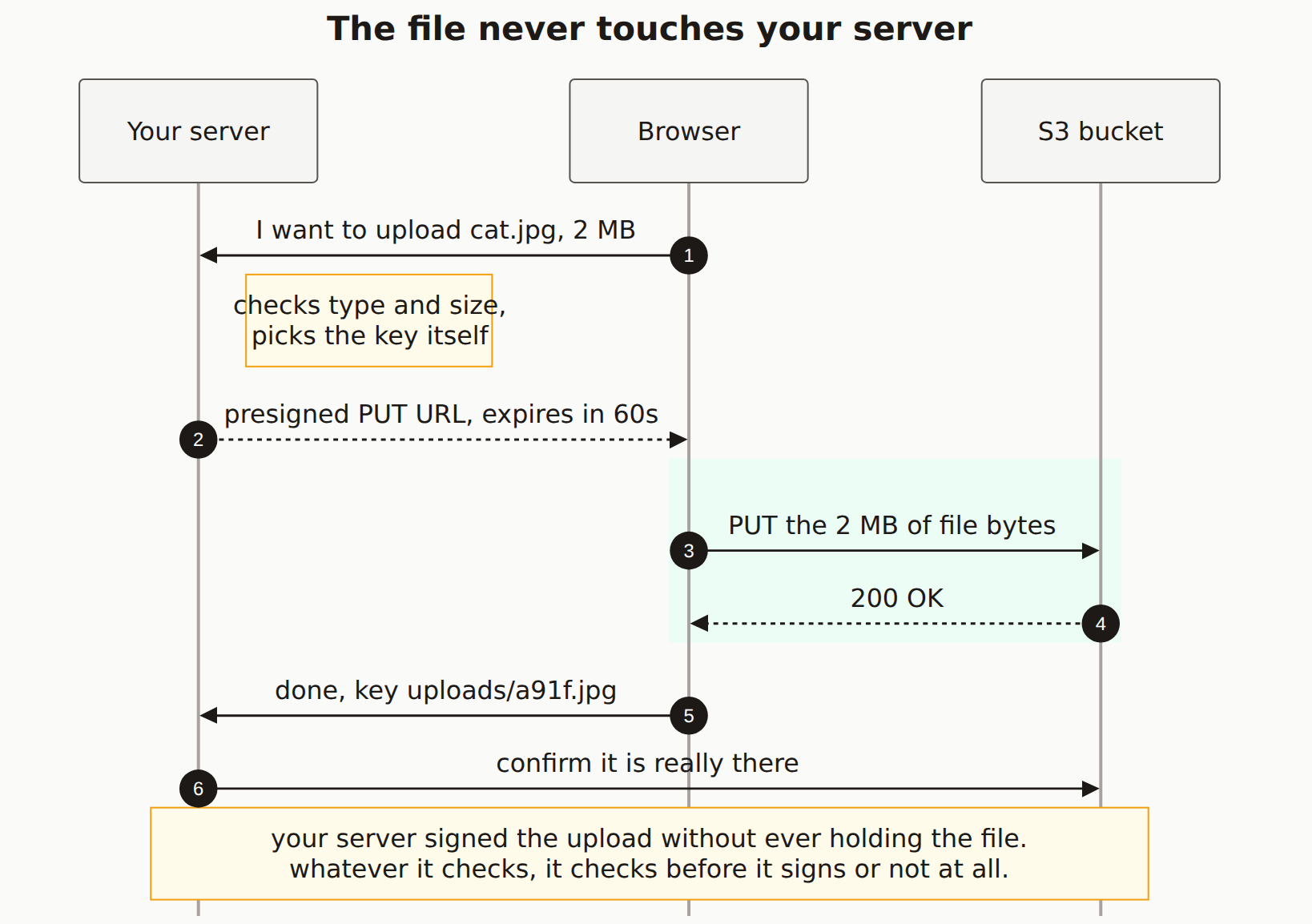
import { S3Client, PutObjectCommand } from '@aws-sdk/client-s3'
import { getSignedUrl } from '@aws-sdk/s3-request-presigner'
import { auth } from '@/lib/auth'
import { nanoid } from 'nanoid'

const s3 = new S3Client({ region: process.env.AWS_REGION })

const ALLOWED_TYPES = ['image/jpeg', 'image/png', 'image/webp']
const MAX_SIZE = 5 * 1024 * 1024  // 5MB

export async function POST(req: Request) {
  const session = await auth()
  if (!session?.user) {
    return Response.json({ error: 'Unauthorized' }, { status: 401 })
  }

  const { contentType, size } = await req.json()

  // Validate content type
  if (!ALLOWED_TYPES.includes(contentType)) {
    return Response.json({ error: 'Invalid file type' }, { status: 400 })
  }

  // Validate size
  if (size > MAX_SIZE) {
    return Response.json({ error: 'File too large' }, { status: 400 })
  }

  // Generate unique key (prevents overwrites and path traversal)
  const key = `uploads/${session.user.id}/${nanoid()}`

  const command = new PutObjectCommand({
    Bucket: process.env.S3_BUCKET!,
    Key: key,
    ContentType: contentType,
    ContentLength: size,
  })

  const uploadUrl = await getSignedUrl(s3, command, { expiresIn: 300 })

  return Response.json({ uploadUrl, key })
}
Client-Side Upload
async function uploadFile(file: File) {
  // Get presigned URL from your API
  const res = await fetch('/api/upload', {
    method: 'POST',
    headers: { 'Content-Type': 'application/json' },
    body: JSON.stringify({
      contentType: file.type,
      size: file.size,
    }),
  })

  if (!res.ok) {
    throw new Error('Failed to get upload URL')
  }

  const { uploadUrl, key } = await res.json()

  // Upload directly to S3
  const uploadRes = await fetch(uploadUrl, {
    method: 'PUT',
    headers: { 'Content-Type': file.type },
    body: file,
  })

  if (!uploadRes.ok) {
    throw new Error('Upload failed')
  }

  return key
}
Bucket Policy AWS S3
{
  "Version": "2012-10-17",
  "Statement": [
    {
      "Sid": "DenyPublicAccess",
      "Effect": "Deny",
      "Principal": "*",
      "Action": "s3:GetObject",
      "Resource": "arn:aws:s3:::your-bucket/*",
      "Condition": {
        "StringNotEquals": {
          "aws:PrincipalAccount": "your-account-id"
        }
      }
    }
  ]
}

// For public read access (if needed):
// Use CloudFront with signed URLs instead of making bucket public
Never trust client-provided filenames. Generate unique keys server-side to prevent path traversal attacks and accidental overwrites.
Security Checklist
Pre-Launch Checklist
AWS credentials never exposed to client
File types validated server-side
File size limited
Unique keys generated server-side
Bucket public access blocked
Presigned URLs have short expiry
Related Integration Stacks
Cloudflare R2 Alternative Supabase Storage Integration Firebase Storage Patterns
Check Your Upload Security
Scan for file upload vulnerabilities.