Every founder hits this in the same order. Your frontend calls your API, the browser console says the request was blocked by CORS policy, you paste an Access-Control-Allow-Origin header into your server, and it works. The lesson that sticks is "CORS is a thing that blocks requests, and headers unblock it."
Both halves of that are wrong, and the second half is the one that gets an API left open.
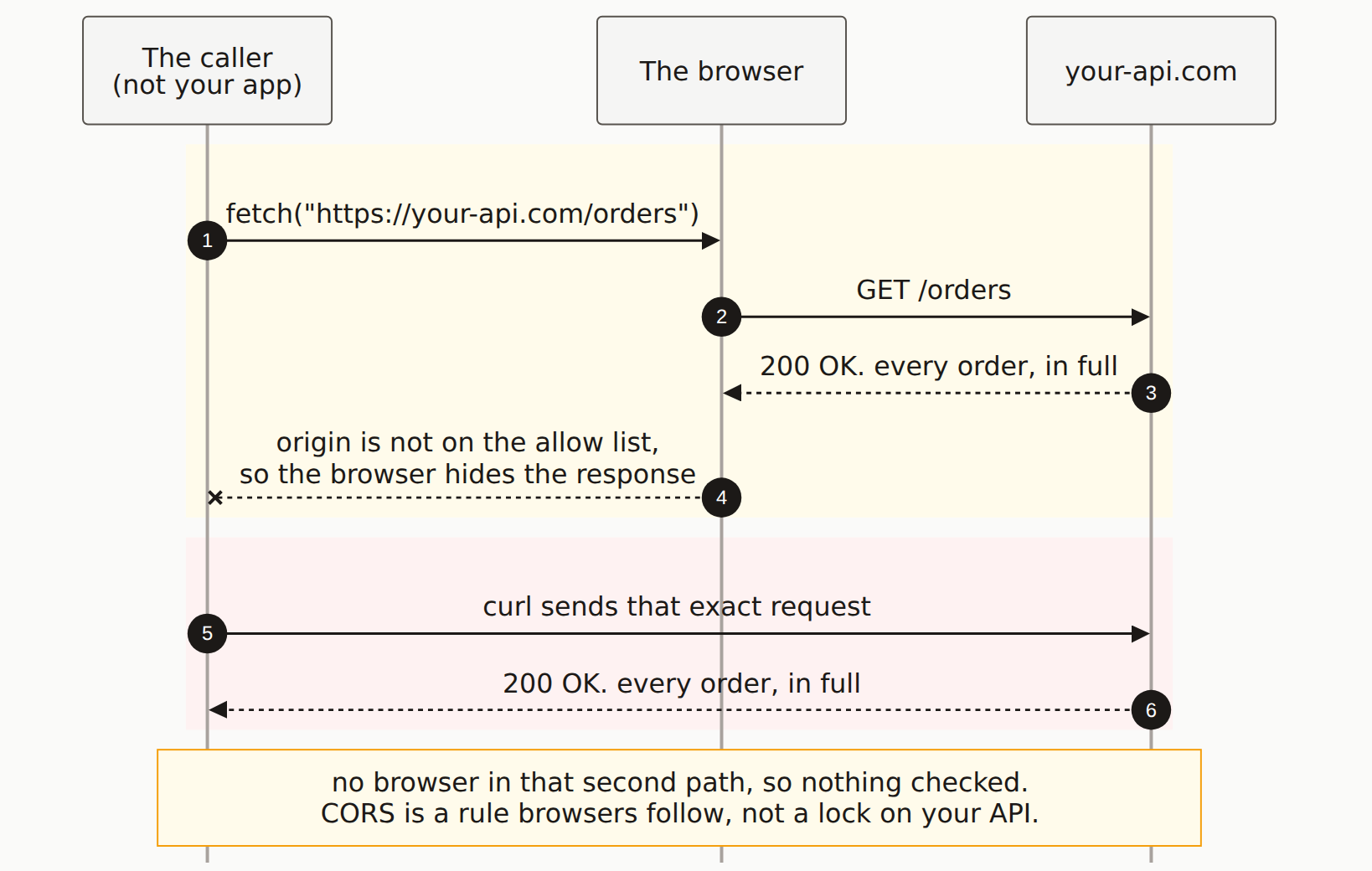
Reading the diagram
Three lanes: whoever is calling, the browser, and your API. The order of the arrows is the entire argument.
Steps 1 to 3, the amber band. A page on some other origin calls fetch(). The browser forwards it. Your server receives GET /orders, runs the handler, queries the database, and returns every order in full. Notice how far down the page that happens. Your server has already done the work and already put the data on the wire.
Step 4 is the only place a check occurs. The browser looks at the response headers, sees that this origin is not on the allow list, and refuses to hand the body to the JavaScript that asked for it. The x on that arrow is the block everyone talks about. It happens in the browser, after the fact, to your own frontend.
That is worth sitting with. The thing CORS blocked was not the attack. It was step 4 of a sequence where steps 1 through 3 all succeeded.
Steps 5 and 6, the red band. Same caller, same URL, same server. This time the request goes through curl. Look at where the arrow travels: straight past the browser lane without stopping. Nothing in that path has any opinion about Access-Control-Allow-Origin, because the header is an instruction to a browser and there is no browser here. Your server answers exactly as it did before, and the data arrives.
Both responses contained the same data. The difference is not what your server was willing to send. It is whether the thing receiving it agreed to throw it away.
What this changes about the fix
Once the sequence is visible, two common moves get re-ranked.
Setting a wildcard is not "opening a hole", and setting a strict origin is not "closing" one. Access-Control-Allow-Origin: * on an endpoint that returns public data costs you nothing. A strict allow list on an endpoint that returns user data with no authentication protects you from nobody, because the attacker was never going to use a browser. In both cases the header is configuring your own frontend's access, not a stranger's.
The header is a signal, not the finding. When our scanner reports a permissive CORS policy, the useful question is never "is the header too loose." It's what that endpoint returns to a request with no credentials at all. A wildcard sitting on /api/users is worth investigating precisely because it suggests nobody thought about who reaches that route. Run the check yourself:
# no cookies, no Origin header, no browser. exactly what a stranger gets.
curl -s https://your-api.com/api/orders | head -40
If that returns rows, your CORS configuration is not what was protecting them. Nothing was.
So the order of work is: authenticate and authorize the endpoint first, then set CORS to the narrowest origin list your frontend actually needs. The first step is the security. The second is making your own app work.
One genuine exception is worth knowing. A preflight does run before the real request, for anything beyond a simple GET or form post, so a DELETE from a disallowed origin gets stopped by the browser before your handler runs. That protects your user from a page they visited. It still does nothing about curl.
The Mermaid source
Copy this and swap in your own endpoint.
---
title: "The browser enforces CORS, not your server"
---
sequenceDiagram
    autonumber
    participant P as The caller<br/>(not your app)
    participant B as The browser
    participant Y as your-api.com

    rect rgb(255, 251, 235)
        P->>B: fetch("https://your-api.com/orders")
        B->>Y: GET /orders
        Y-->>B: 200 OK. every order, in full
        B--xP: origin is not on the allow list,<br/>so the browser hides the response
    end

    rect rgb(254, 242, 242)
        P->>Y: curl sends that exact request
        Y-->>P: 200 OK. every order, in full
    end

    Note over P,Y: no browser in that second path, so nothing checked.<br/>CORS is a rule browsers follow, not a lock on your API.
Does CORS protect my API?
No. CORS is a rule browsers follow about which responses they will hand to JavaScript. Your server sends the response either way. Anything that is not a browser, curl, Postman, a Python script, a scraper, ignores the headers entirely and reads the body. If your API needs protection, that comes from authentication and authorization on the server, not from an Access-Control-Allow-Origin header.
If CORS is not security, why does it exist?
It protects your users, not your server. Without it, any site your logged-in user visits could run JavaScript that reads their bank balance using their session cookie. CORS is the rule that stops one origin from reading another origin's responses inside the user's browser. It is a control on the browser's behaviour, which is why it does nothing about a request that never involves a browser.
Why did my request go through even though CORS blocked it?
Because the block happens after the response arrives. For a simple request there is no preflight, so the browser sends it, your server runs the handler, writes to the database if that is what the handler does, and returns a response. Only then does the browser check the headers and refuse to give the body to your JavaScript. The side effects already happened.
Is Access-Control-Allow-Origin star dangerous?
It is a signal worth checking rather than a vulnerability on its own. A wildcard on a genuinely public, unauthenticated endpoint is fine. The real problem is a wildcard, or a reflected origin, on an endpoint that returns user data, because it means the only thing standing between a stranger and that data is whatever authentication the endpoint has. Browsers also refuse to combine a wildcard with credentialed requests, which is why reflecting the incoming Origin header is the more dangerous pattern.
How do I test what my API returns to a non-browser?
Run curl against the endpoint with no cookies and no session. If JSON comes back, that is exactly what any stranger gets. This is the single fastest way to find out whether an endpoint you believed was protected by CORS is actually protected by nothing.
What does your API return to a stranger?
A scan calls your endpoints from outside with no session and reports the ones that answer anyway.