Stop seeing "blocked by CORS policy" without compromising security
TL;DR
TL;DR
Never use Access-Control-Allow-Origin: * with credentials. Whitelist specific domains. Handle preflight OPTIONS requests. For same-origin apps (frontend and API on same domain), you might not need CORS at all.
What is CORS?
Cross-Origin Resource Sharing (CORS) is a browser security feature. It blocks requests from one domain to another unless the server explicitly allows it. Frontend on app.example.com, API on api.example.com? You need CORS.
The word doing the work in that paragraph is browser. Here is the same request twice, once through a browser and once not:
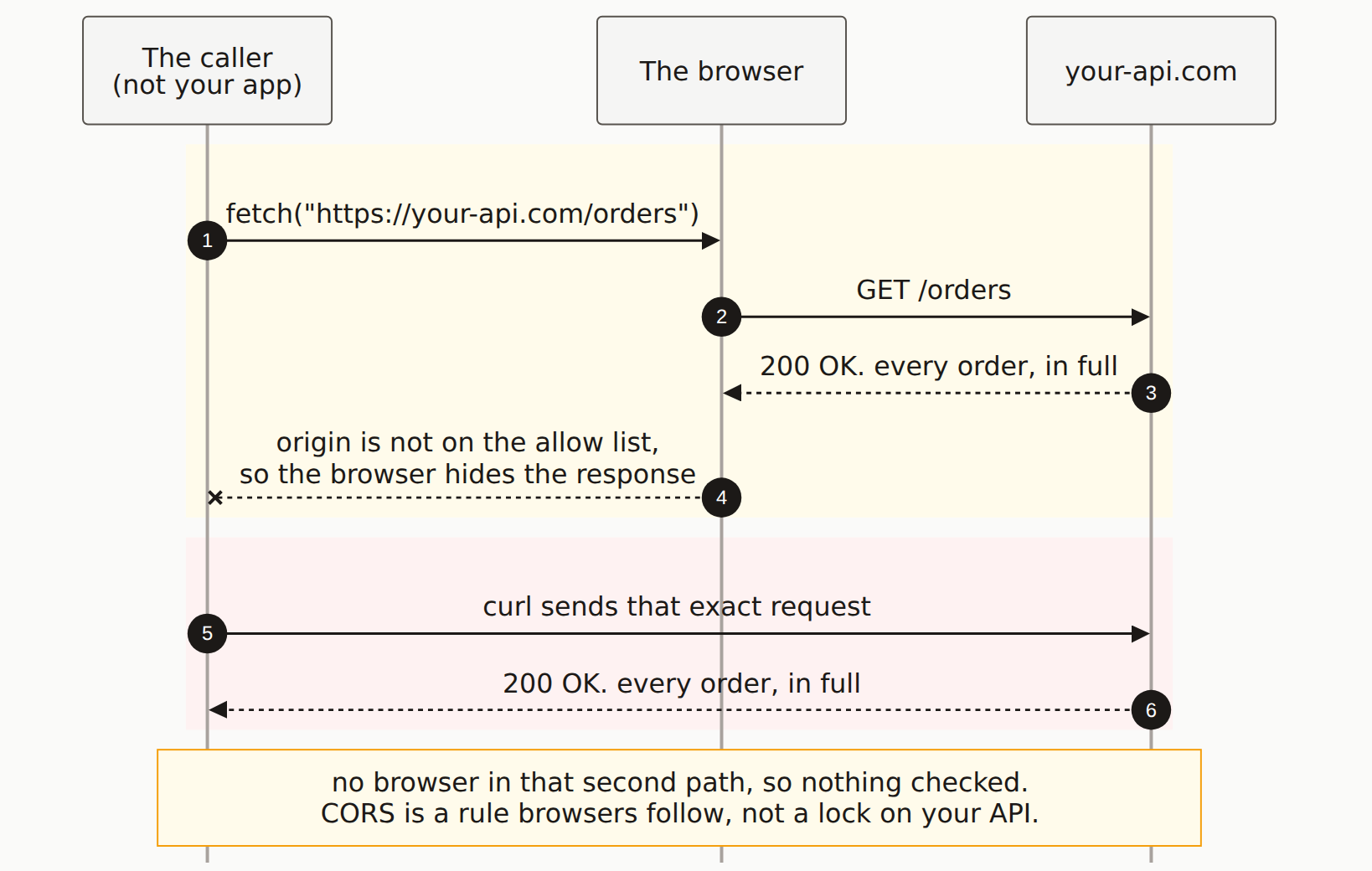
The Most Common Mistake
Never Do This in Production
// DANGEROUS: Allows any website to call your API
res.setHeader('Access-Control-Allow-Origin', '*');
res.setHeader('Access-Control-Allow-Credentials', 'true'); // This won't even work!
Using * with credentials isn't just insecure. It's invalid. Browsers reject the combination outright.
Next.js App Router
Option 1: Route Handler Headers
// app/api/data/route.ts
const ALLOWED_ORIGINS = [
  'https://myapp.com',
  'https://www.myapp.com',
  process.env.NODE_ENV === 'development' ? 'http://localhost:3000' : '',
].filter(Boolean);

function getCorsHeaders(origin: string | null) {
  const headers: Record<string, string> = {
    'Access-Control-Allow-Methods': 'GET, POST, PUT, DELETE, OPTIONS',
    'Access-Control-Allow-Headers': 'Content-Type, Authorization',
  };

  if (origin && ALLOWED_ORIGINS.includes(origin)) {
    headers['Access-Control-Allow-Origin'] = origin;
    headers['Access-Control-Allow-Credentials'] = 'true';
  }

  return headers;
}

export async function OPTIONS(request: Request) {
  const origin = request.headers.get('origin');
  return new Response(null, {
    status: 204,
    headers: getCorsHeaders(origin),
  });
}

export async function GET(request: Request) {
  const origin = request.headers.get('origin');

  // Your logic here
  const data = { message: 'Hello' };

  return Response.json(data, {
    headers: getCorsHeaders(origin),
  });
}
Option 2: Next.js Middleware
// middleware.ts
import { NextRequest, NextResponse } from 'next/server';

const ALLOWED_ORIGINS = [
  'https://myapp.com',
  'https://www.myapp.com',
];

export function middleware(request: NextRequest) {
  const origin = request.headers.get('origin');
  const isAllowedOrigin = origin && ALLOWED_ORIGINS.includes(origin);

  // Handle preflight
  if (request.method === 'OPTIONS') {
    return new NextResponse(null, {
      status: 204,
      headers: {
        'Access-Control-Allow-Origin': isAllowedOrigin ? origin : '',
        'Access-Control-Allow-Methods': 'GET, POST, PUT, DELETE, OPTIONS',
        'Access-Control-Allow-Headers': 'Content-Type, Authorization',
        'Access-Control-Max-Age': '86400',
      },
    });
  }

  const response = NextResponse.next();

  if (isAllowedOrigin) {
    response.headers.set('Access-Control-Allow-Origin', origin);
    response.headers.set('Access-Control-Allow-Credentials', 'true');
  }

  return response;
}

export const config = {
  matcher: '/api/:path*',
};
Express.js
Secure Express CORS Setup
import cors from 'cors';
import express from 'express';

const app = express();

const corsOptions = {
  origin: (origin, callback) => {
    const allowedOrigins = [
      'https://myapp.com',
      'https://www.myapp.com',
    ];

    // Allow requests with no origin (mobile apps, curl, etc.)
    if (!origin) return callback(null, true);

    if (allowedOrigins.includes(origin)) {
      callback(null, true);
    } else {
      callback(new Error('Not allowed by CORS'));
    }
  },
  credentials: true,
  methods: ['GET', 'POST', 'PUT', 'DELETE', 'OPTIONS'],
  allowedHeaders: ['Content-Type', 'Authorization'],
};

app.use(cors(corsOptions));
Vercel Serverless Functions
// api/data.ts
import type { VercelRequest, VercelResponse } from '@vercel/node';

const ALLOWED_ORIGINS = ['https://myapp.com'];

export default function handler(req: VercelRequest, res: VercelResponse) {
  const origin = req.headers.origin as string;

  if (ALLOWED_ORIGINS.includes(origin)) {
    res.setHeader('Access-Control-Allow-Origin', origin);
    res.setHeader('Access-Control-Allow-Credentials', 'true');
  }

  res.setHeader('Access-Control-Allow-Methods', 'GET, POST, OPTIONS');
  res.setHeader('Access-Control-Allow-Headers', 'Content-Type, Authorization');

  // Handle preflight
  if (req.method === 'OPTIONS') {
    return res.status(204).end();
  }

  // Your logic
  return res.json({ message: 'Hello' });
}
Understanding Preflight Requests
Browsers send an OPTIONS request before certain requests. A preflight check. It happens when:
- Using methods other than GET, HEAD, or POST
- Sending custom headers (like Authorization)
- Using Content-Type other than form data or text/plain
You must handle OPTIONS requests or your API calls will fail:
// Handle preflight in any framework
if (request.method === 'OPTIONS') {
  return new Response(null, {
    status: 204, // No Content
    headers: corsHeaders,
  });
}
When You Don't Need CORS
If your frontend and backend are on the same domain, you don't need CORS:
- Same origin: Frontend at myapp.com, API at myapp.com/api
- Next.js API routes: Automatically same origin
- Server-side requests: CORS only applies to browsers
Debugging CORS Issues
Check the Error Message
// Browser console errors and what they mean:

// "No 'Access-Control-Allow-Origin' header"
// -> Your server isn't returning the CORS headers at all

// "The value of the 'Access-Control-Allow-Origin' header...must not be '*' when credentials mode is 'include'"
// -> You're using credentials with wildcard origin

// "Method PUT is not allowed"
// -> Add PUT to Access-Control-Allow-Methods

// "Request header field authorization is not allowed"
// -> Add Authorization to Access-Control-Allow-Headers
Test with curl
# Check what headers your server returns
curl -X OPTIONS https://api.myapp.com/data \
  -H "Origin: https://myapp.com" \
  -H "Access-Control-Request-Method: POST" \
  -v 2>&1 | grep -i "access-control"
Security Best Practices
- Whitelist origins: Never use wildcards in production
- Validate origin server-side: Don't just echo back the Origin header
- Be specific with methods: Only allow methods you actually use
- Be specific with headers: Only allow headers you expect
- Consider same-origin: Use reverse proxy to avoid CORS entirely
- Use environment variables: Different allowed origins for dev/prod
// Environment-based origin list
const ALLOWED_ORIGINS = process.env.NODE_ENV === 'production'
  ? ['https://myapp.com']
  : ['http://localhost:3000', 'http://localhost:3001'];