There are two different questions on the way to your data, and most apps only ask the first one.
"Are you logged in?" is a question about the person. "Does this row belong to you?" is a question about the row. Passing the first tells your server nothing at all about the second, which is how a logged-in customer ends up reading another customer's invoice by changing a number in the URL.
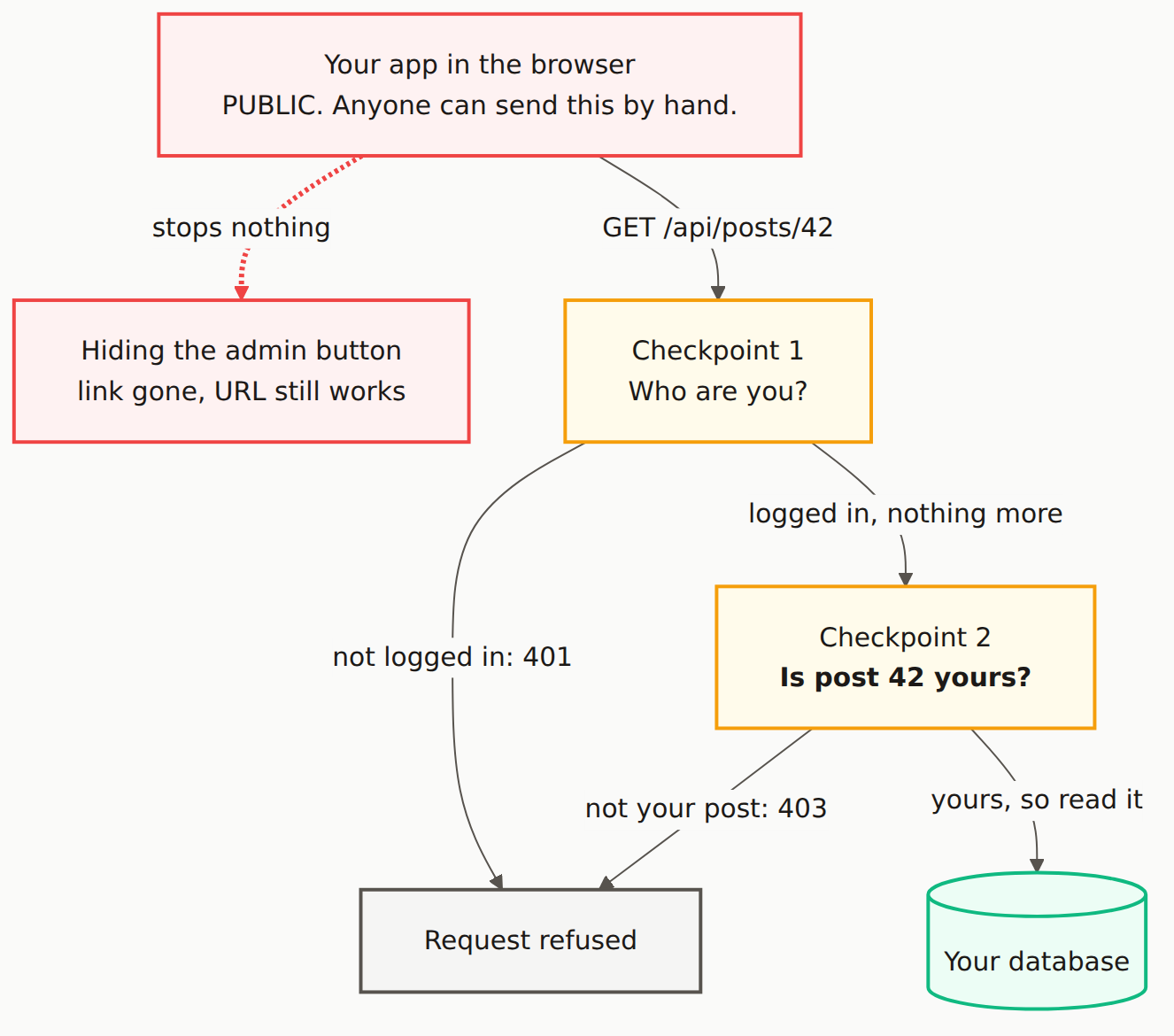
Reading the diagram
Start at the top, in red. Everything red is public: your app in the browser is code you shipped to strangers, and a request does not have to come from it. Anyone can type the URL, or send it from a terminal, with no page loaded at all.
Follow the dashed line to the left first, because that is the branch most people believe in. Hiding the admin button changes what the interface shows. It stops nothing. The route is still there and still answers.
Now the real path. Checkpoint 1 asks who you are. It is usually middleware, it usually works, and it returns 401 when nobody is logged in. Notice its outgoing label: "logged in, nothing more." That is the entire result of that check. It proves an identity, and identity is not permission.
Checkpoint 2 is the one that is missing in most of the code we scan. It has post 42 in hand, it compares the owner of that row against the caller, and it returns 403 when they differ. Only after that does anything reach the database, in green.
The two checkpoints are drawn separately because they fail separately. An app can pass the first perfectly and never perform the second, and from the outside it looks fine, because every test you wrote was signed in as you.
The tell: your app only ever returns 401. If no code path in your app can produce a 403, you almost certainly have Checkpoint 1 and not Checkpoint 2. Search your codebase for 403 and see what comes back.
The five-minute check
Log in as a real user, open something that belongs to you, and take the ID out of the URL. Then make a second account and request that same ID.
If the second account gets the data, Checkpoint 2 is not there. This is the whole of IDOR, and it takes two browser profiles to find.
Where the second check goes
Not in middleware. Middleware runs before the record is loaded, so it cannot compare an owner it has never seen. Put it in one of two places:
- In the handler, immediately after loading the record and before returning it. This is the pattern protecting routes walks through.
- In the database, as a row-level security policy. Slower to write, harder to forget, and it keeps holding when someone adds an endpoint next month and does not think about permissions.
The database version is stronger for one specific reason: it is the only one that survives a new route being added by someone who was not thinking about this diagram.
The Mermaid source
Copy this and adapt it to your own endpoints.
---
title: "Signed in is not the same as allowed"
---
flowchart TB
    B["Your app in the browser<br/>PUBLIC. Anyone can send this by hand."]
    G["Hiding the admin button<br/>link gone, URL still works"]
    A["Checkpoint 1<br/>Who are you?"]
    Z["Checkpoint 2<br/><b>Is post 42 yours?</b>"]
    X["Request refused"]
    D[("Your database")]

    B -. "stops nothing" .-> G
    B -->|"GET /api/posts/42"| A
    A -->|"not logged in: 401"| X
    A -->|"logged in, nothing more"| Z
    Z -->|"not your post: 403"| X
    Z -->|"yours, so read it"| D

    classDef public fill:#fef2f2,stroke:#ef4444,stroke-width:2px,color:#1c1917
    classDef gate fill:#fffbeb,stroke:#f59e0b,stroke-width:2px,color:#1c1917
    classDef private fill:#ecfdf5,stroke:#10b981,stroke-width:2px,color:#1c1917
    classDef store fill:#f5f5f4,stroke:#57534e,stroke-width:2px,color:#1c1917

    class B,G public
    class A,Z gate
    class D private
    class X store

    linkStyle 0 stroke:#ef4444,stroke-width:3px
Isn't hiding the admin button enough if users can't see the link?
No. The button lives in your app in the browser, which anyone can open, read and modify. Removing a link removes the link, not the route. The URL still resolves, and anyone can send that request directly with curl or the browser address bar. A guard that runs in the browser is a user-experience feature, not a security control.
What is the difference between 401 and 403?
401 means the server does not know who you are, so Checkpoint 1 stopped you. 403 means the server knows exactly who you are and you still may not have this, so Checkpoint 2 stopped you. If your app can only ever return 401, that is a strong hint that Checkpoint 2 was never written.
I already have login middleware. Isn't that enough?
Middleware normally answers only the first question: is someone logged in. That is authentication. It does not know that post 42 belongs to a different account, because it never looks at post 42. Every logged-in user passing a route-level check is exactly the setup that produces IDOR bugs.
Where should the ownership check live?
Next to the data, in the handler that loads the record, or in the database itself through row-level security. The check needs the record in hand to compare its owner against the caller, and route middleware runs before anything is loaded. Putting it in the database means it holds even when someone adds a new endpoint and forgets.
Does your app have the second checkpoint?
A scan probes your routes from outside, signed in as nobody, and reports what answers.