Both of your current Supabase keys start with eyJhbGci. The public one and the all-powerful admin one look identical at a glance, which is exactly why the admin key keeps ending up in frontend bundles without anyone noticing.
That changes with the new key format. Supabase is replacing the legacy anon and service_role JWTs with sb_publishable_... and sb_secret_.... Those prefixes are the practical win nobody talks about: sb_secret_ in a deployed JavaScript file, a git diff, or a pull request is instantly, obviously wrong. eyJhbGci is not.
TL;DR
Supabase is deprecating the legacy anon and service_role JWT keys by the end of 2026. anon becomes sb_publishable_ (one per project, safe in your frontend) and service_role becomes sb_secret_ (several allowed, each individually revocable, server-side only). Both old and new keys work at the same time during migration, and legacy keys stay valid until you disable them yourself. Removal is expected late 2026 but the date is officially TBC. Before you migrate, search your deployed bundle for the admin key, because that's the failure this migration actually exposes.
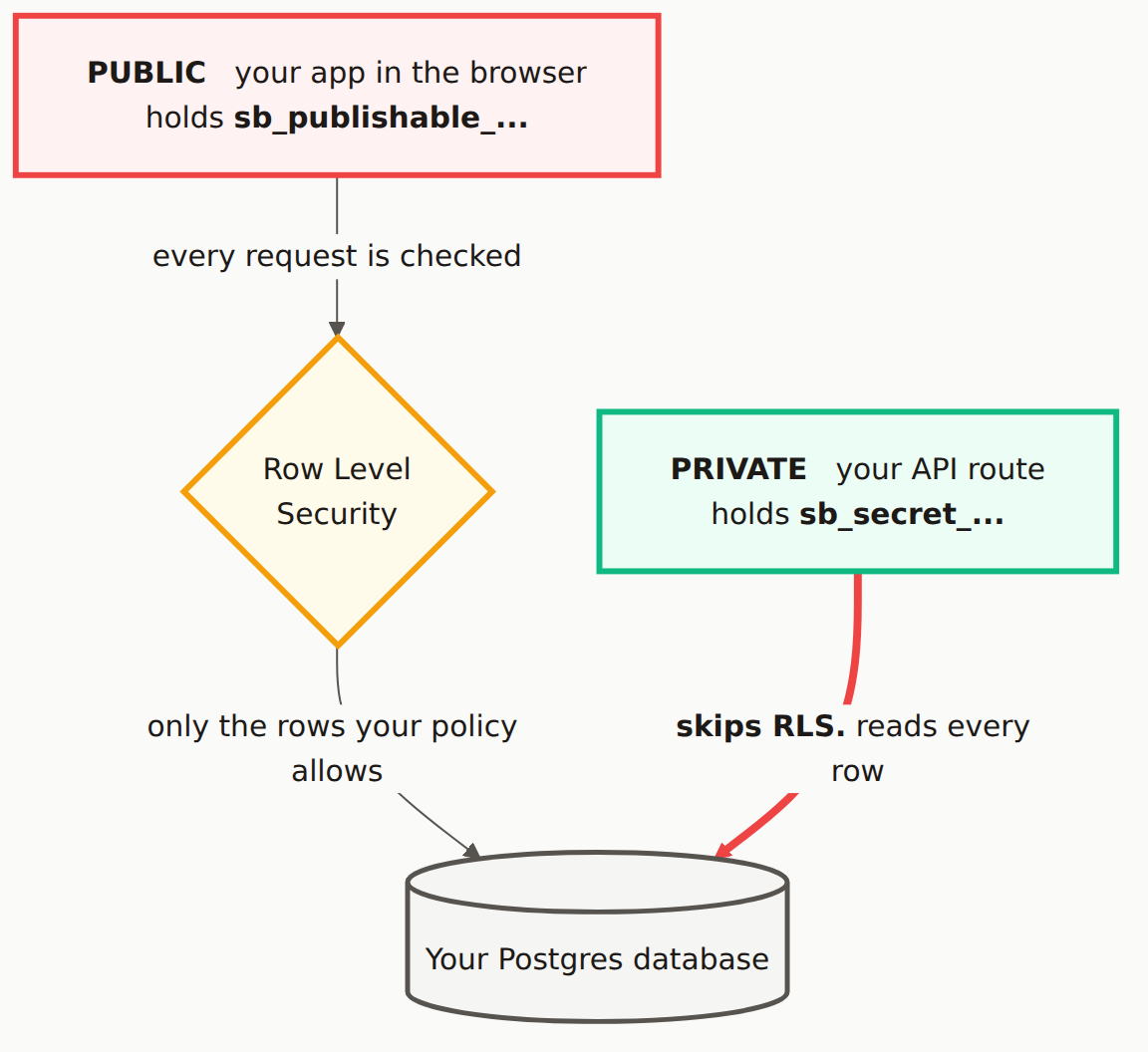
What Is Actually Changing
Two keys become two key types, with different naming and different revocation behavior.
| Legacy key | New key | Where it belongs | What it can do |
|---|---|---|---|
anon (JWT, eyJhbGci...) | sb_publishable_... | Browser, mobile app, anywhere public | Only what your RLS policies allow. One per project. |
service_role (JWT, eyJhbGci...) | sb_secret_... | Server routes, Edge Functions, CI, cron jobs | Bypasses every RLS policy. Full read and write on every table. |
The permissions model didn't change. A publishable key is still governed by Row Level Security, and a secret key still ignores RLS completely. What changed is the format, the count, and how you revoke them.
Which Supabase key bypasses RLS?
Two of the four: service_role and sb_secret_. Supabase's API keys doc says it in one line, "A secret key bypasses every Row Level Security policy you have." anon and sb_publishable_ bypass nothing. If a key that bypasses RLS is reachable from a browser, your policies don't matter, however carefully they were written.
There's one new guardrail. Send a secret key from a browser and Supabase matches on the User-Agent header and returns 401 Unauthorized. Don't read that as a safety net: the same doc warns that a leaked key still works from curl, a script, or any other tool. The block catches the accident, not the attacker.
Where the rollout stands
Per Supabase's tracking discussion, the new keys went into preview in June 2025 and launched fully in July 2025. From November 2025, new projects don't get anon or service_role at all, and projects restored after 1 November 2025 don't get them back. If your project is older than that, you still have both sets.
Timeline, stated precisely because the details matter: Supabase's tracking discussion (discussions/29260) says legacy keys will be deleted and removed from the Docs and Dashboard in late 2026, TBC. The API keys doc says Supabase is "deprecating the anon and service_role keys by the end of 2026". No specific day has been announced. Once the legacy keys are deleted, anything still sending an eyJhbGci key stops getting answers, so the deadline is real even without a date on it.
Why This Is a Security Upgrade, Not Busywork
Two things get genuinely better, and both matter more for AI-built apps than for hand-written ones.
Secret keys are individually revocable. The legacy service_role key is one key for the entire project. If it leaks, Supabase's rotation guide has you deactivate the legacy keys (which takes anon down with it) and revoke the legacy JWT secret. Every single thing that uses either key dies at the same instant: your webhook handler, your cron job, your admin dashboard, the seed script on your laptop, the CI pipeline you set up six months ago and forgot. That fear is why people sit on a known-leaked service_role key for days instead of rotating it. With sb_secret_ keys you create one per consumer, so deleting the leaked one takes down exactly one thing while everything else keeps running.
The prefix is greppable. This one sounds cosmetic. It isn't. A legacy Supabase key in a bundle is a long base64 blob that looks like every other JWT in the file, including the perfectly harmless anon key and any session token. You can't eyeball it. You have to decode the payload and read the role field to know whether you're looking at a public key or a god key.
sb_secret_ is a literal string. It shows up in Ctrl+F in devtools, in grep, in a code review diff, in a secret scanner's ruleset, and in your own memory when you're skimming a file at 1am. The word service_role never appears in a legacy key as plain text; it's base64-encoded inside the payload, so a scanner that pattern-matches the raw string misses it. You have to decode first. With the new format, that step disappears.
Check Whether Your Secret Key Is in Your Frontend
Do this before you migrate, not after. If the legacy service_role key is already in your deployed bundle, migrating without noticing just means you now have a new admin key sitting in the same place.
Search your live bundle.
Open your deployed app, press F12, go to the Sources or Network tab, and search across all files for service_role. Then search for eyJhbGci. Both should turn up either nothing or only your anon key.
If you find a JWT and want to know which one it is, paste the middle segment into the console:
JSON.parse(atob('MIDDLE_SEGMENT_OF_THE_KEY'))
A "role": "anon" result is fine. A "role": "service_role" result means your admin key is public right now, and you should stop reading about migration and go fix that first.
Check for the wrong prefix on the right variable.
This is the single most common way it happens in Lovable, Bolt, and v0 projects. Anything prefixed NEXT_PUBLIC_ or VITE_ gets compiled into the browser bundle by design. If an admin key got assigned to one of those, the bundler did exactly what it was told.
# Any hit here is a problem
grep -rn "NEXT_PUBLIC_SUPABASE_SERVICE_ROLE\|VITE_SUPABASE_SERVICE_ROLE" .
grep -rn "NEXT_PUBLIC_SUPABASE_SECRET\|VITE_SUPABASE_SECRET" .

# After migrating, the new prefix makes this trivial
grep -rn "sb_secret_" src/ app/ components/ pages/
Search your git history, not just your working tree.
Deleting a key from a file doesn't remove it from history. git log -S searches every commit for content containing a string:
# Did this key value ever exist in any commit?
git log -S 'eyJhbGciOiJIUzI1NiI' --oneline --all

# Same check for the new format, going forward
git log -S 'sb_secret_' --oneline --all

# And the usual suspects
git log --all --full-history -- .env .env.local .env.production
If any of these return commits, treat the key as compromised regardless of what your current code looks like.
If you found a live service_role key through any of those checks, our Supabase key exposure guide covers rotation, git history scrubbing, and the server-side pattern that keeps it from happening again. Come back here afterward.
The Migration, in the Order That Won't Break Production
Create the new keys.
Dashboard, then Project Settings > API Keys. Create the publishable key (you get one) and then create secret keys. Don't create just one secret key out of habit. Make one per consumer: sb_secret_ for your server API, another for your Edge Functions, another for CI. That's the entire point of the new format. Name each one after where it lives so a future you knows what breaks if it's revoked.
Update server-side environment variables first.
Server first, because a server running an old key while the client runs a new one is harmless. The reverse is also harmless here (both key sets are live), but server-first keeps the blast radius boring.
Replace SUPABASE_SERVICE_ROLE_KEY with the new sb_secret_ value everywhere it exists. Everywhere is longer than you think: production, staging, preview environments, GitHub Actions secrets, the cron job on Railway, the .env on the laptop you use for seed scripts.
# Server-side only. No NEXT_PUBLIC_, no VITE_, ever.
SUPABASE_URL=https://yourproject.supabase.co
SUPABASE_SECRET_KEY=sb_secret_...
Update client-side environment variables.
Swap the anon key value for the sb_publishable_ value. The variable name can stay the same if renaming it means touching a lot of files, though renaming is cleaner:
# Client-side. Safe to ship, still governed by RLS.
NEXT_PUBLIC_SUPABASE_URL=https://yourproject.supabase.co
NEXT_PUBLIC_SUPABASE_PUBLISHABLE_KEY=sb_publishable_...
Redeploy the frontend.
Verify every environment before you disable anything.
Log in as a real user. Trigger the flows that hit your admin key: the webhook, the scheduled job, the admin screen. Check your Supabase API logs for 401s. Because both key sets are valid at once, a mistake at this stage is invisible until you disable the legacy keys, which is precisely why this step exists.
Disable the legacy keys last.
Once nothing is still calling Supabase with a eyJhbGci key, disable the legacy anon and service_role keys in the dashboard. This is a deliberate action you take, not something Supabase does to you on a schedule (at least not until the removal date lands). Creating the new keys never revokes the old ones on its own. And if a client you missed starts failing afterward, the migration guide notes you can reactivate the legacy keys while you fix it.
The environments people forget: Vercel and Netlify preview deployments often carry their own copy of environment variables, separate from production. So do staging projects, GitHub Actions secrets, Supabase Edge Function secrets, and any local .env a teammate is running scripts against. Disable the legacy keys while one of those still holds an old value and that thing starts returning 401s with no obvious cause. Grep your infra for eyJhbGci before you flip the switch.
What to Do About the Date
Don't wait for a deadline that hasn't been set. The honest status as of November 2026: removal is expected late 2026, Supabase still marks it TBC, and the docs say deprecated by the end of 2026. That's it. Anyone quoting you a specific day is guessing.
Subscribe to the tracking discussion. It's where the date will be confirmed. In the meantime, the migration itself takes an afternoon on a small app and leaves you with revocable secret keys and a key format you can actually search for, which is worth doing on its own.
One caution while you're in that dashboard. The Migrate JWT secret button sitting near your API keys is a different migration, it's optional, and it has no announced deadline. Clicking it because you read about this one is how logged-in users suddenly start failing RLS checks with auth.uid() returning null.
Is sb_publishable the same as the anon key?
Functionally, yes. sb_publishable_ is the direct replacement for the legacy anon key. It's meant to sit in your frontend, it identifies your project, and what it can read or write is still controlled entirely by your Row Level Security policies. The difference is the format: the anon key is a JWT starting with eyJhbGci, while the publishable key is a short opaque string starting with sb_publishable_. You get one per project.
When exactly do the old Supabase keys stop working?
There's no fixed date yet. The Supabase tracking discussion says removal is expected in late 2026 and explicitly marks it TBC, and Supabase's API keys doc says it is deprecating anon and service_role by the end of 2026. Until you disable them yourself, your legacy keys keep working alongside the new ones, so you can migrate one environment at a time. Watch discussions/29260 for the confirmed date.
What replaces the service_role key?
Secret keys with the sb_secret_ prefix. The meaningful difference is that you can create several and revoke any one of them without touching the others. The legacy service_role key was a single key for the whole project, so rotating it meant every service using it had to be updated in the same moment.
Which Supabase key bypasses RLS?
The legacy service_role key and the new sb_secret_ keys. Supabase's API keys doc puts it flatly: a secret key bypasses every Row Level Security policy you have. The anon key and the sb_publishable_ key do not; everything they can read or write is decided by your RLS policies, which is why they're safe in a frontend and the other two never are.
Do I have to migrate if my app already works fine?
Eventually, yes. The tracking discussion says legacy keys will be deleted in late 2026 (date TBC), and anything still using them stops working then. New projects already ship without legacy keys. Migrating early also gets you secret keys you can delete one at a time. A leaked legacy service_role key can only be retired by deactivating both legacy keys and revoking the legacy JWT secret.
Scan your deployed app for Supabase admin keys in your JavaScript bundle, tables missing RLS, and open policies. Free, no signup required.