Every leaked-key incident starts the same way: somebody could not tell which kind of key they were holding.
That is a reasonable mistake. Some providers make it obvious, and some ship two keys that look nearly identical and behave completely differently. This tree starts with the only thing you always have, which is the first few characters.
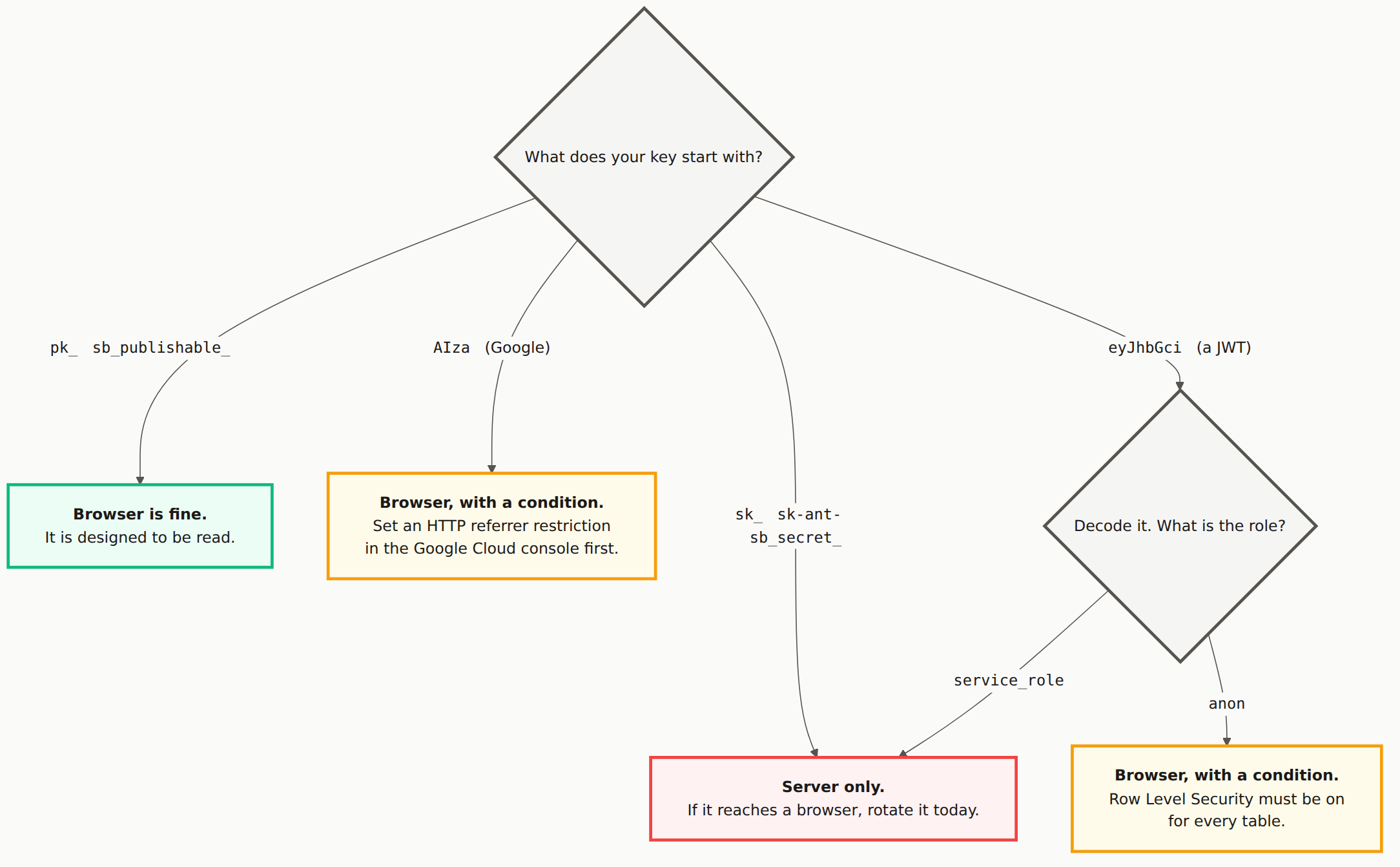
Server only
sk_ (Stripe and many others), sk-ant- (Anthropic), sb_secret_ (Supabase), and any Supabase JWT that decodes to service_role.
These bypass restrictions rather than operate within them. A service_role key ignores every Row Level Security policy you have written. A Stripe sk_ key can issue refunds and read every customer record. There is no configuration that makes them safe to ship to a browser.
If one of these has reached a browser, the fix is not to hide it better. Rotate it, then move it to a server route.
Browser safe, no conditions
pk_ and sb_publishable_. These are designed to be read. They identify your project and nothing more, and the provider assumes they are public.
Browser safe, but only with a condition attached
This is the row that catches people, because the answer is "yes, but" and the "but" is doing all the work.
AIzaSy(Google). Fine in a browser once you set an HTTP referrer restriction in the Cloud console so it only works from your domain. Skip that step and anyone can copy it out of your bundle and bill their usage to you.- A JWT that decodes to
anon(Supabase). Fine in a browser if Row Level Security is on for every table. The anon key is not itself a restriction, it is an identifier. RLS is the restriction.
The eyJhbGci trap. Both legacy Supabase keys are JWTs and both start with the same characters, so they are indistinguishable at a glance. That is exactly why people shipped the wrong one. Decode the payload and read the role field before you trust it. The newer sb_publishable_ and sb_secret_ prefixes exist to make this mistake harder.
How to decode a JWT without a tool
Paste this in your browser console, replacing the placeholder:
JSON.parse(atob("YOUR_KEY".split(".")[1]));
You will get an object with a role field. anon means check your RLS. service_role means rotate it now.
The Mermaid source
The diagram is generated from a text file. Copy it and add whatever providers your own stack uses.
---
title: "Which keys are safe to ship to a browser"
---
flowchart TB
Q{"What does your key start with?"}
Q -->|"<code>sk_</code> <code>sk-ant-</code> <code>sb_secret_</code>"| SEC
Q -->|"<code>pk_</code> <code>sb_publishable_</code>"| PUB
Q -->|"<code>AIza</code> (Google)"| REF
Q -->|"<code>eyJhbGci</code> (a JWT)"| JWT
JWT{"Decode it. What is the role?"}
JWT -->|"<code>service_role</code>"| SEC
JWT -->|"<code>anon</code>"| RLS
SEC["<b>Server only.</b><br/>If it reaches a browser, rotate it today."]
PUB["<b>Browser is fine.</b><br/>It is designed to be read."]
REF["<b>Browser, with a condition.</b><br/>Set an HTTP referrer restriction<br/>in the Google Cloud console first."]
RLS["<b>Browser, with a condition.</b><br/>Row Level Security must be on<br/>for every table."]
classDef ask fill:#f5f5f4,stroke:#57534e,stroke-width:3px,color:#1c1917
classDef danger fill:#fef2f2,stroke:#ef4444,stroke-width:3px,color:#1c1917
classDef safe fill:#ecfdf5,stroke:#10b981,stroke-width:3px,color:#1c1917
classDef caution fill:#fffbeb,stroke:#f59e0b,stroke-width:3px,color:#1c1917
class Q,JWT ask
class SEC danger
class PUB safe
class REF,RLS caution
How can I tell if an API key is safe to put in my frontend?
Read the first few characters. Keys meant for browsers usually say so: pk_ for publishable, sb_publishable_ for Supabase. Keys starting sk_, sk-ant- or sb_secret_ are secret and must stay on your server. If the key starts eyJhbGci it is a JWT and you have to decode it, because the same shape is used for both the safe and the dangerous Supabase key.
Is the Supabase anon key safe to expose?
Only if Row Level Security is enabled on every table. The anon key is designed to be public, but it is not itself a restriction. RLS is the restriction. With RLS off, the anon key reads everything, which is how most exposed Supabase databases happen.
What about Google API keys starting with AIzaSy?
They are usually fine in a browser, but only once you add an HTTP referrer restriction in the Google Cloud console so the key only works from your own domain. Without that restriction anyone who copies it out of your bundle can bill their usage to your project.
Not sure what is in your bundle?
A scan reads your deployed JavaScript and tells you which keys are in it.