One query, one key, three tables. Which table it hits decides whether the caller gets their own rows, nothing at all, or everything you have.
Row Level Security gets described as a switch, and that framing is what causes the trouble. Switching it on and writing a policy are two separate actions, and a table missing either one behaves in a way people do not expect.
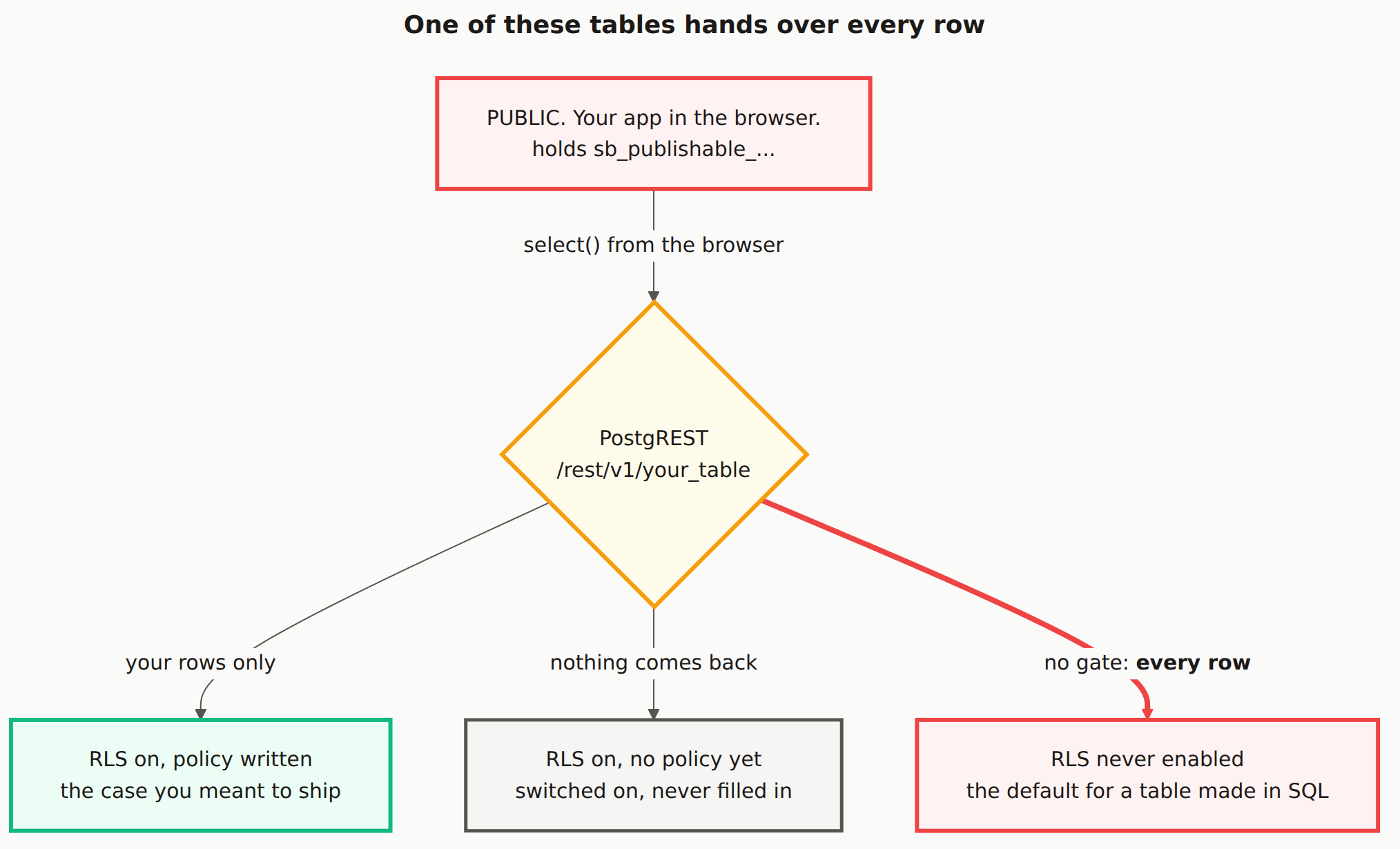
Reading the diagram
The red box at the top is your app running in someone else's browser. It holds the publishable key, which is exactly where that key belongs. Anyone can read it, and that is fine by design.
The amber diamond is PostgREST, the REST API Supabase puts in front of Postgres. Every .from("your_table").select() your frontend runs becomes a request to /rest/v1/your_table here. This is the point people tend to skip when picturing their app: the browser is not talking to Postgres, it is talking to an HTTP API that then talks to Postgres on your behalf.
What happens next is not decided by the key. It is decided by the table.
Left path, green. Row Level Security is on and a policy is written. The policy runs, and the caller gets back the rows it allows. This is the case you meant to ship.
Middle path, grey. Row Level Security is on but no policy exists yet. Postgres denies by default, so nothing matches and nothing comes back. This is the one that generates support threads, because an empty array looks like a bug. It is not a bug. It is the system failing closed.
Right path, red. Row Level Security was never enabled on this table. There is no gate to run, so the query returns every row. The publishable key in that public browser now reads the whole table.
The dangerous path is the quiet one. The middle path announces itself immediately: your feature is broken and you go and fix it. The right-hand path works perfectly. Your app shows the data, nothing errors, and nothing tells you that a stranger running the same query gets the same rows.
Why the right-hand path keeps happening
Supabase enables Row Level Security for you when you create a table through the dashboard's table editor. It does not when the table is created by a CREATE TABLE statement, whether you ran that in the SQL editor or it arrived in a migration.
That matters here because AI-generated backends create tables the second way almost every time. Ask an assistant for a schema and you get SQL, not a sequence of dashboard clicks. So the tables in a vibe-coded Supabase project start life on the right-hand path unless something explicitly moves them off it.
The check takes one query. Run this in the SQL editor and every row it returns is a table sitting on the red path.
select tablename
from pg_tables
where schemaname = 'public'
  and rowsecurity = false;
The Mermaid source
Copy this and swap in your own tables.
---
title: "One of these tables hands over every row"
---
flowchart TB
    UI["PUBLIC. Your app in the browser.<br/>holds sb_publishable_..."]

    PG{"PostgREST<br/>/rest/v1/your_table"}

    T1["RLS on, policy written<br/>the case you meant to ship"]
    T2["RLS on, no policy yet<br/>switched on, never filled in"]
    T3["RLS never enabled<br/>the default for a table made in SQL"]

    UI -->|"select() from the browser"| PG
    PG -->|"your rows only"| T1
    PG -->|"nothing comes back"| T2
    PG ==>|"no gate: <b>every row</b>"| T3

    classDef danger fill:#fef2f2,stroke:#ef4444,stroke-width:3px,color:#1c1917
    classDef safe fill:#ecfdf5,stroke:#10b981,stroke-width:3px,color:#1c1917
    classDef gate fill:#fffbeb,stroke:#f59e0b,stroke-width:3px,color:#1c1917
    classDef store fill:#f5f5f4,stroke:#57534e,stroke-width:2.5px,color:#1c1917

    class UI danger
    class PG gate
    class T1 safe
    class T2 store
    class T3 danger

    linkStyle 3 stroke:#ef4444,stroke-width:4px
What is the difference between RLS being off and having no policy?
They look similar in the dashboard and behave like opposites. With Row Level Security enabled and no policy, Postgres denies everything, so your query returns an empty array. With Row Level Security never enabled, there is no check to run, so the query returns every row in the table. One fails closed, the other fails open.
Why did my Supabase query suddenly return an empty array?
Usually because Row Level Security is on for that table and no policy matches your request. That is the middle path in the diagram. It is the safe failure, and the fix is to write the policy rather than to switch Row Level Security back off.
Do tables I create in the SQL editor have RLS on by default?
No. Tables created through the dashboard's table editor get Row Level Security enabled for you, but a table created with a CREATE TABLE statement in the SQL editor or in a migration does not. AI-generated migrations produce exactly this shape, which is why the right-hand path in the diagram is worth checking for.
Does the publishable key being public mean my data is public?
Only for tables on the right-hand path. The key is designed to be readable by anyone, and Row Level Security is the thing that makes that safe. So the key sitting in your bundle is not the problem. A table with no gate in front of it is.
Not sure which path your tables are on?
A scan queries your project the way a stranger would and reports what comes back.