Most founders who find a Server-Timing header on their Vercel app didn't know they had one. That's because, until August 10, 2026, nobody could see it: Vercel's changelog says its CDN stripped the header "from every response." The header was there the whole time. It just never left Vercel.
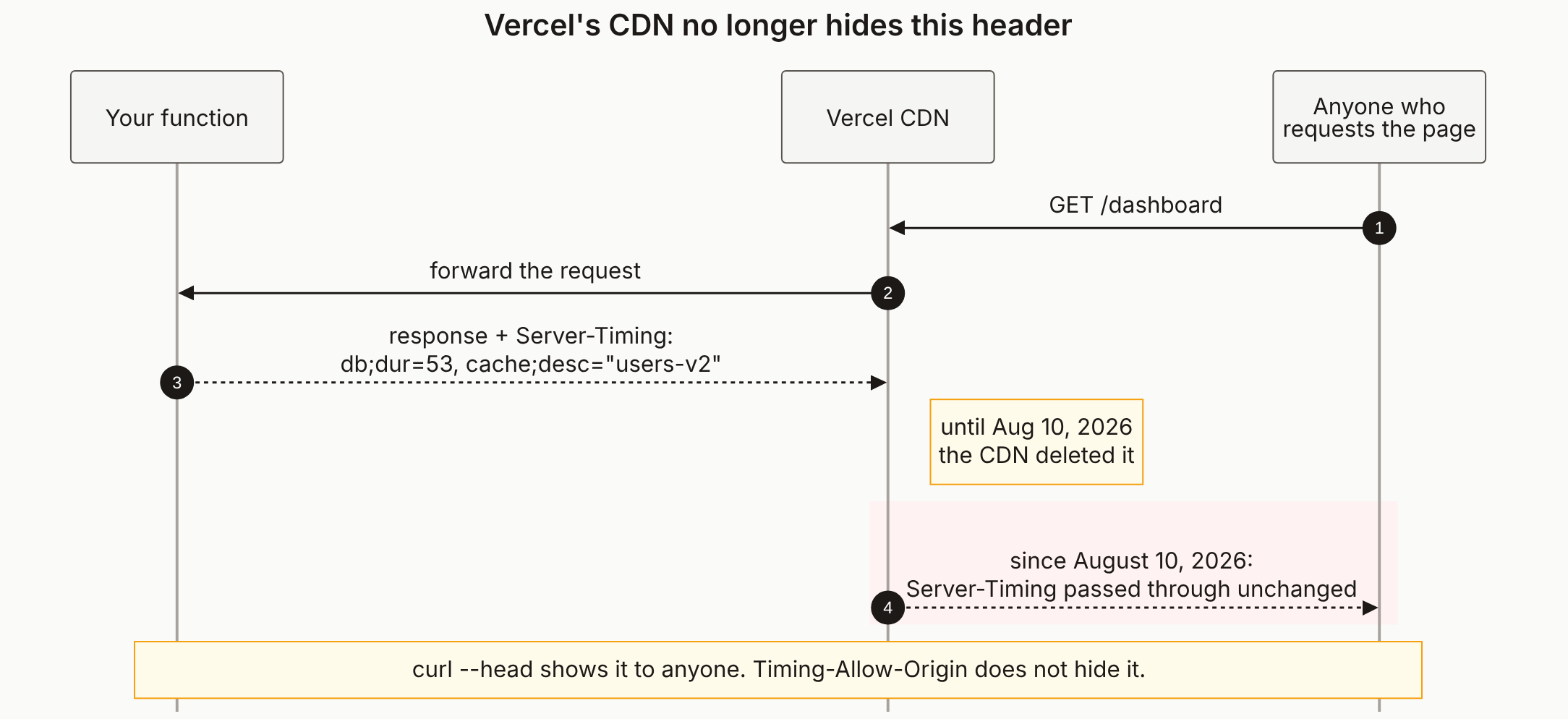
Reading the diagram
Steps 1 and 2 are an ordinary page load. Somebody requests /dashboard, the CDN forwards it to your function, and nothing about the request is unusual.
Step 3 is where the header is born, and it's in your lane. Your function (or a middleware, or an instrumentation library) adds Server-Timing to the response. The values in the diagram are illustrative, shaped like MDN's examples: a metric name, a duration, and sometimes a free-text desc. The desc is the part to read hardest, because that's where internal names end up.
The note on the CDN lane is the old behaviour. For as long as you've been on Vercel, the CDN deleted this header before the response went anywhere. Locally you always saw it; in production nobody did. That gap is how a debug header survives for months without anyone noticing.
Step 4, the red hop, is the change. Since August 10, 2026 the CDN passes Server-Timing through unchanged, per the same changelog entry. Red here means what it means across all our diagrams: anyone can read this. Not just you with dev tools open. Anyone who can request the page.
The footer note answers the two questions people ask next. curl --head https://your-app.vercel.app prints the header from any machine. And Timing-Allow-Origin doesn't hide it: that header only decides whether a script on another origin can read the values through the browser's performance API.
Run curl --head against your production URL, not localhost. If no server-timing line comes back, none of this applies to you. If one does, our full guide covers what's usually in it and the three ways to remove it.
The diagram source
---
title: "Vercel's CDN no longer hides this header"
---
sequenceDiagram
    autonumber
    participant F as Your function
    participant C as Vercel CDN
    participant B as Anyone who<br/>requests the page

    B->>C: GET /dashboard
    C->>F: forward the request
    F-->>C: response + Server-Timing:<br/>db#59;dur=53, cache#59;desc=#quot;users-v2#quot;

    Note right of C: until Aug 10, 2026<br/>the CDN deleted it

    rect rgb(254, 242, 242)
        C-->>B: since August 10, 2026:<br/>Server-Timing passed through unchanged
    end

    Note over F,B: curl --head shows it to anyone. Timing-Allow-Origin does not hide it.
Can anyone see my Server-Timing header?
Yes. It's an ordinary response header, so anyone who receives the response can read it, from browser developer tools or a single curl --head. On Vercel it used to be deleted at the CDN before it reached anyone. Vercel's changelog of July 30, 2026 says that stopped on August 10, 2026.
Does Timing-Allow-Origin hide Server-Timing?
No. Timing-Allow-Origin only controls whether a page on another origin can read the values through the browser's PerformanceServerTiming API. The header itself is sent to whoever made the request either way.
How do I keep Vercel stripping Server-Timing?
Vercel's changelog gives a vercel.json route with a response.headers transform that deletes the server-timing key on every response. It ships with a deployment, so redeploy after adding it. Better still, stop setting the header in production at the source.
Does Vercel add a Server-Timing header itself?
Not according to its documented list of headers it adds automatically, which covers cache-control, content-length, content-type, date, server, strict-transport-security, x-robots-tag, x-vercel-cache and x-vercel-id. If you see one, something in your own code or dependencies is setting it.
See Every Header Your App Sends
We read your live response headers and flag the ones that give away your stack, like X-Powered-By and versioned Server headers, plus the security headers you're missing.