Node's security releases land on a fixed day. Whether your app is running the fix a week later depends on two things you probably never set on purpose: which host you're on, and how you wrote your Node version. This diagram follows one release down to the process actually serving requests.
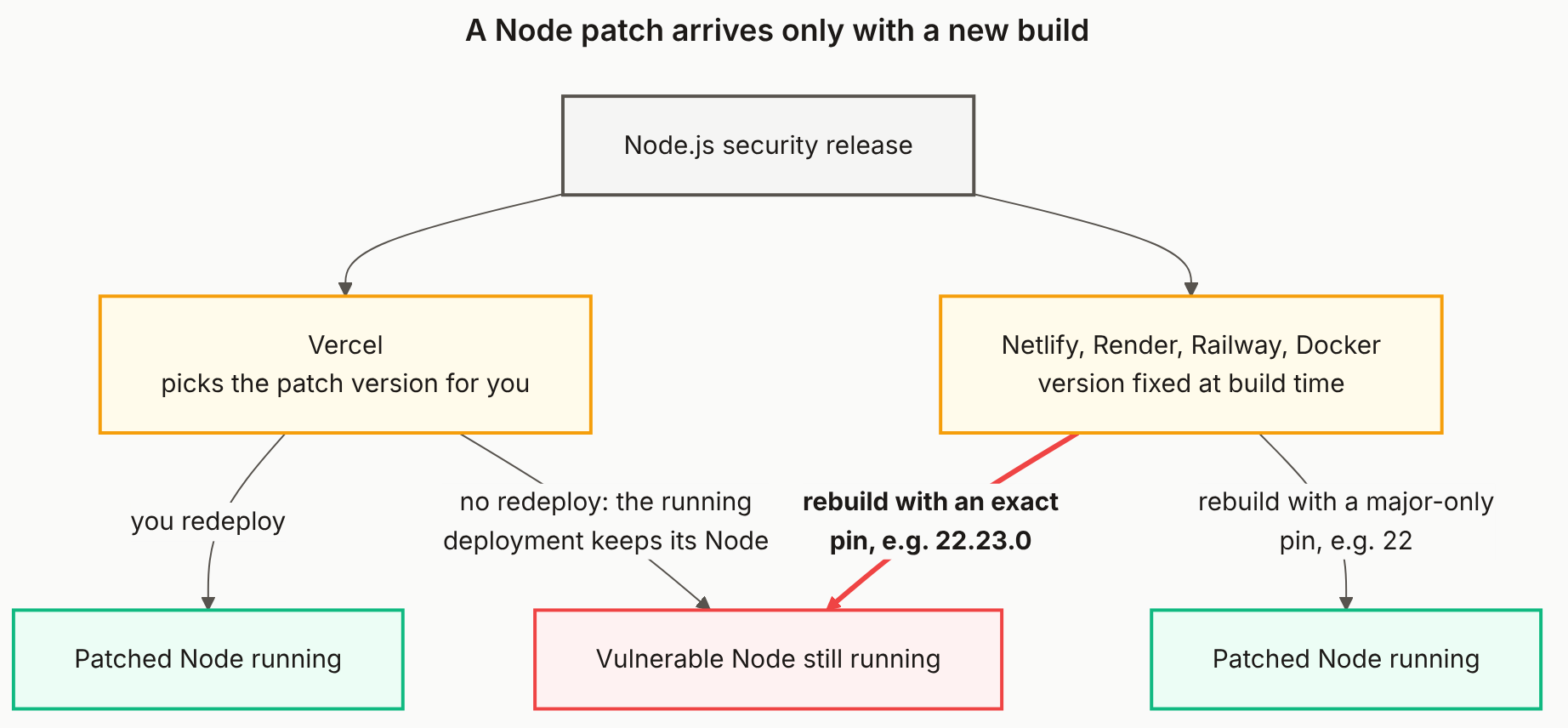
Reading the diagram
Top, grey: the release. Node publishes a patch release, as it did on October 21, 2026 for a Brotli decoder bug. Grey means it's just an event; nothing in your app has changed yet.
Middle, amber: your host decides the next step. Both host boxes are amber because each one is a decision point, and the decision usually isn't the one people assume.
- Vercel, left. You pick a major line like
24.xand Vercel picks the patch. That's as close to "patched for you" as this gets, but Vercel's bulletin for the October release scoped the patched runtime to new deployments. The left arrow to green needs a redeploy. Without one, the running deployment keeps its Node and drops into the red box. - Netlify, Render, Railway and Docker, right. The Node version is chosen when the image is built and frozen there. Netlify's docs say it pins a site to its build image's default; Railway bakes it into the image; a Dockerfile's
FROM node:22resolves to a fixed image until you rebuild and re-pull.
Bottom: what a new build actually installs. On the right, the version spec decides. A major-only pin such as 22 resolves forward to the newest patch and lands in green. An exact pin such as 22.23.0 reinstalls exactly that version, known CVEs included. That's the one red edge, because it's the path people take while believing they're covered: they redeploy constantly, and every rebuild faithfully restores the vulnerable release.
The red box sits in the middle on purpose. Both hosts can end there, through different doors.
What to do with it
Find your pin first: .node-version, .nvmrc, engines.node in package.json, a NODE_VERSION variable in your host's dashboard, or a FROM node: line. If it's an exact version and you had no reason for the last two numbers, cut it to the major. Then rebuild after each Node security release and confirm process.version in a log. The full per-host walkthrough is in Who Patches Your Node.js Runtime?.
The Mermaid source
Copy this and swap in your own hosts.
---
title: "A Node patch arrives only with a new build"
---
flowchart TB
    R["Node.js security release"]

    V["Vercel<br/>picks the patch version for you"]
    H["Netlify, Render, Railway, Docker<br/>version fixed at build time"]

    OK1["Patched Node running"]
    BAD["Vulnerable Node still running"]
    OK2["Patched Node running"]

    R --> V
    R --> H
    V -->|"you redeploy"| OK1
    V -->|"no redeploy: the running<br/>deployment keeps its Node"| BAD
    H -->|"<b>rebuild with an exact<br/>pin, e.g. 22.23.0</b>"| BAD
    H -->|"rebuild with a major-only<br/>pin, e.g. 22"| OK2

    classDef neutral fill:#f5f5f4,stroke:#57534e,stroke-width:2px,color:#1c1917
    classDef gate fill:#fffbeb,stroke:#f59e0b,stroke-width:2px,color:#1c1917
    classDef private fill:#ecfdf5,stroke:#10b981,stroke-width:2px,color:#1c1917
    classDef public fill:#fef2f2,stroke:#ef4444,stroke-width:2px,color:#1c1917

    class R neutral
    class V,H gate
    class OK1,OK2 private
    class BAD public

    linkStyle 4 stroke:#ef4444,stroke-width:3px
Does Vercel patch Node.js on a deployment that is already running?
No. Vercel picks the Node patch version for you, but its October 2026 security bulletin promised the patched runtime to new deployments. A deployment that is already running keeps the Node it started with, so redeploy after a security release.
Why didn't rebuilding on Netlify update my Node version?
Most likely an exact pin. Netlify pins a site to its build image's default Node version, and an exact value like 22.23.0 in .node-version or NODE_VERSION reinstalls that same version on every rebuild. A major-only value like 22 resolves to the newest 22.x each time you build.
Is pinning the Node major version safe?
It's the setting that lets a rebuild pick up security patches while keeping you on the same major release. Pair it with a rebuild after each Node security release, since nothing changes until a new build runs.
Where does Cloudflare Workers fit?
It doesn't appear in the diagram because there is no Node version to manage. Cloudflare patches its workerd runtime itself, and a compatibility date controls behaviour, not which security fixes you get.
What does your live app reveal?
A CheckYourVibe scan checks your deployed app from the outside: exposed keys, missing headers, and the version banners that tell attackers what you're running.