A git commit in your terminal and the Commit button in Cursor's Source Control panel look like the same action. From Cursor 3.15.6 until the fix in 3.22, they weren't. The panel added one setting to every git call it made, and that setting switched off every git hook in the repository, including the pre-commit hook that was supposed to stop a key from being committed.
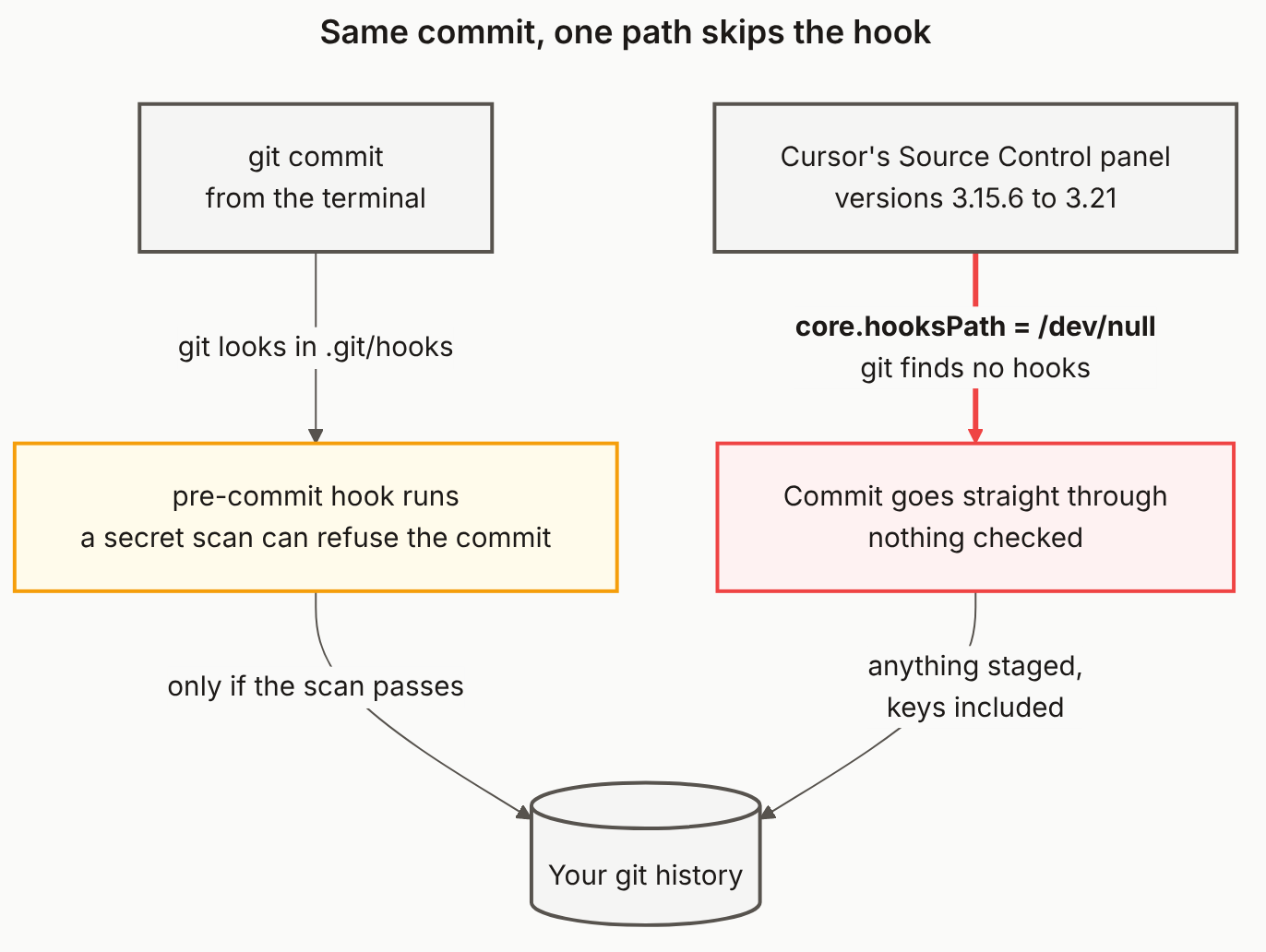
Reading the diagram
Start at the top: two ways in. Both boxes are grey because neither is the problem on its own. You staged the same files and typed the same message. The difference is entirely in what happened on the way to git.
The left path is git doing its normal job. With no override, git looks for hooks in .git/hooks. If you've set up Husky, gitleaks or a hand-written pre-commit script, it runs there. The amber box is a check: a secret scan in that hook can refuse the commit, and the arrow below it only fires if the scan passes.
The right path is the bug, and the red arrow is the whole lesson. Cursor's panel passed core.hooksPath pointed at the null device (/dev/null on macOS and Linux) as part of each git call. Git looked for hooks in a place with nothing in it and carried on. There's no error and no warning, so from your side the commit just worked.
Both paths end in the same history. That's why it matters. The commit on the right isn't marked or flagged in any way. Anything you staged went in, and a key that the left path would have stopped is now sitting in your history like any other line.
The fix is the Cursor update, not a config change. If you relied on a hook between early August and your 3.22 update, the useful question is what got through, and our full write-up has the 30-second hook test and the history scan.
The diagram source
---
title: "Same commit, one path skips the hook"
---
flowchart TB
    TERM["git commit<br/>from the terminal"]
    PANEL["Cursor's Source Control panel<br/>versions 3.15.6 to 3.21"]
    HOOK["pre-commit hook runs<br/>a secret scan can refuse the commit"]
    SKIP["Commit goes straight through<br/>nothing checked"]
    REPO[("Your git history")]

    TERM -->|"git looks in .git/hooks"| HOOK
    PANEL -->|"<b>core.hooksPath = /dev/null</b><br/>git finds no hooks"| SKIP
    HOOK -->|"only if the scan passes"| REPO
    SKIP -->|"anything staged,<br/>keys included"| REPO

    classDef public fill:#fef2f2,stroke:#ef4444,stroke-width:2px,color:#1c1917
    classDef gate fill:#fffbeb,stroke:#f59e0b,stroke-width:2px,color:#1c1917
    classDef store fill:#f5f5f4,stroke:#57534e,stroke-width:2px,color:#1c1917

    class SKIP public
    class HOOK gate
    class TERM,PANEL,REPO store

    linkStyle 1 stroke:#ef4444,stroke-width:3px
Why didn't my pre-commit hook run in Cursor?
From version 3.15.6 until the 3.22 fix, Cursor's Source Control panel added core.hooksPath pointed at the null device to every git call it made. Git looked for hooks there, found none, and ran none. Commits from the terminal were unaffected. Cursor staff announced 3.22 as available on September 25, 2026.
Is the bug still live?
No, for panel commits on 3.22 or later, according to Cursor staff in the forum thread. Check Help > About for your version. Cursor said the override exists to stop agent-run git from executing repo hooks, so don't assume hooks run for commits the agent makes.
How do I test whether my hooks run from the panel?
Put a pre-commit hook containing only exit 1 in .git/hooks, stage a change, and press Commit in the Source Control panel. If the commit is refused, hooks run. If it goes through, they're being skipped. Delete the test hook afterwards.
Did anything get committed that my hook would have blocked?
Only a history scan can tell you. If you committed through the panel between early August and your 3.22 update and relied on a secret-scanning hook, scan the commits from that window with a tool like gitleaks rather than assuming the hook would have caught them.
Check What Made It to Production
A skipped hook means a key can reach your repo. We scan your live app for keys that made it all the way to the browser.